





Optimizing gaming mouse DPI & polling rate: what’s best for competitive play?
In the high-stakes world of competitive gaming, every millisecond and pixel matters. While powerful PCs and fast monitors often grab the headlines, one of the most direct interfaces between a player and the game—the gaming mouse—holds immense power to elevate or hinder performance. Specifically, understanding and optimizing your mouse’s Dots Per Inch (DPI) and polling rate can be the key difference between a clutch play and a frustrating defeat. But what exactly are these settings, and how do you find the ‘best’ combination for your competitive aspirations?
What is DPI and Why Does it Matter?
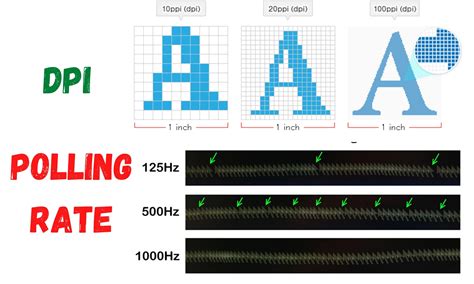
DPI, or Dots Per Inch, essentially measures how sensitive your mouse is. It quantifies how many pixels your on-screen cursor moves for every inch you move your physical mouse. A higher DPI means the cursor moves further with less physical mouse movement, while a lower DPI requires more physical movement for the same on-screen distance.
For competitive play, particularly in genres like First-Person Shooters (FPS) or Real-Time Strategy (RTS), DPI plays a critical role in aiming and camera control. Many professional FPS players tend to favor lower DPI settings (400-800 DPI) combined with higher in-game sensitivities. This allows for more precise, micro-adjustments and reduces the likelihood of overshooting targets. Conversely, some players in games requiring rapid camera sweeps or menu navigation might opt for slightly higher DPIs.
Demystifying Polling Rate: Responsiveness and Input Lag
Polling rate, measured in Hertz (Hz), indicates how many times per second your mouse reports its position to your computer. For example, a polling rate of 1000Hz means your mouse updates its position 1,000 times every second, or every 1 millisecond. Conversely, a 125Hz polling rate updates every 8 milliseconds.
In competitive gaming, a higher polling rate directly translates to reduced input lag and smoother, more accurate cursor movement. The difference between 125Hz and 1000Hz might seem negligible to the casual user, but for an esports professional, those few milliseconds of latency can mean the difference between landing a headshot and missing it. Most competitive gamers and professionals now exclusively use a 1000Hz polling rate to ensure the most responsive and immediate feedback possible from their mouse.

The Sweet Spot: DPI, In-Game Sensitivity, and eDPI
It’s important to understand that DPI doesn’t work in isolation. It’s the interplay between your mouse’s DPI and your game’s in-game sensitivity setting that determines your actual effective sensitivity. This combined value is often referred to as eDPI (effective DPI), calculated by multiplying your mouse’s DPI by your in-game sensitivity.
For instance, a player using 800 DPI with an in-game sensitivity of 1.0 has an eDPI of 800. Another player using 400 DPI with an in-game sensitivity of 2.0 also has an eDPI of 800. While the eDPI is the same, the feel can be slightly different due to the mouse’s native sensor tracking. The goal is to find an eDPI that allows for precise aiming while still enabling quick enough turns for situational awareness.

Finding Your Perfect Setup: A Practical Guide
There’s no single ‘best’ DPI or polling rate for everyone, as optimal settings are highly personal and depend on several factors:
- Game Type: FPS games often favor lower eDPI for precision, while MOBA/RTS games might tolerate or even benefit from slightly higher.
- Mouse Pad Size: Larger mouse pads accommodate lower DPI settings, allowing for wide, sweeping movements.
- Grip Style: Claw, palm, and fingertip grips can influence preferred sensitivity.
- Monitor Resolution: Higher resolutions might subtly influence the feel of certain DPI settings.
- Personal Comfort: Ultimately, what feels natural and controllable to you is paramount.
The best approach is experimentation. Start with common competitive settings (e.g., 400-800 DPI, 1000Hz polling rate) and use aim trainers or practice modes to fine-tune your in-game sensitivity. Make small adjustments and play consistently with new settings for a few days before making further changes. Consistency is key to building muscle memory.
Beyond Numbers: Consistency and Comfort
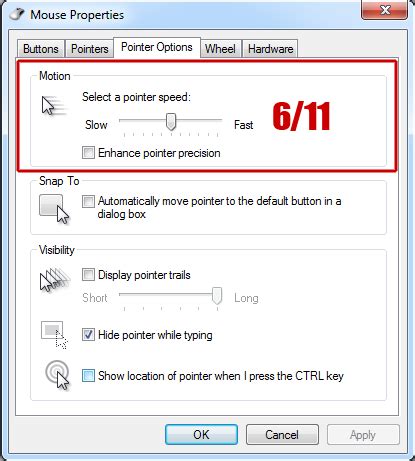
While the technical aspects of DPI and polling rate are vital, the human element cannot be overlooked. Once you find settings that feel comfortable and effective, stick with them. Constantly changing your sensitivity can hinder muscle memory development, which is crucial for peak performance. Ensure your mouse drivers are up-to-date and that mouse acceleration (often called ‘Enhance pointer precision’ in Windows) is disabled, as it introduces inconsistent mouse movement.
Conclusion: Tailoring Your Advantage
Optimizing your gaming mouse’s DPI and polling rate is a personalized journey toward competitive excellence. While a 1000Hz polling rate is almost universally recommended for minimal input lag, your ideal DPI and resulting eDPI will be unique. By understanding these settings, experimenting methodically, and prioritizing consistency, you can unlock your full potential and ensure your gaming hardware empowers, rather than impedes, your path to victory.


