





Is my CPU bottlenecking my RTX 4080 in demanding PC games at 1440p?
Pairing a high-end graphics card like the NVIDIA RTX 4080 with the right CPU is crucial for achieving optimal gaming performance, especially when targeting resolutions like 1440p. Many PC gamers wonder if their central processing unit is truly keeping up with their powerful GPU, or if it’s becoming a bottleneck.
The question of CPU bottlenecking becomes particularly pertinent with top-tier GPUs, as they can render frames much faster than older or less powerful CPUs can prepare them. Let’s dive into understanding this dynamic and how to determine if your CPU is holding back your RTX 4080 at 1440p.
Understanding CPU Bottlenecking
A CPU bottleneck occurs when your processor cannot supply data to your graphics card fast enough, leading to your GPU sitting idle for periods, rather than rendering frames at its full potential. In simple terms, the CPU is the “brain” orchestrating the game’s logic, AI, physics, and draw calls, while the GPU is the “artist” drawing the frames.
If the brain can’t give instructions fast enough, the artist has to wait. This results in lower-than-expected frame rates, even if your GPU usage appears low, or not consistently high.
1440p Gaming: The Balancing Act
At lower resolutions (like 1080p), the CPU often bears more of the load because the GPU has less work to do per frame, making it more likely for the CPU to become the limiting factor. However, as resolution increases to 1440p and beyond, the GPU’s workload significantly ramps up due to the increased pixel count.
While 1440p shifts more demand to the GPU compared to 1080p, the CPU still plays a critical role, especially in graphically demanding games with complex simulations or high draw distances. It’s a sweet spot where both CPU and GPU need to be robust to deliver a smooth experience.
How to Identify a CPU Bottleneck
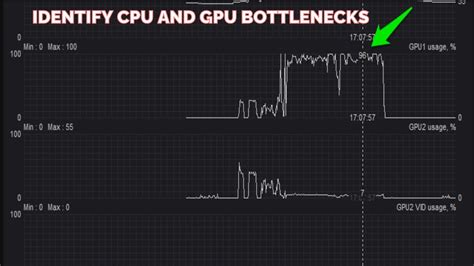
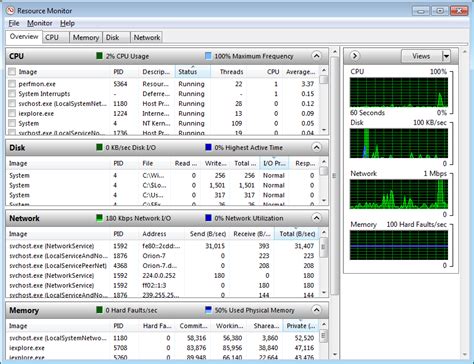
The most reliable way to check for a CPU bottleneck is by monitoring your system’s resource usage while gaming. Tools like MSI Afterburner (with RivaTuner Statistics Server), HWMonitor, or even Windows Task Manager can provide real-time data.
- GPU Usage: If your RTX 4080’s usage consistently stays below 95-100% in demanding scenes while frame rates are lower than expected, it’s a strong indicator of a CPU bottleneck.
- CPU Usage: High CPU usage (close to 100% on multiple cores, especially the primary gaming cores) simultaneously with low GPU usage confirms a CPU limitation.
- Frame Rate Consistency: Noticeable dips in frame rate in CPU-intensive areas (e.g., bustling cityscapes, large-scale battles) even when graphical settings are high, point to the CPU struggling.
Key Factors Affecting Bottlenecking
Several elements contribute to whether your CPU will bottleneck an RTX 4080 at 1440p:
- Specific Game Engine: Some games are inherently more CPU-intensive than others. Open-world games, strategy games, and titles with complex physics or large numbers of NPCs tend to stress the CPU more.
- Game Settings: CPU-bound settings include draw distance, NPC density, physics quality, and certain shadow calculations. Adjusting these can highlight or alleviate a bottleneck.
- Your Specific CPU Model: Older generation CPUs (e.g., pre-Ryzen 3000 series or Intel 7th Gen and older i7s/i5s) or lower-end modern CPUs might struggle more than contemporary high-core count, high-IPC processors.
- RAM Speed and Latency: Fast RAM significantly benefits CPU performance, especially for AMD Ryzen processors. Slow RAM can exacerbate a CPU bottleneck.

Common CPU Pairings and Potential Bottlenecks
An RTX 4080 generally pairs well with modern mid-to-high-end CPUs from the last few generations. This includes Intel’s Core i7/i9 (10th Gen or newer, with 12th/13th/14th Gen being ideal) and AMD’s Ryzen 7/9 (3000 series or newer, with 5000/7000 series being optimal). If you’re running an older processor, such as an Intel Core i7-7700K or a first-gen Ryzen 1700, at 1440p, you are very likely experiencing a noticeable CPU bottleneck in many demanding titles.

Mitigation Strategies and Solutions
If you suspect a CPU bottleneck, here are a few approaches:
- Adjust Game Settings: Prioritize GPU-intensive settings (textures, anti-aliasing) over CPU-intensive ones (draw distance, crowd density). Increasing resolution to 4K can also shift the burden more to the GPU, potentially making a CPU bottleneck less apparent, though the RTX 4080 is better suited for high refresh rate 1440p or 4K with DLSS.
- Overclock Your CPU/RAM: If your CPU and motherboard support it, a stable overclock can provide a performance boost. Similarly, optimizing RAM speed and timings can help.
- Upgrade Your CPU (and potentially Motherboard/RAM): This is the most effective, but also most expensive, solution. Moving to a newer generation CPU with higher IPC and core counts will significantly improve performance in CPU-bound scenarios.
Conclusion
While the RTX 4080 is a formidable GPU for 1440p gaming, its full potential can indeed be held back by an inadequate CPU. The key to determining if you have a bottleneck lies in diligent performance monitoring. If your GPU usage consistently falls short of 95-100% in demanding titles while your CPU is heavily utilized, it’s time to consider an upgrade or adjust your game settings. A balanced system ensures you get the most out of your high-end hardware, delivering smooth and immersive gaming experiences at 1440p.


