





Where to find safe, high-quality game mods & avoid malicious downloads?

Unlocking New Worlds: The Appeal of Game Mods
Game modifications, or mods, can dramatically enhance your gaming experience, adding new content, improving graphics, fixing bugs, or even completely transforming gameplay. From elaborate questlines in RPGs to simple quality-of-life adjustments, mods offer endless possibilities. However, this vibrant world also harbors risks. Downloading mods from untrusted sources can expose your system to malware, viruses, and other security threats. The key is knowing where to look and what precautions to take.
Official & Curated Modding Platforms
The safest place to start your modding journey is often through official channels or highly curated platforms. Many games, especially on PC, integrate mod support directly into their launchers or offer dedicated marketplaces:
- Steam Workshop: For games like Skyrim, Garry’s Mod, and Cities: Skylines, the Steam Workshop is an invaluable resource. Mods are often easier to install and generally go through a basic vetting process by Valve or the game’s developers.
- In-Game Mod Managers: Some developers provide in-game mod browsers or managers, like Bethesda’s Creation Club or the mod menu in games like Minecraft (via official launchers). These typically ensure compatibility and a level of safety.
- Official Game Forums/Websites: Developers occasionally host or link to approved mods on their official forums or websites. Always prioritize these sources when available.
Reputable Third-Party Modding Websites
While official platforms are great, the vast majority of mods reside on independent, community-driven websites. These are often the heart of the modding community, but require a more cautious approach:
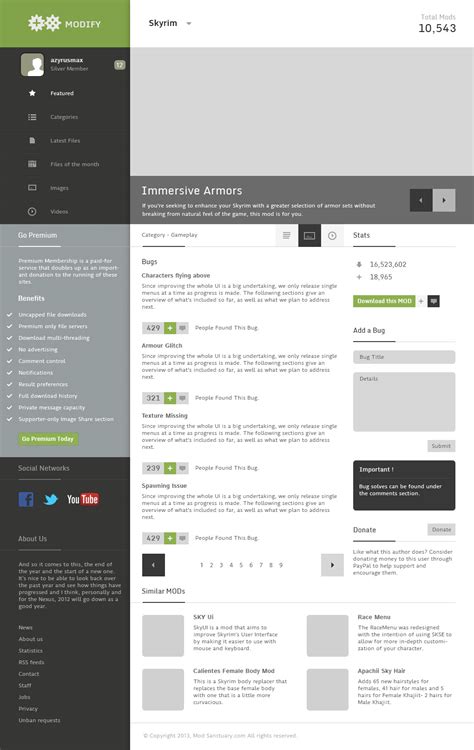
- Nexus Mods: Undeniably the largest and most well-known modding site, Nexus Mods hosts millions of files for thousands of games. Its robust community, detailed file pages, and moderation policies make it a relatively safe haven. Always check the ‘Files’ tab for optional files and read the description carefully.
- Mod DB / Indie DB: These sites host a wide range of mods, from simple tweaks to total conversions, particularly for older or more niche titles. They also feature indie games.
- Specific Game Forums & Wikis: Many popular games have dedicated fan-run forums or wikis (e.g., Grand Theft Auto V modding forums, Factorio Wiki). These can be excellent sources but always cross-reference information and download links.

Vetting Mods: How to Spot Quality and Avoid Malice
Even on reputable sites, vigilance is key. Not every mod is created equal, and some might be poorly made or even malicious. Here’s how to evaluate a mod:
- Check the Author’s Reputation: Look at their profile. Do they have other popular mods? A long history of positive contributions is a good sign.
- Read User Comments and Endorsements: Pay close attention to recent comments. Are users reporting issues, bugs, or even malware? High endorsement counts usually indicate quality and safety.
- Review Download Counts: Popular mods with thousands or millions of downloads are generally more vetted by the community.
- Examine the File Description & Requirements: A good mod page will have a clear description, installation instructions, and list any dependencies (e.g., specific game versions, other mods). Be wary of sparse descriptions or suspicious requirements.
- Scan Downloads with Antivirus: Always run any downloaded mod file through your antivirus software before installing, even if it comes from a trusted site.

Essential Safety Practices for Modders
Beyond choosing trusted sources, implement these general safety measures:
- Backup Your Save Files & Game Data: Before installing any significant mod, especially one that alters core game files, back up your game’s save data and potentially the entire game folder. This can save you from corrupted saves or unplayable installations.
- Use a Mod Manager: For complex games with many mods, a dedicated mod manager (like Vortex for Nexus Mods, or specific managers for games like Kerbal Space Program) can simplify installation, conflict resolution, and uninstallation, making it easier to revert changes.
- Understand File Types: Be cautious of executable files (.exe) unless they are clearly part of a reputable installer. Most mods will be archives (.zip, .rar, .7z) containing game assets or script files.
- Keep Your Antivirus Up-to-Date: A robust, active antivirus solution is your last line of defense.
Recognizing Red Flags and Avoiding Scams
Be skeptical of:
- Mods promising unrealistic features with no explanation.
- Download links that redirect multiple times or use obscure file-sharing sites.
- Files that require excessive system permissions for no clear reason.
- Mod authors with no history or very few, vague posts.
- Mods that trigger persistent antivirus warnings, even after manual checks.
Conclusion: Mod Safely, Play Better
Modding can breathe new life into your favorite games, offering countless hours of extended enjoyment. By sticking to reputable sources, diligently vetting individual mods, and employing smart safety practices, you can minimize risks and fully embrace the creative power of the gaming community. Happy modding!

