





Optimal monitor refresh rate and resolution for competitive FPS gaming?
Elevating Your Game: The Monitor’s Role in Competitive FPS
In the high-stakes world of competitive First-Person Shooter (FPS) gaming, every millisecond and pixel can mean the difference between victory and defeat. While powerful GPUs and CPUs often grab the headlines, your monitor is the window to the action, translating your system’s raw power into a visual experience. For serious competitors, optimizing monitor settings—specifically refresh rate and resolution—is paramount to gaining a decisive edge.
The Need for Speed: Understanding Refresh Rate (Hz)
Refresh rate, measured in Hertz (Hz), dictates how many times your monitor updates the image on the screen per second. A higher refresh rate means a smoother, more fluid visual experience, which is incredibly beneficial in fast-paced FPS titles. For competitive players, this translates to:
- Reduced Motion Blur: Objects appear clearer during rapid movement.
- Faster Target Acquisition: Enemies are easier to track and aim at.
- Lower Input Lag: While not directly tied to refresh rate, higher refresh rate monitors often come with lower input lag, ensuring your actions register almost instantly.
While 60Hz has long been the standard, it’s considered insufficient for competitive FPS today. A 144Hz monitor is generally considered the minimum entry point for serious competitive play, offering a significant jump in smoothness over 60Hz. For those aiming for the absolute pinnacle, 240Hz monitors are becoming the new standard for elite players, with even 360Hz+ displays emerging for the most demanding pro-gamers. To fully benefit from a high refresh rate, your graphics card must be able to render frames at or above the monitor’s refresh rate.

Clarity vs. Performance: The Resolution Debate
Resolution refers to the number of pixels displayed on your screen, expressed as width x height (e.g., 1920×1080). Higher resolutions mean more pixels, leading to a sharper, more detailed image. Common resolutions include:
- 1080p (Full HD – 1920×1080): The long-standing standard, offering a great balance of clarity and performance.
- 1440p (QHD – 2560×1440): A popular upgrade for many, providing noticeably more detail than 1080p.
- 4K (UHD – 3840×2160): Offers incredible visual fidelity but is very demanding on hardware.
For competitive FPS gaming, the optimal resolution is often a balance. 1080p remains the go-to for most competitive players due to its lower demand on the GPU, allowing for consistently higher frame rates. Higher frame rates are almost always prioritized over higher resolution in competitive scenarios. While 1440p offers a more immersive and clearer picture, it requires a much more powerful graphics card to maintain the high frame rates necessary for competitive play at a high refresh rate. 4K, while stunning, is generally not recommended for competitive FPS gaming due to its extremely high GPU demand and the difficulty in maintaining sufficiently high frame rates.
The Interplay: Refresh Rate, Resolution, and Your Hardware
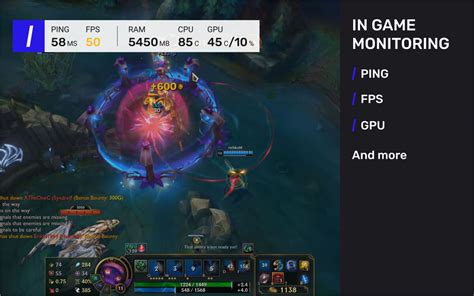
Choosing the optimal refresh rate and resolution isn’t about picking the highest numbers; it’s about creating a harmonious setup with your PC’s hardware. A 240Hz monitor is wasted if your graphics card can only push 100 FPS in your favorite game. Similarly, playing at 1440p on an entry-level GPU will likely result in significantly lower frame rates, negating any potential visual advantage. Always aim to pair your monitor with a GPU capable of maintaining frame rates that match or exceed your chosen refresh rate at your desired resolution. Technologies like NVIDIA G-Sync and AMD FreeSync can further enhance the experience by synchronizing the monitor’s refresh rate with the GPU’s frame rate, reducing screen tearing and stutter.
Beyond the Big Two: Other Critical Monitor Features
While refresh rate and resolution are pivotal, a few other monitor specifications significantly impact competitive FPS performance:
- Response Time: Measured in milliseconds (ms) GtG (Gray-to-Gray), this indicates how quickly pixels can change color. Lower response times (1ms GtG is ideal) reduce ghosting and motion blur.
- Input Lag: The delay between an input action (e.g., mouse click) and the action appearing on screen. Lower input lag is always better.
- Panel Type:
- TN (Twisted Nematic): Traditionally known for fastest response times and high refresh rates, often at the expense of color accuracy and viewing angles. Still a strong choice for competitive-only setups.
- IPS (In-Plane Switching): Offers superior color accuracy and viewing angles, with modern IPS panels now achieving very high refresh rates and low response times. A great all-rounder.
- VA (Vertical Alignment): Known for excellent contrast ratios and deeper blacks, but generally slower response times and more ghosting, making them less ideal for competitive FPS.

Conclusion: Finding Your Competitive Sweet Spot
For competitive FPS gaming, the optimal monitor setup prioritizes fluidity and responsiveness. While 1080p resolution combined with a 144Hz or 240Hz refresh rate is the widely accepted sweet spot, always ensure your PC hardware can consistently deliver frames at or above your monitor’s refresh rate. Don’t forget to factor in other crucial elements like low response time and minimal input lag. By carefully considering these factors, you can equip yourself with a monitor that not only showcases your game beautifully but also provides the tangible performance advantages needed to climb the ranks and dominate the competition.


