





How to get actionable gaming news alerts for upcoming releases & critical game updates?
In the fast-paced world of video games, staying on top of the latest information can be a game-changer. From highly anticipated new releases to critical updates, patches, and limited-time events, missing out on key announcements can mean losing out on pre-order bonuses, beta access, or even a crucial fix that addresses a game-breaking bug. The sheer volume of gaming news makes it challenging to sift through the noise and find truly actionable alerts. This article will guide you through effective strategies and tools to ensure you receive timely, relevant notifications for everything important in your gaming universe.

The Importance of Timely Gaming Information
For dedicated gamers, timely information isn’t just a luxury; it’s a necessity. Missing an announcement for a new game’s pre-order window could mean losing out on exclusive in-game items or early access. Overlooking a critical patch update might leave you struggling with bugs or connectivity issues, diminishing your overall gaming experience. Furthermore, staying informed about competitive scene updates, developer Q&As, or community events allows you to remain engaged and at the forefront of the gaming community, enhancing your enjoyment and potentially even your performance.
Traditional vs. Modern Alert Methods
Historically, gamers relied on dedicated gaming magazines, websites, and forums to get their news. While these sources still hold value, the digital age has ushered in a new era of instant, personalized alerts. Modern methods move beyond passive consumption, offering proactive notifications tailored to your specific interests, ensuring you’re alerted precisely when and where it matters most.
Top Strategies for Actionable Alerts
Dedicated Gaming News Apps & Aggregators
Many prominent gaming news outlets like IGN, GameSpot, PC Gamer, and Eurogamer offer their own mobile applications. These apps often feature customizable push notifications for breaking news, reviews, and specific game or platform updates. Beyond individual sites, aggregators like Flipboard or dedicated gaming news apps can pull content from multiple sources into a single, digestible feed, letting you set up alerts for keywords or categories.
Platform-Specific Notifications
Digital storefronts and console ecosystems are powerful tools for managing new releases and updates. Services like Steam, PlayStation Store, Xbox, and Nintendo eShop allow you to wishlist games. When a wishlisted game is released, goes on sale, or receives a significant update, you’ll often receive an email or in-app notification. Ensure your notification settings are configured to receive these alerts.
Developer/Publisher Official Channels
For the most direct and accurate information, follow your favorite game developers and publishers directly. This often includes:
- Official Websites: Many feature news sections or blogs.
- Newsletters: Sign up for email newsletters to receive updates straight to your inbox.
- Social Media: Twitter, Facebook, and Instagram are frequently used for immediate announcements.
- Discord Servers: Join official Discord communities for real-time discussions, developer AMAs, and direct announcements.
- YouTube Channels: Subscribe for trailers, dev diaries, and live streams.
Community Forums & Subreddits
While not “alerts” in the traditional sense, active subreddits (e.g., r/games, r/gaming, or specific game subreddits) and dedicated forums can be excellent sources for breaking news, particularly community discoveries, datamining, or early patch notes discussions. Many Reddit apps allow you to set up keyword alerts for posts in specific subreddits, transforming passive browsing into active alert reception.
RSS Feeds
For a more technical approach, RSS (Really Simple Syndication) feeds allow you to subscribe to updates from almost any website that offers them. Using an RSS reader (e.g., Feedly, Inoreader), you can consolidate news from various gaming sites, blogs, and even YouTube channels, often with options for keyword-based notifications.

Leveraging Technology for Personalized Alerts
IFTTT and Zapier
Services like IFTTT (If This Then That) and Zapier allow you to create powerful custom automation recipes. For example, you could set up a recipe to get a notification on your phone when a specific gaming website publishes an article with certain keywords, or when a developer posts on Twitter. The possibilities for highly personalized alerts are extensive.
Google Alerts
Google Alerts is a simple yet effective tool. You can set up alerts for specific game titles, developer names, or keywords like “release date” or “patch notes.” Google will then email you whenever new content matching your criteria appears on the web.
Calendar Integration
Manually (or semi-automatically using tools) adding upcoming release dates, DLC launches, and event dates to your personal digital calendar (Google Calendar, Outlook Calendar) with reminders is a straightforward way to keep track of important milestones.
Best Practices for Managing Your Alerts
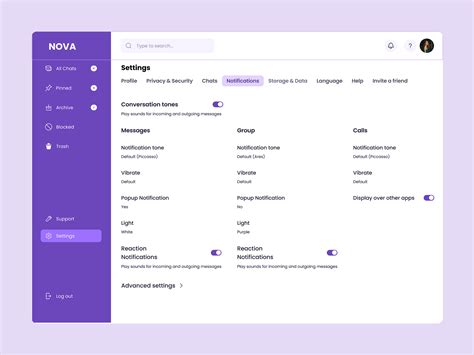
While having multiple alert systems is beneficial, it’s crucial to manage them effectively to avoid information overload:
- Curate Your Sources: Stick to reputable and relevant sources.
- Prioritize: Decide what information is critical and what is merely interesting.
- Consolidate: Where possible, use aggregators or RSS readers to bring multiple sources into one place.
- Review & Refine: Regularly check your alert settings and subscriptions. Unsubscribe from channels that no longer provide value.
- Use Do Not Disturb: Set specific times for notifications if constant pings become disruptive.
Conclusion
Never again miss out on a crucial game release, a significant update, or an exclusive event. By strategically combining dedicated gaming apps, official platform notifications, developer channels, community insights, and powerful automation tools, you can craft a personalized, actionable alert system that keeps you perfectly in sync with your gaming world. Stay informed, stay ahead, and enhance your gaming journey with timely, relevant news at your fingertips.



