





Best ergonomic mouse & keyboard for long PC gaming sessions?

Why Ergonomics Are Crucial for PC Gamers
For dedicated PC gamers, long hours spent in front of a screen are a given. While chasing that next level or victory, it’s easy to overlook the physical toll these sessions can take on your wrists, hands, and arms. Repetitive Strain Injury (RSI), carpal tunnel syndrome, and general discomfort are common ailments among gamers who neglect proper ergonomics. Investing in ergonomic peripherals isn’t just about comfort; it’s about safeguarding your health, maintaining performance, and ensuring your gaming journey can continue pain-free for years to come.
Choosing the right ergonomic mouse and keyboard can significantly reduce stress on your joints and muscles. This guide will walk you through the key features and considerations for selecting the best gear to keep you comfortable during even the most intense gaming marathons.

Understanding Ergonomic Gaming Mice
An ergonomic gaming mouse aims to keep your hand in a more natural, relaxed position, minimizing strain on your wrist and fingers. Traditional mice often force your hand into a pronated (palm-down) position, which can contribute to discomfort over time. Here’s what to look for:
- Contoured Design: A mouse that fits the natural curve of your hand, providing full palm support and often a thumb rest, helps distribute pressure evenly.
- Vertical Mice: These mice keep your hand in a ‘handshake’ position, reducing forearm pronation significantly. While they take some getting used to, many users find them superior for long-term comfort.
- Adjustable DPI: While not strictly ergonomic, being able to adjust sensitivity (DPI) means less large-scale arm movement, reducing shoulder and arm fatigue.
- Lightweight: A lighter mouse requires less effort to move, which can reduce strain over extended periods.
- Customizable Buttons: Reprogramming buttons to perform complex actions can minimize repetitive finger movements.
Selecting the Right Ergonomic Gaming Keyboard
Keyboards are equally important, as they involve constant finger and wrist movement. The goal is to minimize wrist extension and deviation, keeping your wrists in a neutral position.
- Split Keyboards: These keyboards separate the keys into two sections, allowing you to position your hands naturally, often shoulder-width apart, which reduces ulnar deviation (bending the wrist outwards).
- Tentign and Negative Tilt: Some ergonomic keyboards allow you to ‘tent’ the two halves upwards or tilt the entire board downwards from the back. These features help maintain a more neutral wrist posture by rotating your wrists inwards or tilting them back slightly.
- Integrated or Detachable Wrist Rests: A well-padded wrist rest provides support, keeping your wrists elevated and in line with your forearms, preventing them from resting directly on a hard desk surface.
- Key Switches: While personal preference plays a huge role, lighter actuation force switches (e.g., certain linear or tactile mechanical switches) can reduce finger fatigue over time compared to heavier switches.
- Programmable Keys: Similar to mice, programmable keys can help streamline commands and reduce repetitive keystrokes.
Beyond Peripherals: Optimizing Your Gaming Setup
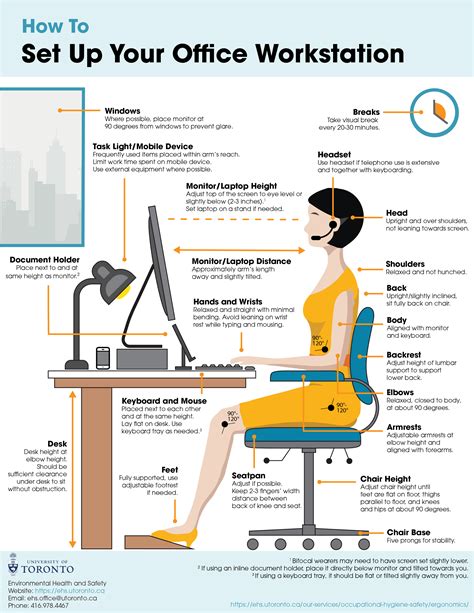
Even the best ergonomic mouse and keyboard won’t completely alleviate strain if your overall setup is poor. Consider these additional factors:
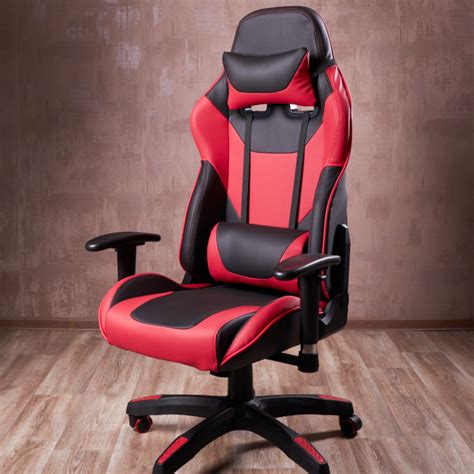
- Chair and Posture: Invest in a good ergonomic gaming chair that supports your lower back. Sit with your feet flat on the floor, back supported, and shoulders relaxed.
- Monitor Placement: Position your monitor at arm’s length, with the top of the screen at or slightly below eye level. This prevents neck strain.
- Desk Height: Your desk should allow your elbows to be at a 90-degree angle or slightly open when your hands are on your keyboard and mouse.
- Regular Breaks: Even with the best setup, taking short breaks every hour to stretch and move around is crucial for circulation and reducing cumulative strain.
Making the Right Choice for You
Finding the perfect ergonomic mouse and keyboard is often a personal journey. What works for one gamer might not work for another. It’s highly recommended to try out different types of ergonomic peripherals if possible. Many stores offer demo units, or you can check return policies when purchasing online. Pay attention to how your hand and wrist feel after short gaming sessions with new gear.
Don’t be afraid to experiment with different setups. The initial investment in ergonomic gear and adjusting your habits will pay dividends in the long run, allowing you to enjoy your favorite PC games comfortably and without the looming threat of pain or injury.
Conclusion
Long PC gaming sessions don’t have to lead to discomfort or injury. By thoughtfully selecting an ergonomic mouse and keyboard, alongside optimizing your overall setup and incorporating healthy habits like regular breaks, you can significantly enhance your gaming experience. Prioritize your physical well-being as much as your in-game performance, and your body (and your K/D ratio) will thank you.


