





Is my CPU bottlenecking my RTX 3080? How to check & fix it?

Understanding CPU Bottlenecking with an RTX 3080
You’ve invested in a powerhouse graphics card like the NVIDIA RTX 3080, expecting top-tier gaming performance. But what if your games aren’t running as smoothly or at the frame rates you anticipated? The culprit might not be your GPU, but rather your Central Processing Unit (CPU) struggling to keep up – a phenomenon known as a CPU bottleneck.
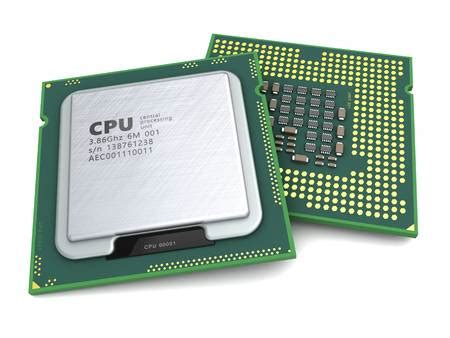
A bottleneck occurs in a computer system when one component limits the potential performance of another. In the context of gaming, a CPU bottleneck means your processor can’t feed data to your powerful RTX 3080 fast enough, preventing the GPU from achieving its full utilization and potential frame rate.

Symptoms of a CPU Bottleneck
Identifying a CPU bottleneck is crucial for optimizing your gaming experience. Here are some tell-tale signs:
- Lower-than-expected FPS: Even with high-end settings, your frame rate might be consistently lower than what benchmarks suggest for your RTX 3080.
- Stuttering or Frame Drops: Frequent, noticeable hitches, especially in CPU-intensive game areas (e.g., crowded cities, large-scale battles).
- Low GPU Utilization: If your GPU utilization hovers well below 99-100% while your CPU utilization is consistently high (near 100%), it’s a strong indicator. Your GPU is waiting for the CPU.
- High CPU Utilization: Your CPU cores, or at least some of them, are maxed out, while your GPU isn’t breaking a sweat.
- Inconsistent Frame Times: Jumps in frame time graphs indicate performance instability, often due to the CPU struggling to process frames consistently.
How to Check for a CPU Bottleneck
The most reliable way to confirm a CPU bottleneck is through real-time monitoring while gaming. Here’s how:
1. Use Monitoring Software
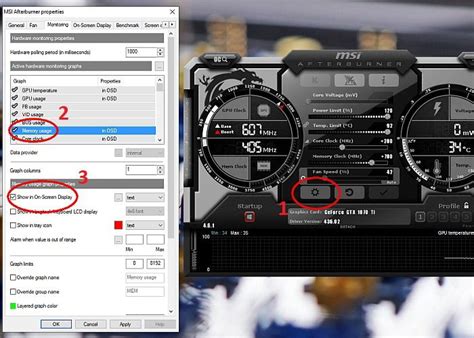
- MSI Afterburner with RivaTuner Statistics Server (RTSS): This is the gold standard. Install both, configure RTSS to display CPU utilization (per core if possible), GPU utilization, CPU temperature, GPU temperature, frame rate (FPS), and frame time overlay on your screen while gaming.
- HWMonitor or HWiNFO64: These tools provide detailed hardware information and sensor readings, including CPU and GPU utilization, though they don’t have an in-game overlay by default.
- Game-specific overlays: Some games have built-in performance monitors (e.g., NVIDIA’s GeForce Experience overlay, Steam’s FPS counter).
2. Analyze the Data
Launch a demanding game and observe the overlay. If your GPU utilization is significantly lower than 90-100% (e.g., 60-70%) while your CPU utilization is consistently high (e.g., 90-100% on multiple cores), then your CPU is likely the bottleneck.
Pay attention to specific CPU-intensive game scenarios. If your GPU utilization drops dramatically only in specific areas where many NPCs or complex physics are at play, that further points to the CPU.

Factors Contributing to CPU Bottlenecking
Several elements can contribute to your CPU struggling to keep up with an RTX 3080:
- Older CPU Generation: An older CPU, even a high-end one from its era, might lack the single-core performance or instruction set needed for modern games.
- Low Core Count/Thread Count: While many games still favor single-core speed, newer titles are increasingly utilizing more cores. A CPU with fewer cores/threads might struggle.
- Lower Clock Speed: The raw clock speed (GHz) of your CPU significantly impacts its ability to process instructions quickly.
- RAM Speed and Latency: Slow RAM can also act as a bottleneck for the CPU, impacting overall system performance.
- Game Optimization: Some games are inherently more CPU-intensive than others, especially titles with complex AI, physics, or open worlds.
- Resolution and Refresh Rate: Counter-intuitively, lower resolutions (e.g., 1080p) often put more strain on the CPU because the GPU can render frames much faster, demanding quicker input from the CPU. Higher refresh rates also demand more from the CPU to deliver frames quickly enough.
How to Fix or Alleviate a CPU Bottleneck
Once you’ve identified a CPU bottleneck, there are several steps you can take, ranging from software adjustments to hardware upgrades.
Software & Settings Adjustments
- Close Background Applications: Ensure no unnecessary programs are running in the background, consuming valuable CPU cycles.
- Update Drivers: Keep your CPU chipset drivers and GPU drivers up to date.
- Adjust In-Game Settings: Lowering CPU-intensive settings like draw distance, crowd density, physics quality, and AI complexity can reduce the load on your processor.
- Increase Resolution (Counter-intuitive but effective): If you’re playing at 1080p and CPU bottlenecked, try increasing the resolution (e.g., to 1440p or even 4K if your monitor supports it). This shifts more of the rendering burden to your RTX 3080, potentially balancing the load.
Hardware Solutions
- CPU Overclocking: If your CPU and motherboard support it, a stable overclock can provide a performance boost. However, ensure adequate cooling and understand the risks involved.
- Upgrade RAM: Faster RAM (higher MHz) with lower latency can significantly improve CPU performance, especially in Ryzen systems. Ensure your motherboard supports the higher speeds.
- Upgrade Your CPU: This is often the most impactful solution. Research modern CPUs that pair well with an RTX 3080 (e.g., Intel i5/i7/i9 12th gen or newer, AMD Ryzen 5/7/9 5000 series or newer). Be aware that a CPU upgrade often necessitates a new motherboard and potentially new RAM, depending on your current system.
- Ensure Adequate Cooling: An overheating CPU will throttle its performance. Make sure your CPU cooler is sufficient, and your case has good airflow.

Conclusion
An RTX 3080 is a formidable graphics card, but its full potential can only be unleashed when paired with a capable CPU. By understanding the signs of a CPU bottleneck, actively monitoring your system’s performance, and implementing the right adjustments or upgrades, you can ensure your gaming rig delivers the smooth, high-fidelity experience you paid for. Striving for a balanced system where no single component significantly holds back another is key to optimal performance.


