





How can I filter gaming news to only see updates for my favorite games & genres?
Navigating the Deluge: Why Personalized Gaming News Matters
In today’s fast-paced gaming world, staying updated on every new announcement, patch, and release can feel like an impossible task. The sheer volume of gaming news across countless platforms can be overwhelming, often burying the information you truly care about under a mountain of irrelevant headlines. For dedicated players, the goal isn’t just to consume news, but to efficiently find updates pertaining specifically to their favorite games and genres.
Fortunately, with the right strategies and tools, you can transform your gaming news feed from a chaotic stream into a highly curated, personalized experience. This guide will walk you through various methods to filter out the noise and ensure you’re always in the loop on what matters most to you.

Leveraging Dedicated Gaming News Platforms
Many prominent gaming news websites and apps offer built-in features to help you tailor your feed. Sites like IGN, GameSpot, PC Gamer, and Polygon often allow users to create accounts and specify their preferred genres (e.g., RPG, FPS, Strategy), platforms (PC, PlayStation, Xbox, Switch), and even follow specific game titles. By utilizing these options, you can significantly reduce the amount of irrelevant content appearing on your homepage or in your notification feed.
Explore the settings and user preferences sections of your favorite gaming news sources. Look for options to “follow” games, “subscribe” to genre channels, or “customize your feed.” These tools are specifically designed to help you focus on the content that aligns with your interests.
Harnessing the Power of RSS Feeds and Aggregators
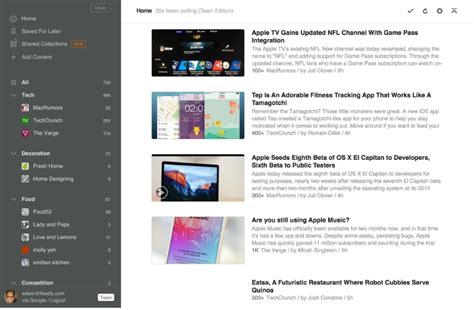
For a more advanced and consolidated approach, RSS (Really Simple Syndication) feeds combined with an RSS reader (like Feedly, Inoreader, or The Old Reader) are incredibly powerful. Many gaming websites offer RSS feeds for their articles, which you can subscribe to. The real magic happens when you categorize these feeds within your aggregator:
- Create categories: Set up folders for genres (e.g., “Indie RPGs,” “Competitive Shooters”) or specific games (e.g., “Starfield News,” “League of Legends Updates”).
- Add specific feeds: Look for RSS feed links on official game websites, fan sites, and even specific sections of larger news outlets.
- Filter keywords: Some advanced aggregators allow you to filter articles within a feed based on keywords, ensuring only highly relevant posts appear.
This method offers unparalleled control over what news you see and can bring updates from diverse sources into one central location.
Optimizing Social Media and Community Platforms
Social media can be a double-edged sword when it comes to news, but with careful curation, it can be a vital source for your favorite games and genres:
- Twitter Lists: Create private or public Twitter lists comprised solely of official game developers, publishers, trusted journalists, and community managers for your preferred titles and genres. This allows you to view a clean, focused stream of tweets without the general noise of your main feed.
- Reddit Subreddits: Subscribe to specific game subreddits (r/elderscrolls, r/stardewvalley) and genre subreddits (r/rpg, r/gamedeals). Many subreddits are excellent for breaking news, community discussions, and fan-made content. Consider using a Reddit client that allows for multi-reddits or custom feeds.
- Discord Servers: Join official Discord servers for games you play. Developers often share direct updates, patch notes, and host Q&A sessions within these communities.

Utilizing Platform-Specific News & Google Alerts
Don’t overlook the built-in news functionality of your gaming platforms:
- Steam, PlayStation Store, Xbox Dashboard: These platforms often have dedicated news sections that highlight updates for games in your library or on your wishlist. Ensure your preferences are set to receive notifications for games you own or follow.
- Google Alerts: Set up Google Alerts for specific game titles, developer names, or even niche genre terms. You’ll receive email notifications whenever new content matching your keywords appears across the web. This is excellent for catching news from smaller blogs or obscure forums you might otherwise miss.

Best Practices for Maintaining a Curated Feed
Once you’ve set up your filtering systems, ongoing maintenance is key:
- Be Specific: The more precise your keywords and subscriptions, the more relevant your news will be.
- Combine Methods: No single method is perfect. A combination of RSS feeds, social media lists, and official channels will provide the most comprehensive coverage.
- Regularly Review: Your gaming interests may evolve. Periodically review your subscriptions, lists, and alerts, removing sources that are no longer relevant and adding new ones.
- Manage Notifications: A curated feed is useless if you’re constantly bombarded with alerts. Adjust notification settings to a comfortable level, perhaps opting for daily summaries instead of instant pings.

Conclusion: Your Gaming News, Your Way
Filtering gaming news doesn’t just save you time; it enhances your overall gaming experience by keeping you intimately connected with the titles and genres you love most. By strategically employing dedicated platforms, RSS feeds, social media tools, and platform-specific features, you can build a personalized news ecosystem that delivers precisely what you want, when you want it. Stop drowning in irrelevant headlines and start enjoying a truly tailored stream of gaming updates.



