NVMe or SATA SSD for gaming PC upgrade?
When upgrading your gaming PC, one of the most impactful changes you can make is improving your storage. Solid State Drives (SSDs) have long replaced traditional Hard Disk Drives (HDDs) as the standard for responsiveness, but a new dilemma has emerged: should you opt for an NVMe SSD or a more conventional SATA SSD? While both offer significant speed improvements over HDDs, understanding their differences is crucial for making the right choice for your gaming setup.
Understanding the Basics: SATA vs. NVMe
To make an informed decision, let’s break down what each type of SSD brings to the table.
SATA SSDs
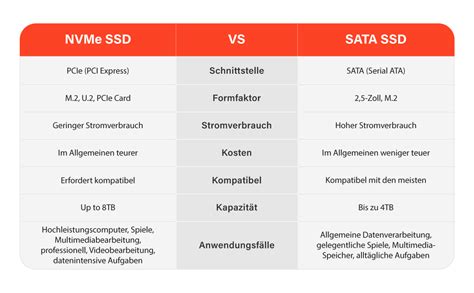
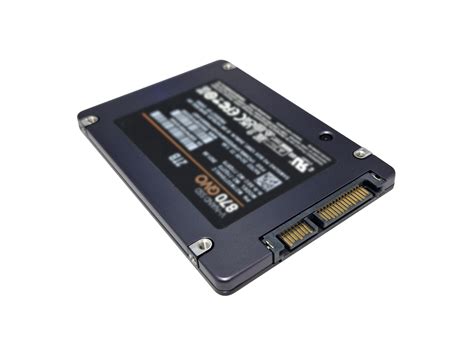
SATA (Serial Advanced Technology Attachment) SSDs connect to your motherboard via a SATA data cable and a SATA power cable. They typically come in a 2.5-inch form factor, similar to laptop hard drives. While significantly faster than HDDs, SATA SSDs operate on a bus that tops out at around 600 MB/s for sequential reads and writes, due to the limitations of the SATA III interface.
NVMe SSDs
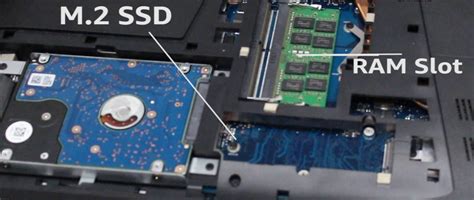
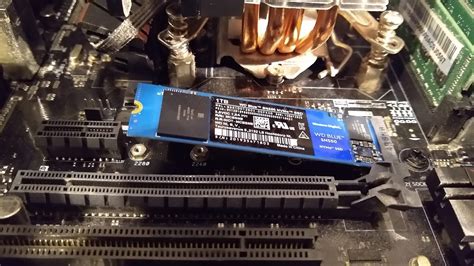
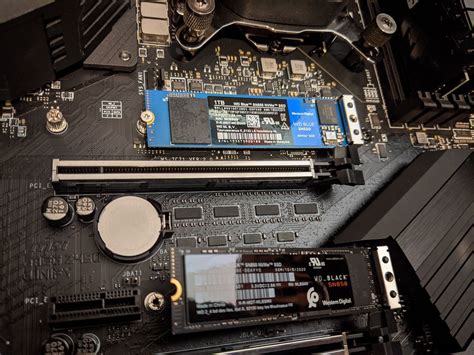
NVMe (Non-Volatile Memory Express) is a communication protocol specifically designed for SSDs to take full advantage of the high-speed PCIe (Peripheral Component Interconnect Express) bus. Unlike SATA, NVMe drives connect directly to the motherboard’s PCIe lanes, usually through an M.2 slot, offering substantially higher bandwidth. This allows NVMe SSDs to achieve theoretical speeds ranging from 3,500 MB/s to over 10,000 MB/s, depending on the PCIe generation (Gen3, Gen4, or Gen5).
Gaming Performance: Is NVMe Worth the Extra Speed?
For most day-to-day computing tasks and gaming, the real-world difference between a high-end SATA SSD and a mid-range NVMe SSD can be surprisingly subtle. Game load times, for instance, are often bottlenecked by CPU, RAM, and GPU processing rather than just raw storage speed. While an NVMe drive will load games slightly faster than a SATA SSD, the difference might only be a few seconds, which many gamers might not notice or deem significant enough to justify a higher price.
However, for games with massive open worlds, complex textures, or those leveraging technologies like Microsoft’s DirectStorage (which offloads data decompression from the CPU to the GPU, requiring very fast storage), NVMe SSDs will provide a more tangible advantage. These scenarios benefit from the NVMe’s ability to handle multiple read/write requests simultaneously and deliver data at incredible speeds.

Cost, Compatibility, and Capacity
Price is a significant factor in any PC upgrade. SATA SSDs are generally more affordable per gigabyte than NVMe drives, making them an excellent choice for budget-conscious gamers or for secondary storage where ultra-high speeds aren’t critical. Modern NVMe drives have become much more accessible, but the latest PCIe Gen4 and Gen5 models still command a premium.
Compatibility is another consideration. Most modern motherboards include at least one M.2 slot for NVMe drives, but older systems might only support SATA. Ensure your motherboard has the necessary M.2 slot and supports the PCIe generation of the NVMe drive you’re considering. SATA SSDs, with their 2.5-inch form factor, are universally compatible with virtually any PC that has an available SATA port and a drive bay.
When to Choose Which for Gaming
Choose SATA SSD if:
- You’re on a tight budget but still want a significant upgrade over an HDD.
- Your motherboard lacks an M.2 slot or has limited PCIe lanes.
- You’re looking for secondary storage for games where load times aren’t your top priority.
- You primarily play older games or titles that don’t heavily rely on storage speed.
Choose NVMe SSD if:
- You’re building a new PC or have a modern motherboard with M.2 slots.
- You want the absolute fastest boot times and application loading.
- You play demanding, large open-world games or titles optimized for DirectStorage.
- You also use your PC for productivity tasks like video editing or large file transfers, which benefit greatly from NVMe speeds.
- You want to future-proof your system for upcoming game releases.
![[M.2 SSD] Samsung PM991 PCIe Gen3 x4 128GB NVMe M.2 2230 SSD 2000R ...](/images/aHR0cHM6Ly90czQubW0uYmluZy5uZXQvdGg/aWQ9T0lQLmlPSGNuZHRoUlFHZWoyMzZuQTVkY3dIYUVLJnBpZD0xNS4x.webp)
Conclusion
For most gamers, both NVMe and SATA SSDs offer a phenomenal upgrade over traditional hard drives. The choice between them ultimately boils down to your budget, existing hardware compatibility, and how much you value those incremental speed gains. If cost is a primary concern, a high-capacity SATA SSD will provide an excellent gaming experience. However, if you’re building a high-end rig, frequently play the latest graphically intensive games, or simply want the best possible performance and future-proofing, an NVMe SSD, especially a PCIe Gen4 or Gen5 model, is the superior choice. Consider your personal gaming habits and system specifications to make the upgrade that’s right for you.