How to safely identify & install trusted game mods to prevent malware or crashes?

Game modifications, or mods, can revolutionize your gaming experience, adding new content, improving graphics, or even creating entirely new gameplay mechanics. However, the world of modding comes with potential risks, from malicious software designed to harm your computer to poorly coded mods that can crash your game. Navigating this landscape safely is crucial for every aspiring modder.
The Allure and Risks of Game Modding
Modding offers unparalleled creativity and extended replayability for many games. From Skyrim’s vast catalog of fan-made quests and visual overhauls to Minecraft’s infinite possibilities with new blocks and mechanics, mods can breathe new life into your favorite titles. Yet, this freedom comes with a significant caveat: not all mods are created equal, and not all mod authors have good intentions.
The primary risks include malware (viruses, ransomware, spyware) disguised as legitimate mods, system instability leading to crashes or corrupted save files, and performance degradation. Understanding these dangers is the first step toward a safe modding journey.
Identifying Trusted Mod Sources
The foundation of safe modding begins with where you download your files. Sticking to well-known, reputable platforms significantly reduces your exposure to risks.
- Official Modding Websites: Platforms like Nexus Mods, Mod DB, and the Steam Workshop are often curated and benefit from large, active communities that help vet content.
- Reputable Game-Specific Forums: Many games have dedicated forums or subreddits where mod authors share their work and community members provide feedback.
- Developer-Endorsed Marketplaces: Some games have official mod support or in-game marketplaces where content is verified by the game developers themselves.
Avoid downloading mods from random file-sharing sites, unverified links in YouTube descriptions, or obscure forums without a strong community presence. These are often breeding grounds for malware.

How to Vet a Mod Before Installation
Even on trusted platforms, exercising caution is vital. Due diligence can prevent many headaches.
- Check Author Reputation: A reliable author usually has a history of well-received mods, positive user interactions, and responsiveness to feedback. New or anonymous authors should be approached with extra skepticism.
- Read Reviews and Comments: The community is your best friend. Look for consistent positive reviews, detailed bug reports, and discussions about compatibility or installation issues. Red flags include numerous reports of crashes, malware warnings, or a complete lack of comments.
- Examine Download Counts and Endorsements: Mods with a high number of downloads and endorsements (if the platform supports it) are generally more reliable as they’ve been used and tested by many players.
- Verify Compatibility: Ensure the mod is designed for your specific game version, edition (e.g., Special Edition vs. Anniversary Edition), and any other mods you plan to use. Incompatible mods are a leading cause of crashes.
- Scan with Antivirus Software: Before installing, run any downloaded mod file through your up-to-date antivirus and anti-malware software. While not foolproof, it’s an important layer of defense.
Safe Installation Practices
Once you’ve identified a trusted mod, proper installation is key to preventing issues.
- Backup Your Game Files: This is arguably the most critical step. Before installing any mod, especially large or complex ones, back up your game’s installation folder and save files. This allows you to revert to a working state if something goes wrong.
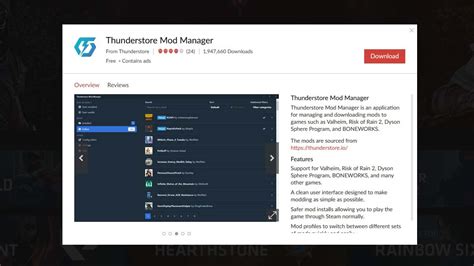
- Use Mod Managers: For games with extensive modding communities (e.g., Fallout, Elder Scrolls, Minecraft), dedicated mod managers like Vortex, Mod Organizer 2, or CurseForge simplify installation, manage load orders, detect conflicts, and allow for easy uninstallation without affecting core game files.
- Read Installation Instructions Carefully: Never skip the mod author’s installation guide. Every mod is unique, and some require specific steps, tools, or dependencies.
- Install Mods Incrementally: Avoid installing dozens of mods at once. Add them one or a few at a time, testing your game after each batch. This makes it much easier to identify which mod is causing a problem if one arises.
Post-Installation & Troubleshooting
After installing mods, your job isn’t quite done. Vigilance helps maintain a stable game.
- Test Your Game Thoroughly: Launch your game and play for a while. Check for crashes, bugs, graphical glitches, or unexpected behavior. Test various game areas or functionalities that the mod might affect.
- Monitor Performance: Keep an eye on your frame rates and system resource usage. A sudden drop in performance might indicate a poorly optimized or conflicting mod.
- Understand Mod Conflicts: When two mods try to change the same game asset, a conflict occurs. Mod managers often help resolve these, but sometimes manual intervention (like adjusting load orders or creating compatibility patches) is necessary.
- Reverting Changes: If a mod causes problems, use your mod manager to disable or uninstall it. If you didn’t use a manager, your backups will be invaluable for restoring your game.

Staying Secure in the Modding Community
Modding is an evolving landscape. Staying informed and practicing ongoing vigilance is key.
- Keep Software Updated: Regularly update your game, mod manager, and antivirus software.
- Be Wary of “Too Good to Be True” Mods: If a mod promises unrealistic features or massive improvements with minimal effort, approach it with skepticism.
- Contribute to the Community: If you find a problematic mod, report it to the platform administrators and leave a clear, helpful review to warn others.
By following these guidelines, you can confidently explore the vast and exciting world of game modding, enhancing your gaming experience while keeping your system safe from malware and frustrating crashes. Happy modding!