





Effective ways to find reliable, updated game mods & avoid compatibility crashes?
Navigating the World of Game Mods Safely
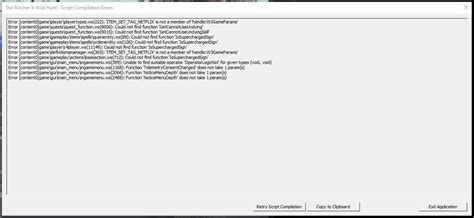
Game modifications, or “mods,” can breathe new life into your favorite titles, offering enhanced graphics, new content, gameplay tweaks, and entirely fresh experiences. However, the world of modding can also be a minefield of outdated files, conflicting scripts, and frustrating game crashes. The key to a smooth modding experience lies in knowing where to find reliable, updated mods and how to manage them to avoid compatibility nightmares.
Where to Find Your Next Favorite Mod
The first step to a stable modded game is sourcing your mods from reputable platforms. While a quick search might lead you to various sites, not all are created equal in terms of reliability and safety.
- Dedicated Modding Websites: Platforms like Nexus Mods are industry standards. They host millions of mods for thousands of games, offer robust community features, and often integrate with popular mod managers. The site’s infrastructure encourages authors to keep mods updated and provides clear version histories.
- Steam Workshop: For many games available on Steam, the Workshop provides an incredibly convenient way to subscribe to and manage mods directly through the game client. While generally reliable, the quality can vary, and direct author support might be less centralized than on dedicated mod sites.
- Official Game Forums & Communities: Many games have official or well-established fan forums where mod authors share their creations. These communities often provide excellent direct support, troubleshooting tips, and early access to new mods.
- Mod Author Pages: Some prolific modders maintain their own websites or Patreon pages where they host their work. These are often excellent sources for their specific creations, ensuring you get the mod directly from the source.

Identifying High-Quality, Updated Mods
Once you’ve found a potential mod, it’s crucial to assess its quality and currency before downloading. A little due diligence here can save hours of troubleshooting later.
- Check the Last Update Date: This is paramount. If a mod hasn’t been updated in years, especially for a game that has received many official patches, it’s a high risk for compatibility issues. Aim for mods updated within the last year or two, or explicitly stated as stable for the current game version.
- Read User Reviews & Endorsements: The community is your best friend. Look at the comments section, endorsements, and bug reports. Are users reporting frequent crashes? Are there many positive reviews confirming functionality? A mod with high download counts and positive feedback is usually a safe bet.
- Review the Mod Description Thoroughly: Mod authors often include vital information: installation instructions, known conflicts with other popular mods, required dependencies (like script extenders), and performance impacts. Skipping this step is a common mistake.
- Check for Dependencies: Many advanced mods require other foundational mods (e.g., a script extender or a framework mod) to function correctly. Ensure you download and install these prerequisites first.
Strategies to Avoid Compatibility Crashes
Even the best mods can cause issues if not managed correctly. Preventing crashes is often about careful planning and using the right tools.

Utilize Mod Managers
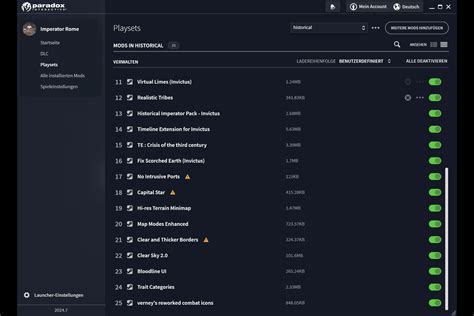
For most games with extensive modding scenes (e.g., Bethesda titles, CD Projekt Red games), a mod manager is indispensable. Tools like Vortex, Mod Organizer 2 (MO2), or dedicated game-specific managers simplify installation, uninstallation, load order management, and conflict detection. They create virtual installations, keeping your game’s original files pristine.
Master Your Load Order
The order in which your mods load can significantly impact stability. When two mods try to modify the same game asset, the one loaded later “wins.” Load order optimization tools like LOOT (Load Order Optimization Tool) are essential for many games, automatically sorting plugins for maximum compatibility. Always run LOOT after adding or removing mods.
Install Incrementally & Test
Never install dozens of mods at once. Add a few at a time, launch your game, and test for stability and functionality. If a crash occurs, you’ll know exactly which recent addition caused it, making troubleshooting much easier.
Always Backup Your Game Files
Before embarking on any significant modding adventure, make a backup of your clean game installation. This is your ultimate safety net, allowing you to quickly revert to a working state if something goes horribly wrong.
Seek Out Compatibility Patches
Many popular mods have official or community-made compatibility patches designed to make them work seamlessly with other widely used mods. Search for these patches on mod pages or community forums.

Keeping Your Modded Game Running Smoothly
Modding isn’t a one-time setup; it’s an ongoing process. Game updates, new mod versions, and community discoveries mean you’ll need to periodically revisit your mod setup.
- Regularly Check for Mod Updates: Authors frequently release updates to fix bugs, improve performance, or adapt to new game patches. Use your mod manager’s features to track updates or manually check mod pages.
- Stay Informed with the Community: Follow game-specific modding subreddits, forums, or Discord servers. These communities are often the first to report new issues, find workarounds, or announce critical updates.
- Be Wary of Game Updates: Major official game updates can break a heavily modded setup. It’s often wise to wait a few days or weeks after a game update for mod authors to release compatibility patches before updating your game or mods.
Conclusion: Embrace Modding with Confidence
Modding can transform your gaming experience, but it requires patience and a systematic approach. By conscientiously choosing reliable mods from reputable sources, carefully reading descriptions, utilizing mod managers and load order tools, and testing incrementally, you can largely mitigate the risks of compatibility crashes. Embrace the vast possibilities of modding, armed with the knowledge to do so effectively and safely.

