





How to find trustworthy mods & avoid common compatibility issues?
The Allure and Challenges of Game Modding
Modding has transformed the gaming landscape, allowing players to customize experiences, add new content, fix bugs, and even completely overhaul games. From graphical enhancements to entirely new quests, mods offer endless possibilities. However, diving into the world of user-generated content comes with its own set of challenges, primarily ensuring the mods you download are trustworthy and won’t destabilize your game or, worse, compromise your system.
Identifying Trustworthy Mod Sources and Creators
The first and most critical step in safe modding is knowing where to look and what to look for. Not all mods are created equal, and not all sources are equally reliable.
Reliable Modding Platforms
- Nexus Mods: Arguably the largest and most well-established modding site, offering a robust platform with extensive review systems, author profiles, and community discussions. It’s generally considered a gold standard for PC game mods.
- CurseForge: Popular for games like Minecraft and World of Warcraft, CurseForge provides a curated and often officially supported platform for specific titles, ensuring a higher degree of trust.
- Official Game Forums & Developer-Endorsed Sites: Some game developers host or endorse specific modding communities. These are often the safest bets, as they might have stricter guidelines or direct developer oversight.
- Reputable Fan Sites: For older or niche games, dedicated fan wikis or forums can be excellent sources, but always exercise extra caution and cross-reference information.
Scrutinizing Mod Details
Once you’ve found a potential mod, a thorough examination is essential before downloading:
- Author Reputation: Check the mod author’s profile. Do they have other popular mods? Do they have a long history on the site? A consistent track record of quality is a good sign.
- Endorsements & Downloads: High numbers of endorsements and downloads, coupled with positive ratings, indicate a widely used and appreciated mod.
- User Comments & Bug Reports: Read through the comments section. Are users reporting significant bugs, crashes, or even suspicious activity? Or are the comments overwhelmingly positive and helpful?
- Mod Description & Requirements: A well-written, detailed description that clearly outlines what the mod does, its dependencies (other mods required), installation instructions, and known conflicts is a mark of a responsible creator.
- Last Updated Date: Mods that are actively maintained and updated are generally more reliable and compatible with newer game versions.
Strategies for Minimizing Compatibility Problems
Even trustworthy mods can clash with each other, leading to crashes, glitches, or corrupted save files. Proactive measures are key to a stable modded game.
Understanding Mod Load Order
Many games process mods in a specific sequence, known as the load order. If two mods modify the same game file or feature, the one loaded later will usually overwrite the changes of the one loaded earlier. Incorrect load order is a leading cause of conflicts. Tools like LOOT (Load Order Optimisation Tool) for Bethesda games can automatically sort your load order to minimize conflicts.
Leveraging Mod Managers
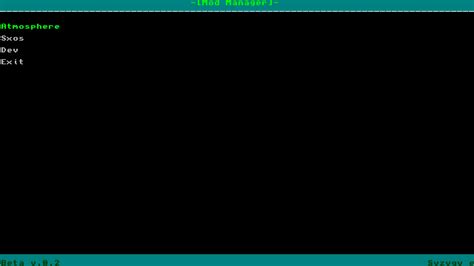
For most modern games, especially those with extensive modding communities, a mod manager is indispensable. Tools like Mod Organizer 2 (MO2) or Vortex (from Nexus Mods) offer:
- Virtual Installation: They install mods into separate folders, keeping your game directory clean and making it easy to enable/disable or uninstall mods without affecting your core game files.
- Conflict Detection: Many managers can identify potential file conflicts between mods.
- Profile Management: Create different mod setups for different playthroughs.
Read Documentation and Community Wisdom
Before installing a mod, always check its ‘Requirements’ and ‘Compatibility’ sections on its download page. Mod authors often list known conflicts with other popular mods and sometimes provide compatibility patches. Additionally, browse the mod’s forum or comment section; other users often report issues and solutions that haven’t made it into the main description.
Best Practices for a Smooth Modding Experience
Install in Batches and Test Thoroughly
Instead of installing dozens of mods at once, add them in small groups (e.g., 2-5 at a time). After each batch, launch your game and test extensively in different scenarios. If a problem arises, you’ll know it’s likely from the most recent batch, making troubleshooting much easier.
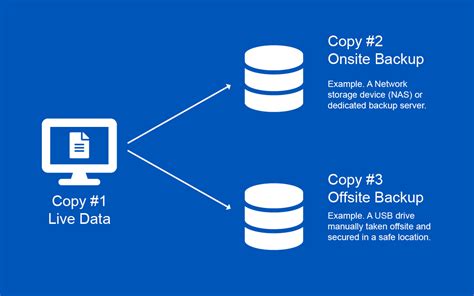
Always Backup Your Saves and Game Files
This cannot be stressed enough. Before any significant modding session, copy your entire game save folder and, ideally, your clean game installation to a separate location. This provides a safety net if something goes wrong and allows you to revert to a stable state.
Keep Mods Updated (Responsibly)
Mod authors frequently release updates that fix bugs, improve performance, or add new features. However, always read the update notes carefully. Sometimes, a new version might have specific installation requirements or could break compatibility with other mods you’re using. Update cautiously and after backing up.
Troubleshooting Common Mod Issues
Despite best efforts, issues can still arise. When they do, here’s a general approach:
- Identify the Symptoms: Is it a crash on startup, a specific bug during gameplay, visual glitches, or corrupted saves?
- Disable Recently Added Mods: If the problem started after installing a new mod or group of mods, disable them first.
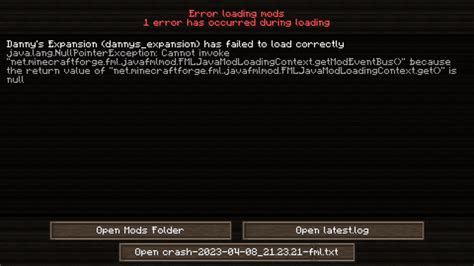
- Check Error Logs: Many games or mod managers generate log files that can pinpoint the mod or file causing the issue.
- Consult Community Resources: Search the mod’s forum, the game’s modding subreddit, or dedicated wikis for similar problems and solutions.
- Revert to a Backup: If all else fails, restore your game to a previous save or clean installation.
Conclusion: Embrace Modding Responsibly
Modding can breathe new life into your favorite games, but it requires a conscious effort towards safety and stability. By diligently vetting your sources, understanding mod interactions, utilizing powerful management tools, and practicing responsible installation habits, you can enjoy a richer, more personalized gaming experience without falling victim to common pitfalls. Happy modding!

