





How can I reduce ping and lag for smoother online gaming?

Understanding Ping and Lag in Online Gaming
For any serious online gamer, the terms “ping” and “lag” are synonymous with frustration. Ping refers to the reaction time of your internet connection—how quickly your device sends a signal to the game server and receives a response. It’s measured in milliseconds (ms), and lower is always better. Lag, on the other hand, is the noticeable delay between your actions and the game’s response, often a direct result of high ping or other network issues.
High ping or persistent lag can turn an exciting multiplayer match into a stuttering nightmare, leading to missed shots, teleporting enemies, and overall poor performance. Fortunately, there are several steps you can take to diagnose and significantly reduce these issues, optimizing your setup for a smoother gaming experience.

Hardware Solutions for a Stable Connection
1. Prioritize a Wired Ethernet Connection
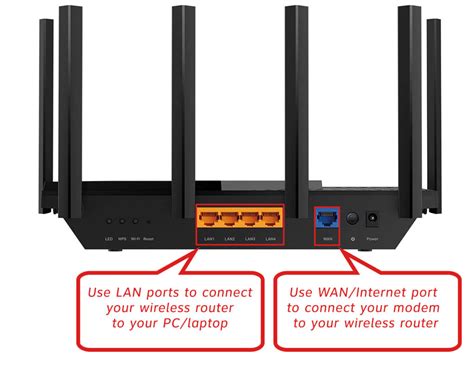
This is arguably the most impactful change you can make. Wi-Fi, while convenient, is susceptible to interference from other devices, walls, and distance, leading to inconsistent speeds and higher ping. An Ethernet cable provides a direct, stable, and faster connection between your gaming device (PC, console) and your router, drastically reducing latency and packet loss.
2. Optimize Your Router and Modem
- Upgrade Your Router: Older routers might not handle modern internet speeds or multiple connected devices efficiently. Consider upgrading to a gaming-specific router with features like Quality of Service (QoS) and beamforming, which prioritize gaming traffic and direct signal more effectively.
- Router Placement: If Wi-Fi is your only option, ensure your router is centrally located, elevated, and free from obstructions (like walls or large furniture). Keep it away from other electronics that emit wireless signals (microwaves, cordless phones).
- Firmware Updates: Always keep your router’s firmware updated. Manufacturers regularly release updates that improve performance, security, and stability.
- Modem Check: Ensure your modem is up to date and compatible with your ISP’s latest speeds. An outdated modem can bottleneck your entire internet connection.
Network Configuration and Software Optimizations
1. Utilize Quality of Service (QoS) Settings
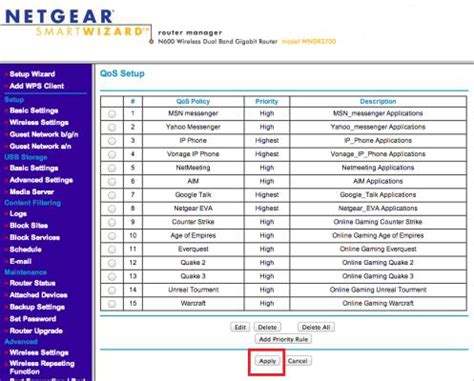
Many modern routers include QoS features that allow you to prioritize certain types of internet traffic. By setting your gaming device or specific game traffic as high priority, your router will ensure that data packets for your game are handled before other traffic (like streaming video or large downloads), significantly reducing lag when your network is busy.
2. Choose the Right DNS Server
Your Domain Name System (DNS) server translates website names into IP addresses. While your ISP’s default DNS is usually fine, switching to a faster, public DNS server (like Google DNS or OpenDNS) can sometimes reduce the time it takes to resolve server addresses, shaving off a few milliseconds of latency.
3. Close Background Applications and Downloads
Anything consuming bandwidth or CPU cycles on your gaming device can contribute to lag. Before gaming, close all unnecessary applications, browser tabs, background downloads, and streaming services. This frees up both network bandwidth and system resources for your game.
4. Select the Closest Game Server Region
Most online games offer multiple server regions. Always choose the server closest to your physical location. Data has less distance to travel, resulting in lower ping. Playing on distant servers will inevitably lead to higher latency, regardless of your local setup.
Internet Service Provider (ISP) Factors
1. Understand Your Internet Plan
While high download/upload speeds are great, for gaming, low latency is paramount. A high-speed connection with poor routing or congestion can still lead to high ping. Check your internet plan’s advertised latency if possible, or consult reviews specific to gaming performance in your area.
2. Contact Your ISP
If you’ve tried all the above steps and still experience persistent high ping, there might be an issue with your ISP’s network. Contact their support. They can check for line issues, congestion in your area, or suggest potential solutions like a different network configuration on their end. They might also be able to provide details on available upgrades to your service that could improve latency.

Conclusion
Reducing ping and lag for smoother online gaming is a multi-faceted process that involves both hardware upgrades and careful software configuration. Starting with a wired connection, optimizing your router, and ensuring your gaming setup is free from background interference are excellent first steps. By systematically addressing each potential bottleneck, you can significantly improve your online gaming experience and focus on the game, not the frustrating delays.


