How to best handle conflicting mods and seek community support without toxic backlash?

Navigating the Modding Minefield
Modding can breathe new life into your favorite games, offering countless hours of enhanced gameplay, visual overhauls, and innovative mechanics. However, the more mods you introduce, the higher the likelihood of encountering conflicts. When two or more mods try to alter the same game files or systems in incompatible ways, issues like crashes, graphical glitches, or broken mechanics can arise. Resolving these conflicts can be a daunting task, often requiring more than just technical know-how—it demands careful community engagement to solicit help without inviting negative feedback.

Preparation: The First Line of Defense Against Conflicts
Before you even think about posting for help, exhaust your self-troubleshooting options. This not only increases your chances of solving the problem independently but also demonstrates to the community that you’ve put in effort, making them more willing to assist. Here’s a robust checklist:
- Isolate the Problem: The golden rule of mod troubleshooting. Disable all mods and enable them in small batches (or one by one) to identify which specific mod or combination is causing the conflict. Mod organizers (like Mod Organizer 2 or Vortex) make this process significantly easier.
- Read Mod Descriptions Carefully: Many conflicts are explicitly mentioned in mod descriptions, along with patches or workarounds. Check for compatibility requirements, load order suggestions, and known issues.
- Check for Updates: Ensure all your mods and the game itself are up-to-date. Developers often release patches that fix compatibility issues.
- Use Conflict Detection Tools: Tools like LOOT (Load Order Optimization Tool) or xEdit can detect and help resolve load order issues and direct file conflicts for many games.
- Consult Official Documentation/Wikis: Many games or extensive modding communities have wikis or dedicated knowledge bases with common issue solutions.
Seeking Community Support Effectively
When self-troubleshooting reaches its limit, the community is your next invaluable resource. However, approaching them requires tact and a clear, concise presentation of your problem.
Crafting Your Help Request
A well-structured request significantly increases your chances of receiving helpful responses and minimizes the risk of frustration from community members.
- Choose the Right Platform: Post in the appropriate section of a forum, subreddit, Discord server, or mod page comments. Some communities have dedicated support channels.
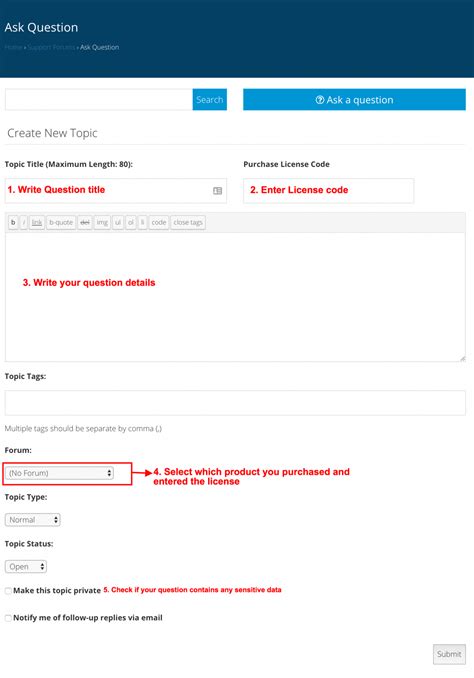
- Clear, Concise Title: Summarize your issue in the title. E.g., “[Game Name] Crash on Startup with X & Y Mods” or “NPC Texture Glitch with Z Mod After Patch.”
- Provide Essential Details: Don’t make people guess. Include:
- Game Version: Crucial for mod compatibility.
- Mod List: A complete list of your installed mods, ideally with links to their download pages.
- Load Order: How your mods are arranged. Screenshots or pasted lists are helpful.
- Problem Description: Exactly what is happening (crashes, errors, graphical issues, etc.).
- Steps to Reproduce: How can others replicate the issue?
- What You’ve Tried So Far: Detail your troubleshooting steps from the ‘Preparation’ section. This shows effort and prevents redundant suggestions.
- Relevant Screenshots/Error Logs: Visual evidence or crash logs (e.g., Papyrus logs for Skyrim, actual crash logs for others) are incredibly helpful for diagnosis.
Fostering a Positive Interaction: Etiquette and Empathy
Your demeanor is just as important as the information you provide. Remember, most community support is offered by volunteers in their free time.
- Be Patient and Polite: Don’t expect instant replies. Thank those who offer help, even if their suggestions don’t immediately solve the problem.
- Avoid Demanding Tone: Phrases like “YOU need to help me” or “FIX THIS NOW” are guaranteed to alienate potential helpers. Frame your request as a plea for assistance, not an order.
- Don’t Cross-Post Excessively: Posting the exact same request across multiple platforms simultaneously can be seen as spamming and disrespectful of others’ time.
- Stay Engaged: If someone asks for more information, provide it promptly. Don’t disappear after posting your initial request.
- Offer Solutions Back: If you eventually solve the problem (with or without help), post the solution in your thread. This helps future users with similar issues and contributes positively to the community’s knowledge base.
Dealing with Potential Toxic Backlash
While most communities are helpful, some individuals or sub-sections can be less welcoming. If you encounter negativity, here’s how to handle it:
- Don’t Engage Directly: Responding to insults or overly critical comments often escalates the situation. Your goal is to get help, not win an argument.
- Focus on Productive Responses: Sift through the noise and only engage with comments that are genuinely trying to help, even if phrased imperfectly.
- Report if Necessary: If comments violate forum rules (e.g., hate speech, personal attacks), use the platform’s reporting function. Moderators are there to maintain order.
- Don’t Take it Personally: Remember that online anonymity can bring out the worst in some people. Their behavior reflects on them, not on your legitimate need for help.

Conclusion: Building a Better Modding Experience
Mastering mod conflict resolution and community engagement is a valuable skill that enhances your gaming experience and contributes positively to the modding ecosystem. By preparing thoroughly, asking for help effectively, and maintaining a respectful attitude, you not only increase your chances of getting your game running smoothly but also foster a healthier, more supportive community for everyone involved. Your thoughtful approach helps turn potential frustrations into opportunities for learning and collaboration, ensuring the vibrant world of game modding continues to thrive.