





How to track critical gaming patch notes & event updates without info overload?

In the fast-paced world of online gaming, staying abreast of the latest patch notes, hotfixes, and time-sensitive event updates is crucial for competitive players and casual enthusiasts alike. Yet, the sheer volume of information released daily across countless titles can quickly lead to an overwhelming sense of “info overload.” How can you ensure you catch the critical updates for your favorite games without drowning in a sea of irrelevant notifications?
The Challenge: Information Overload in Gaming
From minor bug fixes to massive seasonal content drops, game developers constantly push out updates. Missing a crucial patch note could mean being unaware of a significant meta shift, a broken build, or a limited-time cosmetic item. Similarly, overlooking an event announcement might cause you to miss out on exclusive rewards or community engagement opportunities. The difficulty lies in sifting through the noise from dozens of games, forums, and social media feeds to pinpoint what truly matters to you.

Streamlining Your Update Tracking Strategy
The key to effective tracking without burnout is to adopt a structured, multi-pronged approach. Here are some of the most efficient methods:
1. Prioritize Official Sources
Always start with the definitive source: the game developers themselves. Most studios maintain dedicated news sections on their official websites, often with specific categories for patch notes and event calendars. Following official social media accounts (Twitter, Facebook, Discord) can also provide real-time announcements. While these sources are accurate, they might require you to visit multiple sites.
2. Utilize Reputable Gaming News Sites & Aggregators
For a broader overview or curated summaries, turn to established gaming news outlets. Many sites specialize in specific genres or platforms and often consolidate information from various official sources into digestible articles. Look for features like “patch note roundups” or “weekly event calendars” for games you follow. Some platforms even offer RSS feeds you can subscribe to for automated updates.

3. Engage with Curated Community Hubs
For many popular games, dedicated communities on platforms like Reddit or Discord act as excellent filters. Experienced players and moderators often distill official announcements, highlight key changes, and discuss their implications. Joining specific subreddits or Discord servers for your games, especially those with dedicated “announcements” or “patch notes” channels, can be incredibly effective. Just be mindful of the potential for misinformation and always cross-reference critical details with official channels.
4. Leverage Notification Tools and Apps
Several tools are designed to centralize and deliver updates directly to you:
- RSS Readers: If a game’s official news page or a gaming news site offers an RSS feed, an RSS reader can pull all new articles into one place.
- Browser Extensions: Some extensions can monitor specific webpages for changes and notify you.
- Dedicated Gaming Apps: A few apps aim to aggregate gaming news and updates across multiple titles, allowing you to select your preferred games. While less common, they can be powerful.
- Discord Bots: Many community Discord servers utilize bots that pull patch notes or news directly from official sources and post them into a channel.
5. Create Personalized Information Feeds
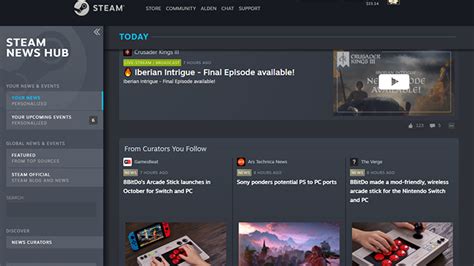
Don’t be afraid to tailor your own news consumption. Unfollow social media accounts that post too much irrelevant content. Mute notification channels on Discord that don’t pertain to your specific interests. Use Twitter lists to follow only developer accounts or trusted news sources for specific games. The more you customize your inputs, the less “noise” you’ll encounter.
Tips to Avoid Overload
- Schedule Check-ins: Instead of constantly refreshing, set aside specific times each day or week to check for updates.
- Be Selective: Focus only on games you actively play and are genuinely interested in.
- Utilize Search & Filters: When on a website or forum, use their search functionality to quickly find “patch notes” or “event schedule.”
- Unsubscribe Liberally: If a source consistently delivers unhelpful information, remove it from your feed.

Conclusion
Navigating the deluge of gaming information doesn’t have to be a daunting task. By strategically choosing your sources, leveraging aggregation tools, and personalizing your feeds, you can efficiently track critical patch notes and event updates without succumbing to information overload. Staying informed not only enhances your gameplay experience but also ensures you’re always ready for the next big adventure or challenge your favorite virtual worlds have to offer.



