





What are the essential PC setup tips for competitive FPS gaming & streaming?

Unleashing Peak Performance: The Dual Challenge of Gaming & Streaming
For aspiring pros and dedicated content creators, the journey to dominance in competitive First-Person Shooter (FPS) games while simultaneously streaming to an audience presents a unique technical hurdle. It’s not just about having a powerful PC; it’s about optimizing every single component and setting to achieve the lowest possible latency, highest frame rates, and a seamless streaming experience. This guide will walk you through the essential PC setup tips to give you that crucial edge.
Striking the perfect balance means your system must handle intense game rendering, encode video in real-time, and manage various background applications without skipping a beat. Every millisecond, every frame, and every pixel matters when victory is on the line and your viewers are watching.
Core Hardware: The Engine of Your Operation
Processor (CPU): The Multitasking Powerhouse
For simultaneous gaming and streaming, your CPU is the heart of your operation. Aim for a modern processor with a high core and thread count (e.g., Intel Core i7/i9 or AMD Ryzen 7/9 series). More cores allow the CPU to dedicate resources to the game, stream encoding, and background tasks independently, preventing bottlenecks and maintaining smooth performance.
Graphics Card (GPU): Visuals at Lightning Speed
The GPU is paramount for achieving high frame rates, which are critical in competitive FPS. Invest in a high-end graphics card (e.g., NVIDIA RTX 30/40 series or AMD RX 6000/7000 series). While the CPU handles stream encoding, a powerful GPU ensures your game runs smoothly at your monitor’s native resolution and refresh rate, providing clearer visuals and more responsive gameplay.
RAM and Storage: Speed and Capacity
RAM: 16GB is the minimum for gaming, but 32GB of fast DDR4 or DDR5 RAM is highly recommended for gaming and streaming. This allows your system to handle large game assets and streaming software without resorting to slower disk paging. Aim for speeds of 3200MHz or higher for DDR4, and 5200MHz or higher for DDR5.
Storage: An NVMe SSD (Solid State Drive) is essential for your operating system, games, and streaming software. NVMe drives offer significantly faster load times and responsiveness compared to SATA SSDs or traditional HDDs. Consider a secondary, larger NVMe or SATA SSD for recording raw footage if you plan to edit videos.
Peripherals: Your Interface with the Game
Monitor: Your Window to Victory
A high refresh rate monitor (144Hz, 240Hz, or even 360Hz) with a low response time (1ms GTG) is non-negotiable for competitive FPS. This reduces input lag and ghosting, allowing you to see enemies and react faster. A resolution of 1080p or 1440p is usually preferred over 4K for higher frame rates.
Mouse, Keyboard, and Headset: Precision and Communication
- Mouse: Choose a lightweight gaming mouse with a high-precision sensor (e.g., 16,000+ DPI), low lift-off distance, and comfortable ergonomics for your grip style. Minimize wireless latency with a reliable 2.4GHz connection or opt for a wired mouse.
- Keyboard: A mechanical keyboard with fast-actuating switches (linear or tactile, depending on preference) provides superior responsiveness and tactile feedback compared to membrane keyboards.
- Headset: A high-quality gaming headset with clear positional audio (7.1 surround sound emulation can be beneficial) helps pinpoint enemy locations. A good microphone is crucial for clear communication with teammates and your stream audience.
Network & Connectivity: Lag-Free Gameplay
Wired Connection: Always use a wired Ethernet connection for your PC. Wi-Fi introduces latency and instability, which can lead to frustrating lag spikes for both gaming and streaming. Ensure your router is placed optimally and supports gigabit speeds if your ISP plan allows.
Internet Speed: A stable internet connection with sufficient upload and download bandwidth is crucial. For streaming at 1080p/60fps, aim for at least 10-15 Mbps upload speed, alongside a robust download speed for smooth game data. Test your connection regularly to ensure stability.
Software Optimization & Streaming Settings
Operating System Optimization
- Game Mode: Enable Windows Game Mode to prioritize your game.
- Background Processes: Close all unnecessary background applications, browser tabs, and services before gaming or streaming.
- Drivers: Keep your GPU drivers (NVIDIA GeForce Experience or AMD Adrenalin), chipset drivers, and other essential drivers updated to the latest stable versions.
- Power Plan: Set your Windows power plan to ‘High Performance’ or ‘Ultimate Performance’.
Streaming Software Settings (e.g., OBS Studio)
Optimize your streaming software (e.g., OBS Studio, Streamlabs Desktop) for your hardware. If you have an NVIDIA GPU, utilize NVENC (New) encoder for superior performance as it offloads encoding to a dedicated chip, freeing up your CPU. For AMD GPUs, use AMD VCE/AMF. Fine-tune your bitrate, resolution, and FPS settings to match your internet upload speed and PC capabilities.
Ergonomics & Environment: Comfort and Clarity
Desk and Chair: An ergonomic gaming chair and a spacious, stable desk are vital for comfort during long gaming and streaming sessions. Proper posture can prevent fatigue and improve focus.
Cable Management: Organize your cables to prevent clutter, improve airflow, and avoid accidental disconnections. A clean setup contributes to a clear mind.
Environment: Ensure your room is well-ventilated to prevent your PC from overheating, especially during demanding streaming sessions. Consider a separate mic if you want to elevate your audio quality beyond a headset mic.
Conclusion: A Holistic Approach to Victory
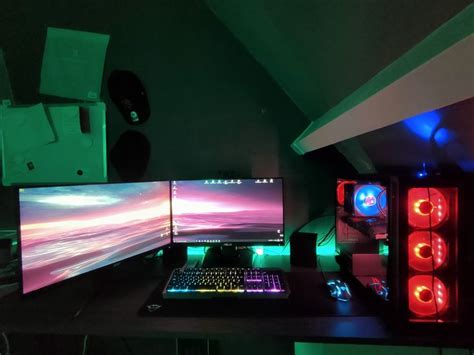
Building an essential PC setup for competitive FPS gaming and streaming is a holistic endeavor. It demands not only top-tier hardware but also meticulous optimization of software, network, and your physical environment. By following these tips, you’ll create a powerful, reliable, and low-latency system that empowers you to perform at your peak in-game while delivering a high-quality, engaging experience to your audience. The perfect setup isn’t just about raw power; it’s about harnessing that power efficiently to win battles and entertain viewers simultaneously.


