





How can I filter essential gaming news & guide updates from the daily noise?
The Overwhelming Landscape of Gaming News
In the fast-paced world of video games, a constant deluge of information floods our screens daily. From major game announcements and developer diaries to endless patch notes, esports results, influencer reactions, and burgeoning indie titles, staying on top of it all feels like a full-time job. While this abundance of content is a testament to the industry’s vibrancy, it also presents a significant challenge: how do you sift through the ‘noise’ to find the essential news and guide updates that genuinely impact your gaming experience?
The sheer volume can lead to information overload, making it hard to discern credible sources, track games you care about, or even discover new titles efficiently. Many gamers feel overwhelmed, missing critical updates or wasting time on irrelevant content. The key lies not in consuming everything, but in strategically filtering what reaches you.
Defining Your Essential Gaming News
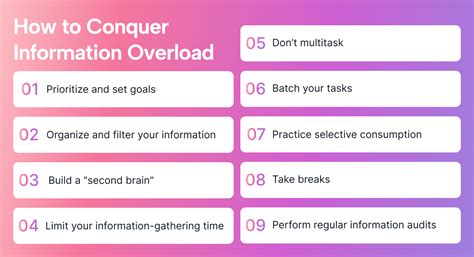
Before you can filter effectively, you need to understand what ‘essential’ means to you. Are you primarily interested in competitive esports updates for a specific title? Do you only care about news for RPGs or a particular console platform? Are you a PC gamer focused on hardware and performance guides? Or perhaps you’re a casual player looking for fun new releases and beginner-friendly tips? Your personal gaming interests will dictate your filtering strategy.
Take a moment to list the games you actively play, the genres you love, the platforms you game on, and the types of content you seek (e.g., reviews, guides, patch notes, lore, competitive meta analysis). This clarity will be your compass in the vast gaming information sea.
Proven Strategies for Effective Filtering
Curate Your Sources
Not all news sources are created equal. Identify and bookmark a select few reputable websites, journalists, content creators, or official developer channels that consistently deliver high-quality, relevant information. Focus on sources known for accuracy, in-depth analysis, and minimal clickbait. Examples include:
- Official Developer & Publisher Channels: For critical updates, patch notes, and announcements.
- Established Gaming Websites: Known for their review integrity and comprehensive coverage (e.g., PC Gamer, IGN, Eurogamer, Gamespot – with discretion).
- Niche Blogs/Communities: Dedicated to specific games or genres that offer deep dives.
- Specific Journalists/Analysts: Those whose reporting you trust on platforms like Twitter or YouTube.
Leverage Technology
Smart tools can significantly reduce manual sifting.
- RSS Feeds & News Aggregators: Services like Feedly, Inoreader, or even Google News allow you to subscribe to specific websites’ RSS feeds or customize topics. You’ll get all new articles in one place, categorized, without visiting each site individually.
- Browser Extensions: Some extensions can highlight keywords or block unwanted content on pages.
- Customized Newsletters: Many major gaming sites offer newsletters. Subscribe to only those that offer summarized, relevant content without overwhelming your inbox.

Master Social Media
Social media platforms like Twitter, Reddit, and YouTube can be treasure troves or swamps of noise. To use them effectively:
- Follow Wisely: Only follow official game accounts, trusted journalists, and community managers.
- Create Lists: On Twitter, create private lists for ‘Essential Gaming News’ or ‘Developers’ to see a curated feed separate from your main timeline.
- Use Mute/Block Features: Don’t hesitate to mute keywords, accounts, or block users that consistently post irrelevant or toxic content.
- Curated Subreddits: For Reddit, subscribe only to highly moderated subreddits specific to your games or interests. Avoid general gaming subs if you’re looking for focused information.

Engage with Communities (Selectively)
Discord servers, forums, and online communities can be excellent for real-time discussions and finding answers. However, they can also be overwhelming. Join only a few, high-quality communities for your primary games or genres. Look for servers with active moderation and dedicated channels for news and updates.
Prioritize Guide Updates
For game guides and walkthroughs, focus on resources that update frequently with game patches:
- Official Game Wikis: Often maintained by the community and developers.
- Dedicated Guide Sites: Websites like Fandom wikis, Wowhead (for WoW), or specific build sites for competitive games.
- YouTube Guides: Follow specific content creators known for reliable, up-to-date build guides, gameplay tips, or exploit discoveries.
Building Your Personalized Gaming News Ecosystem
The most effective strategy combines several of these approaches. Start by identifying your core interests, then select a handful of trusted sources. Utilize RSS feeds or news aggregators to pull content from these sources into a single, manageable dashboard. Complement this with a curated social media list for real-time announcements and engage in specific community discords only for your most played games. Regularly review and refine your sources and tools – as your gaming habits evolve, so too should your news ecosystem.
Conclusion
Filtering essential gaming news and guide updates from the daily noise is not about avoiding information, but about optimizing its flow to serve your interests. By being intentional about your sources, leveraging technology, and actively curating your digital spaces, you can transform the overwhelming flood of gaming content into a manageable stream of valuable insights. This allows you to stay informed, enhance your gameplay, and truly enjoy the vibrant world of gaming without getting lost in the static.



