





Should I upgrade to an NVMe SSD for faster game loading times in my gaming PC?
Understanding NVMe and Its Promise for Gaming
For PC gamers, every millisecond counts, not just in-game but also during the tedious loading screens. The quest for faster load times often leads to examining storage solutions, with NVMe (Non-Volatile Memory Express) SSDs frequently positioned as the pinnacle of speed. NVMe technology, designed specifically for flash memory, leverages the PCIe interface to offer significantly higher theoretical bandwidth compared to the older SATA interface used by traditional HDDs and older SSDs. This promises blazing fast sequential read and write speeds, which sounds like a dream for loading massive game worlds.
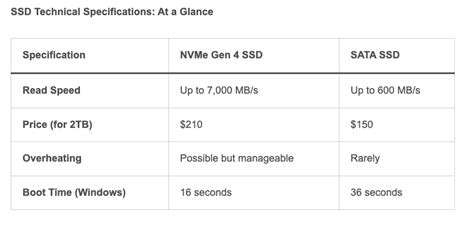
Traditional SATA SSDs, while a massive improvement over mechanical hard drives, are limited by the SATA III interface’s theoretical maximum of 600 MB/s. NVMe drives, depending on their PCIe generation and lane count, can push speeds well into the thousands of MB/s, with modern PCIe Gen 4 drives exceeding 7000 MB/s. On paper, this difference is astronomical, leading many gamers to wonder if an NVMe upgrade is the ultimate solution to banish loading screens forever.

NVMe vs. SATA SSD: Theoretical vs. Real-World Gaming Speed
While the theoretical speeds of NVMe SSDs are undeniably impressive, the actual impact on game loading times is a more nuanced discussion. Most games, even modern AAA titles, don’t typically load assets in massive, sequential blocks that fully saturate an NVMe drive’s potential. Instead, games often load a multitude of smaller files, textures, and data packets in a more random access pattern. In these scenarios, the latency and random read/write performance become more critical than peak sequential throughput.
SATA SSDs already excel at reducing latency and improving random access speeds compared to HDDs. When comparing a high-end SATA SSD to an NVMe SSD in real-world gaming tests, the difference in loading times is often much smaller than the theoretical bandwidth gap suggests. Benchmarks frequently show NVMe drives reducing load times by mere seconds, or even fractions of a second, over their SATA counterparts for most titles. The biggest gains are usually seen in games that are specifically optimized to take advantage of faster storage or in professional content creation tasks involving very large files.
The Actual Impact on Game Loading Times
Numerous tests conducted by tech reviewers and gaming publications consistently demonstrate that the jump from an HDD to a SATA SSD provides a monumental improvement in game loading times. However, the subsequent leap from a SATA SSD to an NVMe SSD typically offers diminishing returns for the average gamer. For many games, the difference might be so subtle that it’s imperceptible without a stopwatch.
There are exceptions, of course. Games with incredibly large open worlds and highly detailed assets, particularly those designed with next-generation console storage in mind (which also utilize NVMe-like technology), *might* show a more noticeable, albeit still usually small, improvement. Microsoft’s DirectStorage API, for example, is designed to leverage NVMe speeds directly by allowing the GPU to decompress game assets, bypassing the CPU and potentially reducing loading times significantly. However, widespread adoption and optimization for DirectStorage in PC games are still in their early stages.

Beyond Storage: Other Factors Influencing Load Times
It’s crucial to remember that storage speed is just one component in the complex equation of game loading times. Your system’s CPU, for instance, plays a significant role in decompressing game assets and processing data. A slower CPU can bottleneck even the fastest NVMe drive. Similarly, the amount and speed of your RAM can influence how quickly game data is accessed and managed, especially during asset streaming.
Game engine optimization is another critical factor. A poorly optimized game, regardless of your hardware, will likely still have longer loading times. Network speed and latency can also impact load times in online multiplayer games, as data needs to be fetched from servers. Therefore, focusing solely on storage speed might overlook other areas where performance gains could be found or where bottlenecks truly lie.
Is the Upgrade Worth It? Cost-Benefit Analysis
When deciding whether to upgrade to an NVMe SSD, a cost-benefit analysis is essential. While NVMe drives were once significantly more expensive than SATA SSDs, prices have become much more competitive, making them an attractive option for new builds or those replacing an older drive. However, if you already have a SATA SSD, the performance gain for gaming alone might not justify the cost of upgrading, especially if you’re on a tight budget.
- If you’re upgrading from an HDD: Moving to *any* SSD (SATA or NVMe) will be a revolutionary upgrade. If prices are similar, an NVMe is a great choice for future-proofing and overall system responsiveness.
- If you already have a SATA SSD: The gaming performance uplift to NVMe is generally marginal. Consider if the extra cost is better spent on a faster CPU, more RAM, or a better GPU, which will likely provide more tangible in-game performance benefits.
- For new builds or multi-purpose PCs: An NVMe SSD is highly recommended. The overall system responsiveness, faster boot times, and benefits for non-gaming tasks (like video editing or large file transfers) make it a worthwhile investment.
The Verdict: When to Go NVMe for Gaming
For the vast majority of gamers, an NVMe SSD will provide a noticeable boost in overall system responsiveness and boot times, making it an excellent choice for your operating system drive. However, when it comes to *strictly* faster game loading times compared to a SATA SSD, the gains are often minor and difficult to perceive without direct comparison. While the gap may narrow as more games adopt technologies like DirectStorage, SATA SSDs still offer excellent value and performance for gaming.
Ultimately, if you’re building a new PC or replacing an old HDD, an NVMe SSD is the recommended choice due to its competitive pricing and superior overall system performance. If you already have a SATA SSD, consider if the marginal gaming load time improvements justify the expense, or if other hardware upgrades would provide a more significant boost to your gaming experience.


