What’s the best gaming monitor for competitive FPS: high refresh rate vs. low response time?
The Eternal Dilemma for FPS Gamers
For competitive First-Person Shooter (FPS) players, every millisecond counts. The difference between a headshot and a missed opportunity often comes down to precise timing and clear visuals. When choosing a gaming monitor, two specifications frequently dominate the discussion: high refresh rate and low response time. Both are crucial, but understanding their individual impacts and how they interact is key to making the best decision for your competitive edge.
Understanding High Refresh Rate (Hz)
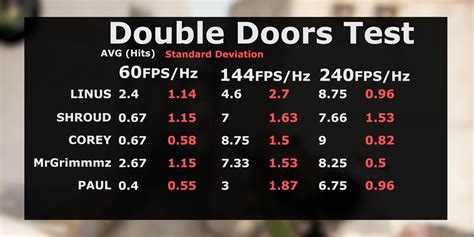
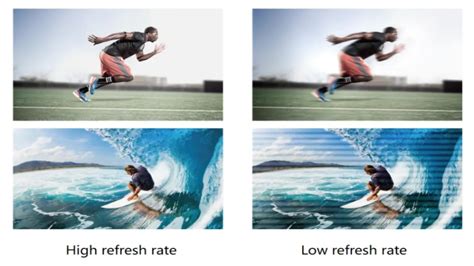
Refresh rate, measured in Hertz (Hz), indicates how many times per second your monitor can update the image displayed on the screen. A 144Hz monitor, for example, can display 144 frames per second, whereas a standard 60Hz monitor can only show 60. For competitive FPS, a higher refresh rate directly translates to smoother motion, reduced input lag, and a more up-to-date view of the game world.
In fast-paced shooters, targets move quickly, and even subtle changes in enemy position can be critical. A higher refresh rate provides more recent information to the player, allowing for quicker reaction times and better target tracking. This means less motion blur and a clearer picture of rapidly moving objects, which is invaluable for aiming and tracking opponents.
Understanding Low Response Time (ms)
Response time, measured in milliseconds (ms), refers to the time it takes for a pixel to change from one color to another, typically from black to white or from one shade of gray to another (GtG – Gray-to-Gray). A lower response time minimizes “ghosting” or “smearing” – the blurry trail left behind fast-moving objects on the screen. This phenomenon occurs when pixels don’t change colors fast enough to keep up with the action, leading to an unclear image.
For competitive FPS, a low response time (typically 1ms GtG is sought after) ensures that the image remains crisp and clear, even during rapid camera movements or when tracking fast-moving enemies. Without low response time, the visual clarity can suffer, making it harder to distinguish enemy models against the background, especially in chaotic gunfights.
The Synergy: Why Both are Important
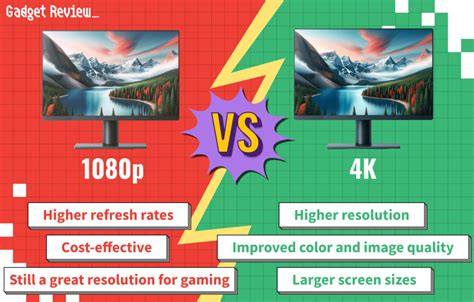
The truth is, neither high refresh rate nor low response time alone makes for the “best” competitive FPS monitor; they work in tandem. A high refresh rate ensures you see the most up-to-date frames, while a low response time ensures those frames are displayed with maximum clarity, free from motion artifacts. You could have a 240Hz monitor, but if its response time is poor, you might still experience ghosting, negating some of the refresh rate’s benefits. Conversely, a 1ms monitor with only 60Hz will be crisp but will show outdated information and feel less fluid.
Another related factor is input lag, which is the delay between your input (mouse click, keyboard press) and when that action registers on screen. While refresh rate and response time contribute to overall perceived lag, monitors with dedicated low input lag modes are often preferred. Modern gaming monitors usually optimize for all three.

Ideal Specifications for Competitive FPS Players
For the serious competitive FPS player, the consensus leans heavily towards a combination of both. Here’s what to look for:
- Refresh Rate: Aim for at least 144Hz. Many professional players now use 240Hz or even 360Hz monitors. The jump from 60Hz to 144Hz is profound; the difference between 144Hz and 240Hz is noticeable but less dramatic for most.
- Response Time: Target 1ms GtG. This is the gold standard for minimizing motion blur and ghosting.
- Panel Type: Historically, TN (Twisted Nematic) panels offered the fastest response times at the expense of color accuracy and viewing angles. However, modern IPS (In-Plane Switching) panels have significantly improved, often achieving 1ms GtG while providing superior color and viewing angles. OLED monitors are emerging as a premium option, offering virtually instantaneous pixel response and incredible contrast, though they come at a higher price point.
- Adaptive Sync: Look for NVIDIA G-Sync or AMD FreeSync compatibility. These technologies synchronize the monitor’s refresh rate with your GPU’s frame rate, eliminating screen tearing and stuttering without adding significant input lag.
The Verdict: Prioritizing Balance and Your Budget
Ultimately, the “best” gaming monitor for competitive FPS isn’t about choosing one over the other but finding the optimal balance. For the vast majority of competitive players, a monitor with at least 144Hz refresh rate and 1ms GtG response time provides a significant competitive advantage. If your budget allows, pushing for 240Hz with 1ms GtG IPS or even an OLED panel will offer the absolute pinnacle of performance.
Always consider your personal preferences and the specific games you play most frequently. While a 360Hz monitor is incredible, if your PC can only consistently push 150-200 FPS in your favorite titles, you might not fully utilize its potential. Invest in a monitor that your system can adequately drive, ensuring you get the most out of both crucial specifications for an uncompromising competitive experience.