





How can I customize alerts for critical game updates and new gaming guide releases?

Never Miss a Beat: Customizing Your Gaming Alerts
For dedicated gamers, staying on top of critical game updates, balance changes, and the release of new comprehensive guides is crucial. Missing a major patch can put you at a disadvantage, while an overlooked guide could hold the key to conquering a challenging boss. Fortunately, a variety of methods allow you to customize your alert system, ensuring you receive the information that matters most, exactly when you need it.

Leveraging Official Platforms and Launchers
The most straightforward way to get alerts is often directly from the platforms you use to play.
PC Platforms: Steam, Epic Games Store, and More
PC gaming clients like Steam and the Epic Games Store offer robust notification settings. Within Steam, you can typically follow specific games, which may push news updates to your activity feed. For more direct alerts, check a game’s dedicated store page or community hub; many developers post news and updates there. Ensure your client’s general notification settings are configured to display updates for games in your library or wishlist. Epic Games Store also provides news feeds and email notifications for followed games.
Console Ecosystems: PlayStation, Xbox, and Nintendo
Console platforms also have built-in alert systems. On PlayStation and Xbox, you can often “follow” games or subscribe to official game channels, receiving updates directly to your console’s dashboard or companion app. Nintendo Switch’s news feed keeps you updated on titles you own or are interested in. Enable push notifications for these console apps on your mobile device for real-time alerts.
Connecting Through Developer & Publisher Channels
Going straight to the source can be incredibly effective for niche or highly anticipated releases.
Official Websites & Newsletters
Most game developers and publishers maintain official websites with dedicated news sections. Subscribing to their newsletters is a passive yet reliable way to receive email alerts about major patches, DLC releases, and new guides directly in your inbox. Check your spam folder regularly, and consider creating a separate email filter for these subscriptions.
Social Media & Forums
Following game developers, publishers, and even specific community managers on platforms like Twitter, Facebook, or Instagram can provide immediate, often informal, updates. Many use these channels for quick announcements, live Q&A sessions, and early peeks at upcoming content. Similarly, official game forums are excellent places for detailed patch notes and community discussions, often with RSS feeds you can subscribe to.

Leveraging Community-Driven Solutions
The gaming community is a powerhouse for real-time information and personalized alerts.
Discord Servers and Bots
Discord is a hub for gaming communities. Joining official or fan-run Discord servers for your favorite games can be invaluable. Many servers feature dedicated “news” or “announcements” channels. Furthermore, specialized Discord bots can be configured to pull information directly from developer RSS feeds, Twitter accounts, or even monitor specific websites for updates, pushing instant notifications to a designated channel or even directly to you.
Reddit Subreddits
Popular games almost always have active subreddits. Many dedicated fans or even developers post update notes, guide releases, and important discussions there. While Reddit’s native notification system isn’t always the most robust for specific types of alerts, third-party tools or even IFTTT (If This Then That) recipes can be set up to monitor specific keywords or posts on subreddits and send you alerts.
Exploring Third-Party Tools and Aggregators
For a more centralized approach, consider services designed to aggregate gaming news.
Gaming News Websites & RSS Feeds
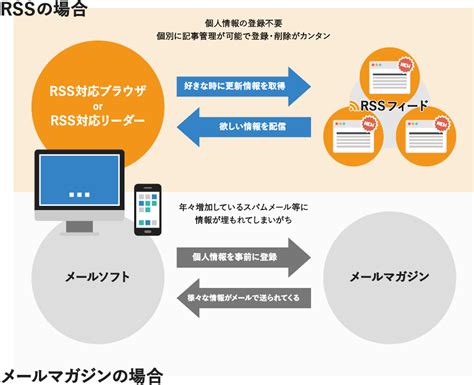
Many prominent gaming news websites (IGN, PC Gamer, Gamespot, etc.) offer RSS feeds for their news categories or even specific games. By using an RSS reader, you can consolidate news from multiple sources into one feed, receiving alerts when new articles or guides are published. Some sites also offer email newsletters for daily or weekly roundups.
Dedicated Alert Apps
Several mobile and web applications specialize in tracking game releases, updates, and news. Apps like Gametracker, or even more general news aggregators like Feedly (with custom RSS subscriptions), can be tailored to notify you about specific titles or genres. Explore your app store for “game update tracker” or “gaming news app” to find tools that suit your needs.
Stay Ahead of the Game
Customizing your alerts for critical game updates and new gaming guide releases doesn’t have to be a complicated endeavor. By combining official platform settings, developer communications, active community channels, and intelligent third-party tools, you can build a robust notification system. This ensures you’re always informed, allowing you to dive back into your favorite games with the latest knowledge and never miss a crucial moment in the ever-evolving world of gaming.



