
How do I optimize Windows and GPU settings for maximum FPS in competitive PC games?
Achieve peak performance in competitive PC games by fine-tuning Windows and GPU settings for maximum Frames Per Second (FPS) and reduced input lag.
News, Guides, and Everything Gaming.







Achieve peak performance in competitive PC games by fine-tuning Windows and GPU settings for maximum Frames Per Second (FPS) and reduced input lag.

Effectively maintaining gaming guides for ongoing patches and DLC without resorting to complete rewrites requires strategic planning, modular content design, and efficient update processes.

Learn how to diagnose the causes of low FPS in new games, identify GPU bottlenecks, and optimize your graphics settings for a smoother gaming experience.
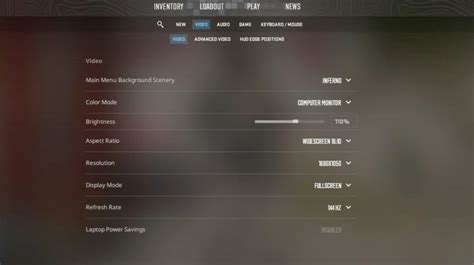
Discover how to fine-tune your game settings and system configurations to achieve maximum frames per second (FPS) on your mid-range gaming PC without compromising too much on visual fidelity.

Learn how to create gaming guides that offer precise, spoiler-free solutions and quick answers, respecting player discovery while efficiently overcoming in-game challenges.

Discover effective strategies and reliable sources for quickly accessing crucial game patch notes and release announcements without encountering unwanted story or gameplay spoilers.

Navigating the world of game mods requires vigilance to protect your system from unsafe files and your experience from hostile online communities.

This article explores effective strategies for reviewers to update their gaming critiques, ensuring they accurately reflect a game’s state after significant post-launch patches and content additions.

Navigate the unpredictable waters of solo queue with an effective support build, focusing on disruption and utility to turn the tide against the current meta’s prevalent threats and ensure your team’s success.
Navigating the world of gaming news to stay informed about your favorite titles without encountering unwanted spoilers requires a strategic approach, focusing on official channels and personal precautions.