





Best practices for effective mod bug reporting & community feedback?
The Cornerstone of Thriving Modding Communities
Modding has transformed countless games, extending their lifespans and enriching player experiences with innovative features, new content, and quality-of-life improvements. However, behind every successful mod lies the painstaking work of its creators, often volunteers. For these creators to continue their work effectively, they rely heavily on accurate bug reports and constructive community feedback. Without a streamlined, respectful, and informative reporting process, issues can fester, developers can become overwhelmed, and the modding ecosystem can suffer. This article outlines best practices for both reporting bugs and providing feedback, ensuring a healthier and more productive interaction between players and modders.
Mastering Mod Bug Reporting
Effective bug reporting is an art that directly contributes to quicker fixes and more stable mods. Here’s how to do it right:
1. Check Before You Report
- Search Existing Reports: Before creating a new report, search the mod’s official bug tracker (e.g., GitHub Issues, Nexus Mods bug section, dedicated forum) to see if the issue has already been reported. Duplicate reports clog up the system and waste developer time.
- Read FAQs and Known Issues: Many mod authors maintain FAQs or a list of known issues. Consult these first, as your problem might already have a solution or be a recognized limitation.
2. Provide a Clear and Concise Title
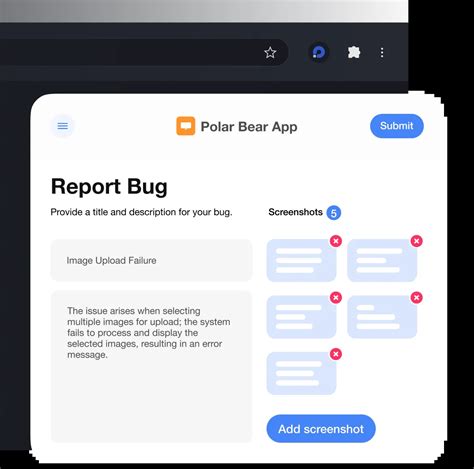
The title is the first thing a mod author sees. Make it informative and to the point. Instead of “Mod Broken,” use something like “CTD when opening inventory with X item” or “NPC pathfinding issue in Y area.”
3. Detail Steps to Reproduce
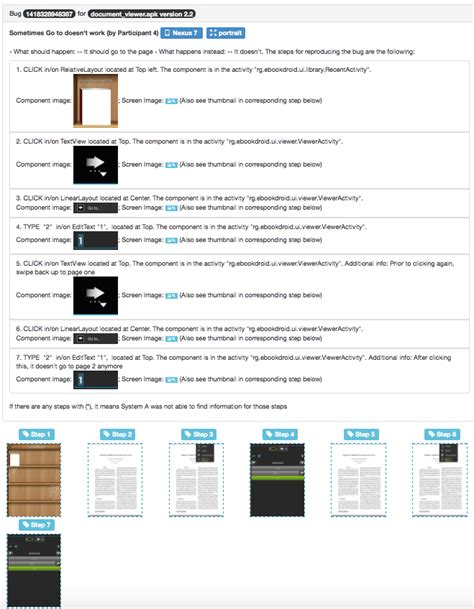
This is arguably the most crucial part. A mod author cannot fix a bug if they can’t reliably make it happen themselves. Provide a numbered list of exact steps:
- Start a new game/Load save game X.
- Go to location Y.
- Perform action Z (e.g., “equip item A,” “talk to NPC B,” “cast spell C”).
- Observe unexpected behavior.
Be as specific as possible. If it only happens sometimes, mention that too, and note any conditions that seem to trigger it.

4. Include Environment Information
Mods don’t exist in a vacuum. Their behavior can be influenced by many factors:
- Game Version: State the exact version of the game you are running.
- Mod Version: Specify the exact version of the mod causing the issue.
- Mod List/Load Order: Provide a complete list of all other mods you are running, preferably with your load order. Tools like Mod Organizer 2 or Vortex often have features to export this.
- Hardware/OS: Briefly list your operating system (e.g., Windows 10, Linux) and relevant hardware (CPU, GPU, RAM) if the bug seems performance-related or system-specific.
5. Attach Relevant Evidence (Screenshots, Videos, Logs)
- Screenshots: If the bug is visual, a screenshot is invaluable. Highlight the issue if necessary.
- Videos: For complex or timing-sensitive bugs, a short video clip can be incredibly helpful.
- Log Files: Crash logs, error logs, or console output are often goldmines for developers. Learn where your game or mod stores these and attach them (or relevant snippets) to your report. Do not paste entire massive log files directly into a text field; use a pastebin service if it’s too large.

Delivering Constructive Community Feedback
Feedback isn’t just about bugs; it’s about suggestions, criticisms, and praise. Done correctly, it helps mods evolve and improve.
1. Be Specific and Actionable
Instead of “This feature is bad,” try “I find feature X confusing because it lacks a clear tutorial, and perhaps a tooltip explaining Y would help.” Focus on the ‘what’ and ‘why,’ and ideally, offer a ‘how to improve.’
2. Keep it Respectful and Empathetic
Remember that mod authors are often hobbyists. Frame your feedback respectfully. Avoid demanding tones, personal attacks, or aggressive language. “I think it would be great if…” is much better than “You need to add…”
3. Differentiate Between Bug, Suggestion, and Personal Preference
- Bug: Something broken or not working as intended.
- Suggestion: An idea for a new feature or improvement.
- Personal Preference: Something you don’t like, but isn’t necessarily a flaw (e.g., “I don’t like the color scheme”). Mod authors may or may not act on these.

4. Offer Positive Reinforcement
Don’t just report problems! If you love a mod or a specific feature, let the author know. Positive feedback is incredibly motivating and helps modders understand what aspects of their work are most appreciated.
5. Use Appropriate Channels
Most mod authors specify their preferred feedback channels (e.g., dedicated forum threads, Discord servers, GitHub discussions). Respect these channels rather than sending private messages for general feedback or bug reports.

For Mod Authors: Fostering Better Communication
While this article focuses on the user’s role, mod authors also have a part to play in fostering effective communication:
- Provide Clear Guidelines: Clearly state your preferred reporting format, what information you need, and where to post it.
- Create Templates: A bug report template can significantly improve the quality of user submissions.
- Engage Respectfully: Even if a report is poorly formatted, try to guide the user towards better practices rather than dismissing them.
- Update Status: Let users know when a bug is acknowledged, being worked on, or fixed.
Conclusion
Effective bug reporting and constructive community feedback are the lifeblood of any vibrant modding scene. By adhering to these best practices, players can significantly contribute to the stability, growth, and overall quality of their favorite mods. This collaborative effort ensures that mod authors can dedicate their time to creating and refining, rather than sifting through ambiguous reports, ultimately leading to a more enjoyable experience for everyone involved in the incredible world of game modding.

