





Gaming PC airflow: intake vs. exhaust fan setup explained?
Why PC Airflow Matters for Gamers
In the high-stakes world of PC gaming, performance is paramount. Modern components like powerful CPUs and GPUs generate a significant amount of heat, especially under heavy load. If this heat isn’t effectively managed, it can lead to thermal throttling, where your components automatically reduce their speed to prevent overheating, resulting in noticeable dips in frame rates and overall system instability.
Beyond performance, proper airflow is vital for the longevity of your hardware. Prolonged exposure to high temperatures can degrade components over time, shortening their lifespan and potentially leading to costly replacements. A well-optimized airflow system ensures cool air reaches critical components and hot air is efficiently expelled, maintaining optimal operating temperatures.

Understanding the Basics: Hot Air Rises
The fundamental principle behind PC airflow relies on basic physics: hot air rises. This natural convection dictates that hot air inside your PC case will want to move upwards. An effective cooling setup leverages this by drawing in cool, fresh air from the bottom or front of the case and expelling hot air from the top or rear.
The goal is to create a clear, unimpeded path for air to flow through your system, picking up heat from components as it passes and then being exhausted. This continuous cycle prevents heat from building up and creating hot spots within the chassis.
Intake Fans: Bringing in the Cool Air
Purpose and Placement
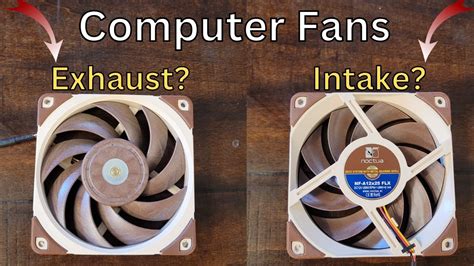
Intake fans are responsible for drawing cooler ambient air from outside the PC case into the interior. This fresh air is critical for cooling components like your CPU, GPU, and motherboard VRMs. They are typically located at the front of the case, pushing air directly over hard drives and towards the main components, or at the bottom, providing cool air directly to the GPU.
Positive Pressure Explained
A setup with more intake airflow than exhaust airflow creates a state of “positive pressure” within your PC case. In this scenario, the internal air pressure is slightly higher than the external pressure. This excess air is forced out through any unsealed gaps or openings in the case, which significantly helps in preventing dust from entering through those unmonitored routes. Dust, a notorious enemy of PC performance and longevity, is largely kept at bay, making positive pressure a favored setup for many.
Exhaust Fans: Pushing Out the Heat
Purpose and Placement
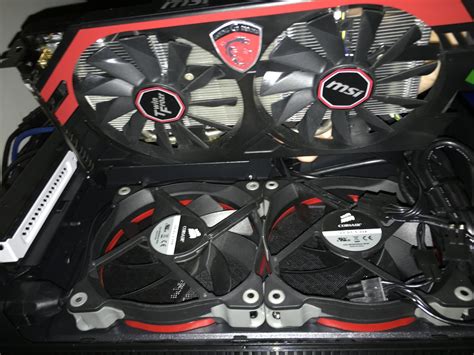
Exhaust fans perform the equally critical task of expelling the hot air that has accumulated inside your PC case. As components heat up the air, these fans push that warm air out, making way for the cool air brought in by the intake fans. Common placements for exhaust fans include the rear of the case, often next to the CPU, and at the top of the case, taking advantage of the natural tendency of hot air to rise.
Negative Pressure Explained
Conversely, a setup with more exhaust airflow than intake airflow results in “negative pressure.” Here, the internal air pressure is lower than the external pressure. This means that air will be drawn into the case not only through the intake fans but also through any available cracks, seams, or unfiltered openings. While effective at quickly removing hot air, a significant drawback of negative pressure is its susceptibility to dust ingress, as unfiltered air can carry dust directly into your system.
Finding the Balance: Positive vs. Negative vs. Neutral Pressure
The optimal airflow setup often lies in finding a balance between intake and exhaust, creating either a slightly positive or a nearly neutral pressure environment.
Positive Pressure (More Intake)
Pros: Excellent dust control, as air is consistently pushed out of all openings. Provides a steady supply of cool air directly over components, enhancing cooling efficiency. Generally recommended for most users.
Cons: If not well-balanced, might slightly recirculate some hot air within the case if exhaust isn’t robust enough.
Negative Pressure (More Exhaust)
Pros: Very efficient at quickly removing hot air from the case, potentially useful in extremely hot environments or with particularly high-TDP components.
Cons: Significant dust buildup over time due to unfiltered air being sucked in through every crevice. Can lead to less direct cooling of specific components if intake is too weak.
Neutral Pressure (Balanced)
Achieving a perfectly neutral pressure (equal intake and exhaust) is difficult in practice due to varying fan speeds, obstacles, and case designs. The ideal often leans towards slightly positive to leverage dust control while ensuring efficient heat expulsion.
Optimal Fan Placement Strategies for Gaming PCs
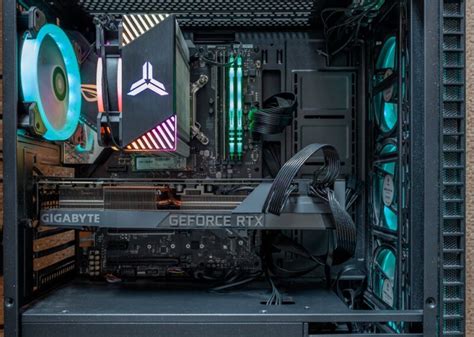
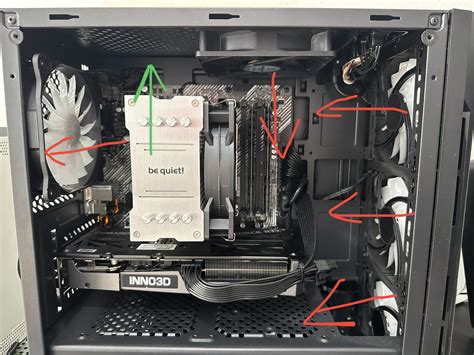
- Front: Always prioritize as intake. Most cases allow for 2-3 fans here, pushing cool air directly onto the CPU, GPU, and storage drives.
- Bottom: Ideal for intake, especially if your GPU needs more direct cool air. Some cases have dedicated bottom fan mounts.
- Rear: Primarily for exhaust. A single 120mm or 140mm fan here works wonders for expelling CPU-generated heat.
- Top: Excellent for exhaust, especially for liquid cooling radiators or multiple fans. Hot air naturally rises, making this a prime spot to vent heat out of the case.
Consider the airflow path. You want a relatively straight path from front-to-back or bottom-to-top. Obstructions like poor cable management can severely hinder efficiency.
Tips for Maximizing Your PC’s Airflow
- Cable Management: Route cables neatly behind the motherboard tray or out of the main airflow path to prevent turbulence and blockages.
- Dust Filters: Ensure all intake fan locations have dust filters and clean them regularly. This is crucial for maintaining positive pressure benefits.
- Fan Speed Curves: Utilize your motherboard’s BIOS or software (e.g., Fan Control) to set custom fan curves that adjust fan speeds based on component temperatures, providing cooling when needed and quiet operation otherwise.
- Case Choice: Opt for cases designed with good airflow in mind, often featuring mesh front panels and ample fan mounts.
- Regular Cleaning: Periodically clean out accumulated dust from inside your case, fans, and heatsinks to maintain peak performance.
Conclusion
Understanding the difference between intake and exhaust fans, and how they contribute to positive or negative pressure, is fundamental to optimizing your gaming PC’s cooling. A well-designed airflow system isn’t just about packing in as many fans as possible; it’s about creating an efficient path for air to travel, keeping your components cool, stable, and performing at their best for years to come. Experiment with different fan setups and monitor your temperatures to find the perfect balance for your specific hardware and case.


