





How can I set up custom gaming news feeds for specific titles & esports updates?

In the fast-paced world of gaming, staying updated with your favorite titles and competitive esports scenes can be a challenge. Generic news feeds often bombard you with irrelevant information. Fortunately, with a few smart strategies and tools, you can curate custom news feeds tailored precisely to your interests, ensuring you’re always in the loop for the games and esports you care about most.
Why Customize Your Gaming News?
Customizing your news feeds saves time and reduces information overload. Instead of sifting through countless articles and social media posts, you get direct access to the updates that matter to you. This includes patch notes, release date announcements, competitive match schedules, roster changes, and community events for specific games like League of Legends, Valorant, Call of Duty, or your favorite indie title. It transforms your news consumption from a chore into an efficient and enjoyable experience.
Leveraging RSS Feeds and Aggregators
RSS (Really Simple Syndication) feeds are the backbone of personalized news aggregation. Many gaming websites, official game portals, and esports organizations offer RSS feeds for their news sections. By subscribing to these feeds using an RSS reader, you can consolidate updates from various sources into a single, organized stream.
- Find RSS Feeds: Look for an RSS icon (often an orange square with a white dot and two curved lines) or a ‘Subscribe via RSS’ link on gaming websites. Many official game sites and major esports news sites offer them.
- Choose an RSS Reader: Popular options include Feedly, Inoreader, or even desktop applications like Outlook or Thunderbird. These services allow you to add multiple RSS feeds and organize them into categories for easy browsing.
- Set Up Custom Categories: Within your RSS reader, create categories for individual games, genres, or esports leagues (e.g., ‘Dota 2 News’, ‘FPS Esports’, ‘Indie Game Dev Updates’) and assign feeds accordingly.

Platform-Specific Solutions and Notifications
Beyond RSS, many platforms offer built-in ways to stay updated directly:
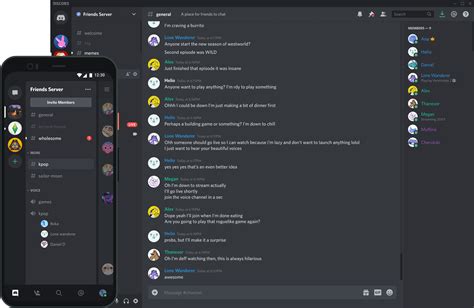
- Discord Servers: Join official game servers or community-run servers for your favorite titles and esports teams. Many have dedicated news channels that automatically pull updates from official sources. Configure your Discord notification settings to only get alerts from these specific channels.
- Twitter Lists: Create private or public Twitter lists of official game accounts, developers, esports organizations, players, and journalists. Monitoring these lists provides a curated feed without the noise of your main timeline. Enable notifications for key accounts if desired.
- Game Launchers: Platforms like Steam, Epic Games Store, Battle.net, and Riot Client often have dedicated news sections or community hubs for games you own. Follow games directly within these launchers to get patch notes and announcements.
Dedicated Gaming News Apps and Websites
Several specialized gaming news platforms offer customization features:
- Aggregators with Customization: Websites and apps like IGN, PC Gamer, and Eurogamer often allow you to select your favorite games or genres to prioritize content. While not as granular as RSS, they can be a good starting point.
- Esports-Specific Platforms: Websites like Liquipedia (for various esports), TheGamer, or Dot Esports focus heavily on competitive gaming. Many allow you to follow specific teams, players, or tournaments.
- Community Forums & Subreddits: For deep dives and community discussions, dedicated subreddits (e.g., r/leagueoflegends, r/globaloffensive) or official game forums are invaluable. Subscribe to specific threads or use Reddit’s custom feed feature to group relevant subreddits.

Following Esports Teams and Leagues
For dedicated esports fans, precision is key:
- Official League Websites: Websites for leagues like LEC, LCS, OWL, CDL, VCT, or BLAST Premier provide schedules, results, and news. Many offer email newsletters or integrate with calendar apps.
- Team Social Media: Follow individual teams on Twitter, Instagram, and YouTube. Teams are often the first to announce roster changes, sponsorships, and player interviews.
- Esports Casters & Analysts: Many influential personalities in esports share breaking news and analysis. Following them can provide timely insights.

Advanced Tips for Power Users
If you want to take customization to the next level, consider:
- IFTTT (If This Then That) or Zapier: These automation services can connect various platforms. For example, you could set up a recipe to automatically post new articles from a specific RSS feed to a private Discord channel or get an email notification when a specific keyword appears on a gaming news site.
- Google Alerts: Set up Google Alerts for specific game titles, developer names, or esports events. You’ll receive email notifications whenever new content matching your keywords appears on the web.
- Browser Extensions: Some browser extensions can enhance your news consumption by highlighting keywords or filtering content based on your preferences.

Conclusion
Setting up custom gaming news feeds requires a bit of initial effort, but the payoff is immense. By strategically utilizing RSS feeds, social media lists, Discord servers, and dedicated platforms, you can craft a personalized news experience that keeps you perfectly informed about your favorite game titles and the dynamic world of esports. Dive in, experiment with the tools available, and transform your gaming news consumption into a streamlined, enjoyable process.



