How do gamers best identify and avoid unsafe mods and toxic modding communities?
Game modifications, or ‘mods,’ can drastically enhance a gaming experience, adding new content, improving graphics, or even creating entirely new gameplay loops. However, the open nature of modding also presents risks, from malicious software to hostile community environments. Staying safe requires a combination of technical awareness and social intelligence.
Identifying and Avoiding Unsafe Mods
The lure of custom content often overshadows potential dangers. Unsafe mods can harbor malware, introduce severe stability issues, corrupt save files, or even compromise your system’s security. Vigilance is paramount when sourcing and installing new modifications.
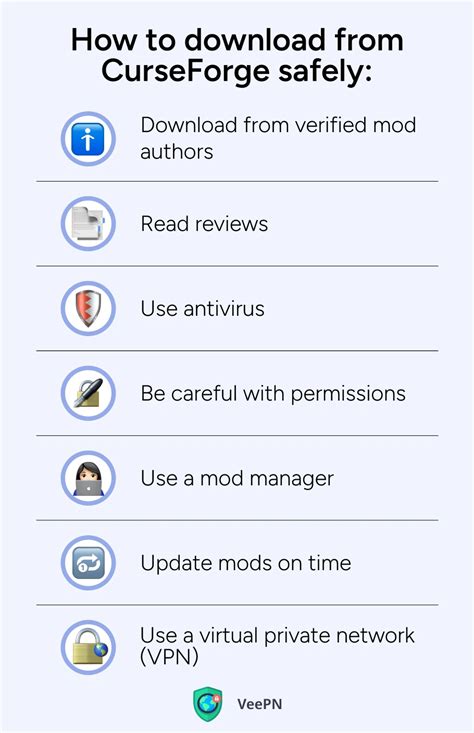
- Verify Reputable Sources: Always download mods from well-established and trusted platforms such as Nexus Mods, ModDB, official game forums, or developer-sanctioned marketplaces. Avoid obscure, untrustworthy links found on random websites or unverified forums.
- Research Author Reputation: Before downloading, research the mod author. Do they have a history of creating safe, well-maintained mods? Look for consistent updates, positive community interaction, and a portfolio of reliable work.
- Check User Reviews and Endorsements: Pay close attention to user comments, bug reports, and endorsement ratios. A mod with many unresolved issues, negative feedback, or suspicious reports from other users is a major red flag.

- Perform Security Scans: Downloaded mod archives should always be scanned with up-to-date antivirus software. For executable files or scripts, consider using online multi-engine scanners like VirusTotal for a comprehensive analysis before running them.
- Read Documentation Thoroughly: Reputable mods typically come with clear installation instructions, compatibility notes, and lists of known issues. A lack of documentation or poorly written instructions can indicate a rushed, incomplete, or potentially problematic mod.
- Consider Sandbox Environments: For highly suspicious or critical mods, consider testing them in a virtual machine or a sandbox environment. This isolates potential threats from your main operating system and game installation.
Navigating and Avoiding Toxic Modding Communities
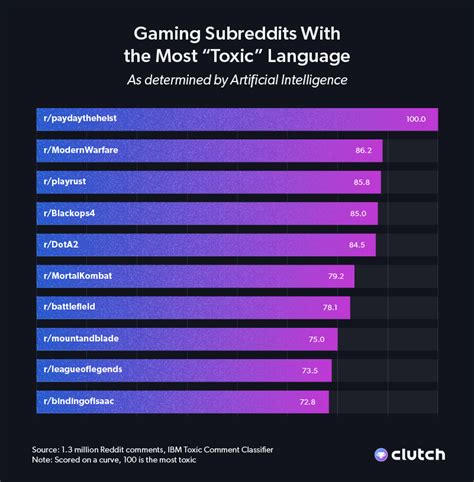
Beyond technical risks, the human element of modding communities can be just as challenging. Toxic environments can quickly drain your enjoyment, discourage participation, and turn a hobby into a source of frustration.

- Observe Before Engaging: Spend time reading forum posts, Discord chats, or comment sections before actively participating. Notice the general tone, how members interact, and how moderators handle disputes. This passive observation can reveal a lot about the community’s culture.
- Look for Clear Guidelines and Active Moderation: Healthy communities have well-defined rules of conduct and active, fair moderation. A lack of clear rules, or inconsistent enforcement, often leads to chaos and a breeding ground for toxicity.
- Identify Red Flags: Be wary of communities exhibiting excessive gatekeeping, personal attacks, constant negativity, discriminatory language, or a general unwelcoming atmosphere towards newcomers or differing opinions.

- Prioritize Support and Collaboration: Seek out communities where members genuinely help each other, share knowledge, celebrate creative contributions, and engage in constructive criticism rather than tearing others down.
- Do Not Tolerate Harassment: If you encounter harassment, bullying, or outright abuse, utilize reporting features, block the offending users, and disengage immediately. Your mental well-being and enjoyment of the hobby are paramount.
Proactive Steps for a Safer Modding Experience
Combining technical scrutiny with social awareness will significantly enhance your modding journey, ensuring it remains fun and secure.

- Backup Everything: Always back up your game saves, configuration files, and even your entire game directory before installing any major mod or overhaul.
- Use Mod Managers: For games with extensive modding scenes, use a dedicated mod manager (e.g., Mod Organizer 2, Vortex). These tools simplify installation, uninstallation, conflict resolution, and create isolated mod profiles, minimizing risk to your base game.
- Stay Informed: Keep an eye on community warnings, security alerts, and official updates related to popular mods or modding tools you use.
Modding offers incredible depth and replayability to gaming, but it requires smart choices and a degree of caution. By being discerning about your mod sources and the communities you engage with, gamers can enjoy a richer, safer, and more fulfilling modding experience without falling victim to digital threats or online toxicity.