





How do I filter essential PS5 game updates from daily gaming news overload?

For PlayStation 5 owners, staying informed about the latest game updates, patches, and crucial announcements can feel like an impossible task. The gaming world is a non-stop torrent of news — from new game reveals and sales events to esports results and industry gossip. Sifting through this daily deluge to find the truly essential PS5-specific information you need to optimize your gaming experience requires a strategic approach.
The Challenge of Gaming News Overload
Every day, countless articles, videos, and social media posts flood our feeds. While much of it is entertaining, it can quickly overshadow the vital updates that impact your actual playtime, such as significant bug fixes, new features for your favorite games, or critical system software updates. The goal isn’t to disconnect entirely, but rather to establish an efficient system for filtering out the noise and zeroing in on what truly matters for your PS5.

Prioritize Official Channels First
The most reliable and direct source for essential PS5 updates will always be the official channels. Cut out the middleman and go straight to the source for undisputed facts.
PlayStation Blog & Official Website
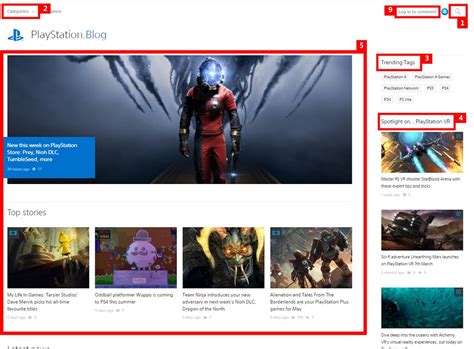
Sony’s PlayStation Blog is a goldmine for PS5 system updates, major game announcements, and in-depth details on upcoming patches directly from the source. Similarly, the official PlayStation website often hosts support articles and patch notes.
Game Developer & Publisher Channels
For updates specific to individual games, follow the official developers and publishers. Most studios have dedicated news sections on their websites, active Twitter/X accounts, or Discord servers where they post patch notes, maintenance schedules, and new content drops well before they hit broader gaming news outlets.
Curate Your News Sources Wisely
Beyond official channels, a select few reputable gaming news outlets can provide valuable context and analysis without the fluff. The key is quality over quantity.
Reputable Gaming Websites
Identify 2-3 trusted gaming news sites known for their accurate reporting and focus on platform-specific news. Sites like IGN, Eurogamer, or Push Square often have dedicated PlayStation sections. Avoid sites known for clickbait or excessive speculation.
RSS Feeds and News Aggregators
Utilize RSS feed readers (like Feedly or Inoreader) to subscribe directly to the news feeds of your chosen official and reputable sources. This pulls updates into one centralized place, letting you scan headlines quickly. Some news apps also allow you to filter by platform or topic.

Master Social Media Filtering
Social media can be a double-edged sword, but with the right techniques, it can be a powerful tool for relevant updates.
Follow Key Accounts
Follow PlayStation’s official accounts (e.g., @PlayStation, @AskPlayStation for support), major game developers, and a handful of respected gaming journalists or influencers who consistently provide factual PS5 news.
Utilize Mute & Keyword Filters
Most social media platforms allow you to mute specific words, phrases, or even accounts. Use this to filter out topics you don’t care about (e.g., “esports results,” “console war,” “rumors”) to keep your feed cleaner and more focused on PS5 updates.
Dedicated Gaming Communities & Tools
Leveraging community-driven platforms can also be highly effective for peer-vetted information.
Subreddits & Forums
Join active PS5-specific subreddits (e.g., r/PS5, r/PlayStation) or official game forums. Enthusiastic communities often share essential updates, patch notes, and discussions as soon as they drop, often with helpful context or analyses.
Set Up Google Alerts
For specific games or topics, create Google Alerts for terms like “PS5 [Game Name] update,” “PlayStation 5 firmware patch,” or “PS5 bug fix.” This sends email notifications when new content matching your keywords is published.

Conclusion: Take Control of Your Gaming News
While the stream of gaming news is endless, filtering essential PS5 game updates doesn’t have to be a chore. By prioritizing official sources, curating your news outlets, wisely managing social media, and utilizing community tools, you can dramatically reduce information overload. This focused approach ensures you stay informed about what truly impacts your PlayStation 5 experience, allowing you to spend less time sifting through noise and more time enjoying your games.



