How do I fix common mod conflicts in Skyrim for stable gameplay?

Navigating the Treacherous Waters of Skyrim Mod Conflicts
Skyrim’s enduring popularity is largely thanks to its vibrant modding community, which constantly introduces new content, mechanics, and visual enhancements. However, the sheer volume and complexity of these modifications often lead to an inevitable challenge: mod conflicts. These conflicts can range from minor visual glitches to game-breaking crashes, making stable gameplay a distant dream. Understanding how to identify, prevent, and resolve these issues is crucial for any aspiring Dragonborn looking to truly customize their experience.
Understanding the Root Causes of Conflict
Mod conflicts arise when two or more mods attempt to change the same game record, asset, or script. This could be anything from a simple mesh or texture file to more complex data like leveled lists, quest stages, or NPC attributes. Without proper resolution, the game engine struggles to decide which change to prioritize, often leading to unexpected behavior or outright crashes. Recognizing the different types of conflicts—file overwrites, plugin conflicts, and script conflicts—is the first step towards a stable mod setup.
The Indispensable Role of Load Order Optimization
The foundation of a stable modded Skyrim lies in an optimized load order. This refers to the sequence in which your game loads its plugin files (.esp, .esm, .esl). When multiple plugins modify the same record, the one loaded last “wins” and its changes are applied. Manually sorting hundreds of plugins is impractical and prone to errors. This is where a tool like LOOT (Load Order Optimization Tool) becomes invaluable.
LOOT automatically sorts your plugins according to a vast, community-maintained masterlist, providing a highly optimized baseline load order. It also identifies potential issues, such as dirty plugins (plugins with deleted references or unintentional changes that can cause instability) and missing masters. Running LOOT regularly, especially after installing new mods, is a non-negotiable step in conflict resolution.
Crafting Patches for Seamless Integration
While LOOT provides an excellent load order, it doesn’t resolve all conflicts, particularly those involving leveled lists or more intricate record merges. For these, you’ll need specialized patching tools:
- Wrye Bash (Bashed Patches): Essential for merging leveled lists (items, spells, NPCs that appear in the game world) from multiple mods into a single plugin. This prevents issues where one mod’s additions overwrite another’s. A Bashed Patch can also merge simple plugins, reduce plugin count, and apply certain fixes.
- Mator Smash (Smashed Patches): A more advanced patching tool that intelligently merges a wider range of record types than Wrye Bash, often leading to more comprehensive conflict resolution, especially for complex overhauls.
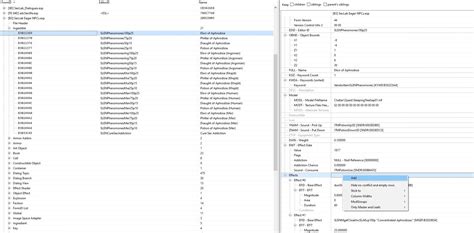
- SSEEdit/xEdit: The ultimate tool for manual conflict resolution. SSEEdit (or xEdit for older Skyrim versions) allows you to open all your plugins and visually inspect conflicts at the record level. You can see exactly which mods are changing what, and then create a “patch” plugin to forward desired changes, resolve specific conflicts, or revert unintended alterations. This requires a deeper understanding but offers unparalleled control.
Effective Mod Management and Installation Practices
A robust mod manager is your control center for a stable modding experience. Tools like Mod Organizer 2 (MO2) or Vortex are highly recommended for their ability to manage mod installations cleanly and non-destructively:
- Virtual File System: Both MO2 and Vortex utilize a virtual file system, meaning mods are installed into separate folders and only linked to your game directory when you launch the game through the manager. This prevents “mod-rot” in your game folder and makes troubleshooting significantly easier, as you can easily enable/disable mods or change their overwrite order without altering your core game files.
- Profile Management: These managers allow you to create different mod profiles, enabling you to experiment with various mod setups without affecting your primary game.
Identifying and Isolating Problematic Mods
Even with the best tools, a crash might occur. When it does, systematic troubleshooting is key:
- Recreate the Crash: Note down exactly what you were doing, where you were, and what mods you recently installed.
- Check Crash Logs: If you have a crash logger installed (e.g., Net Script Framework for Skyrim SE), analyze its output. It often points directly to the problematic mod or missing asset.
- Disable in Halves: If no clear culprit emerges, disable half your recently installed mods and test. If the crash stops, the problem is in the disabled half; if it continues, it’s in the enabled half. Repeat this “binary search” until you isolate the offender.
- Read Mod Pages: Always check a mod’s description, requirements, compatibility section, and bug reports. Many common conflicts are already documented.
Best Practices for Stable Modding
To minimize conflicts and maximize stability:
- Install Mods Incrementally: Don’t install 50 mods at once. Add a few at a time, run LOOT, create your patches, and test for stability before adding more.
- Always Read Descriptions: This cannot be stressed enough. Mod authors often provide crucial compatibility notes and installation instructions.
- Back Up Your Saves: Before any major mod changes, back up your save files.
- Don’t Be Afraid to Start Fresh: Sometimes, an old save with too many mod changes can become unstable. A fresh save is often the best solution for complex troubleshooting.
Fixing mod conflicts in Skyrim is an art and a science, requiring patience and a methodical approach. By utilizing powerful tools like LOOT, Wrye Bash, SSEEdit, and a good mod manager, you can overcome most challenges and carve out your truly unique and stable adventure in Tamriel.