How do I identify trustworthy, high-quality mods for popular PC games to avoid issues?
Modding can dramatically enhance your PC gaming experience, from graphical overhauls to entirely new quests and mechanics. However, the world of user-created content also harbors potential risks, including unstable files, performance issues, and even malware. Identifying trustworthy, high-quality mods is crucial for a smooth and enjoyable experience. This guide will walk you through the key indicators to look for, helping you navigate the vast modding landscape safely.
Choose Reputable Modding Platforms
The first and most critical step is to download mods only from well-known, established platforms. These sites typically have moderation teams, robust review systems, and a history of hosting legitimate content. Avoid obscure forums or direct downloads from unfamiliar sources, as these are often unregulated and high-risk.
- Nexus Mods: Widely considered the largest and safest modding community for a vast array of games. It features strong moderation, a robust file scanner, and a comprehensive user review system.
- Steam Workshop: For games that integrate with it, the Steam Workshop is incredibly convenient and generally reliable. Valve’s platform provides easy installation and automatic updates, though quality can vary.
- ModDB / IndieDB: Excellent resources for older games, total conversions, and indie titles. They have a long history and strong community oversight.
- Official Developer Forums/Websites: Some game developers officially support modding and host mods directly or link to approved sources. These are typically the safest bet.
Scrutinize Community Feedback and Endorsements
One of the strongest indicators of a mod’s quality and safety is its community reception. Before downloading any mod, take time to review what other users are saying. Look beyond just the star rating.
- User Reviews and Comments: Read through the comments section. Are users reporting crashes, bugs, or malware? Are there consistent positive remarks about stability and features? Pay attention to recent comments, as older feedback might not reflect the current version.
- Endorsements and Downloads: A high number of endorsements (or similar positive indicators) and a large download count over time usually signal a popular and well-maintained mod. Very new mods with few downloads and no feedback should be approached with caution.
- Bug Reports and Support: Check if the mod author actively responds to bug reports and provides support in the comments or a dedicated forum. A responsive author indicates commitment to their project.
Evaluate the Mod Author’s Reputation
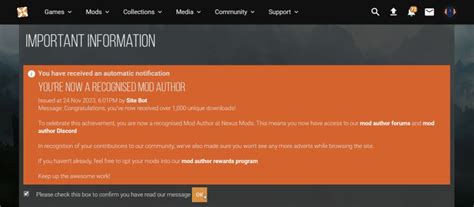
Just as you’d trust a reputable software developer, a mod author’s history and reputation are paramount. Seasoned modders often have a portfolio of well-received projects.
- Author Profile: On platforms like Nexus Mods, you can often view an author’s profile, listing their other mods, contribution history, and endorsements. A long history of well-maintained, popular mods is a great sign.
- Activity and Updates: Check the mod’s last update date. A mod that hasn’t been updated in years for a frequently patched game might be outdated and cause compatibility issues. However, simple mods for stable older games might not require frequent updates.
- Documentation: Does the author provide clear installation instructions, troubleshooting tips, and a description of what the mod does? Good documentation is a hallmark of a professional and reliable modder.
Examine Technical Details and Requirements
Before installing, always check the technical specifications and compatibility notes provided by the author. Ignoring these can lead to crashes and conflicts.
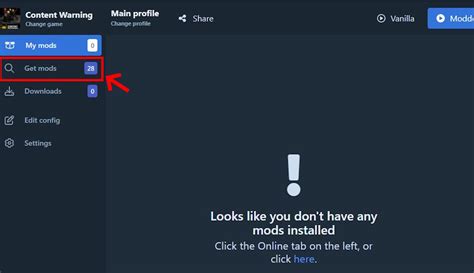
- Dependencies: Many mods require other mods or specific tools (e.g., script extenders, mod managers) to function. Ensure you have all prerequisites installed and updated.
- Compatibility: Does the mod conflict with other popular mods you use? Authors often list known incompatibilities. Tools like LOOT for Bethesda games can help manage load order and detect conflicts.
- Performance Impact: Some graphics-intensive mods can significantly impact frame rates. The author or community often provides information on potential performance hits.
Recognize Red Flags and Exercise Caution
While most modders are passionate enthusiasts, some bad actors exist. Be vigilant for warning signs.
- Lack of Information: Mods with vague descriptions, no screenshots, or minimal installation instructions are suspect.
- Brand New Accounts: Be wary of mods uploaded by brand new user accounts with no other activity or history, especially if the mod claims to be revolutionary.
- Demands for Personal Information: No legitimate mod should ever ask for your personal details or payment outside of official platform donation systems.
- Suspicious File Names/Types: Executable files (.exe) disguised as standard mod files (.zip, .rar, .7z) outside of legitimate installers are a major red flag. Always scan downloaded archives with antivirus software before extracting, especially if unsure.
- Aggressive Pop-ups or Ads: If a mod installer or associated tool generates excessive or suspicious pop-ups, immediately close and delete it.
Conclusion
Successfully navigating the world of PC game mods requires a combination of common sense, diligence, and reliance on community wisdom. By sticking to reputable platforms, scrutinizing community feedback, evaluating mod author credibility, and understanding technical requirements, you can largely avoid problematic mods. Always back up your game files before extensive modding, use a reliable mod manager, and when in doubt, err on the side of caution. Happy modding, and enjoy a vastly enhanced gaming experience!