





How do I responsibly report mod bugs to community developers?

The Importance of Responsible Bug Reporting
Community-made modifications (mods) enhance our gaming experiences in countless ways, from adding new content to improving performance. However, like any software, mods can have bugs. When you encounter one, your impulse might be to immediately alert the developer. But how you report a bug can significantly impact whether it gets fixed, how quickly, and the overall health of the modding community. Responsible bug reporting isn’t just about identifying a problem; it’s about providing actionable information in a respectful manner, transforming you from a frustrated user into a valuable contributor.
This guide will walk you through the steps to effectively and responsibly report mod bugs, ensuring your feedback is constructive and appreciated by the dedicated developers who bring these creations to life.
Before You Report: Essential Preparation
Before you even think about typing out a bug report, some crucial preliminary steps can save both you and the developer a lot of time and effort.
- Check if it’s a Known Issue: Many mods have dedicated forums, bug trackers (like GitHub Issues), or Discord channels where known bugs are listed. Search these resources first. It prevents duplicate reports and shows you’ve done your homework.
- Isolate the Problem: If you’re using multiple mods, try to determine which mod is causing the issue. This often involves disabling other mods one by one or in batches until the bug disappears or reappears. Testing with only the problematic mod (and its dependencies) enabled is ideal.
- Reproduce the Bug Consistently: Can you make the bug happen every time? Or under specific conditions? Understanding how to consistently trigger the bug is vital for the developer to diagnose and fix it.
- Gather All Relevant Information: This is arguably the most important step. Collect:
- Your game version.
- The exact version of the mod(s) in question.
- Your operating system and relevant hardware specs (if applicable).
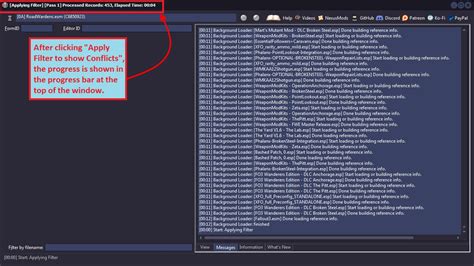
- Any error logs, crash logs, or console output generated by the game or mod (these are often in specific game folders).
- Screenshots or short video clips demonstrating the bug.
Crafting an Effective Bug Report
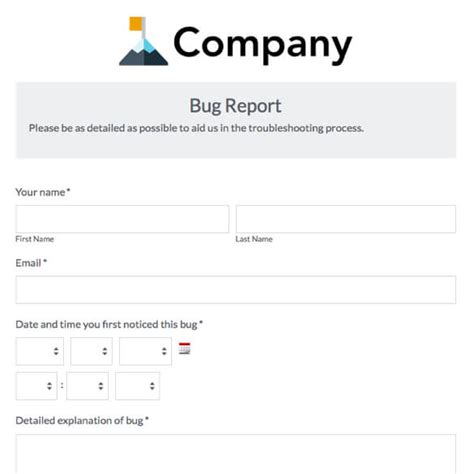
Once you’ve done your homework, it’s time to put together the report. A well-structured report is clear, concise, and comprehensive.
- Clear and Concise Title: Summarize the issue in a few words. Examples: “[Bug] Item X causes crash on use” or “[Visual Glitch] Texture missing on Y object in Z area.”
- Detailed Description: Explain the bug in full. What happened? Where did it happen? When did it start? Be objective and avoid emotional language.
- Steps to Reproduce: Provide a numbered list of steps a developer can follow to make the bug occur. Be as precise as possible. For example: “1. Open inventory. 2. Select Item A. 3. Click ‘Use’ button.”
- Expected vs. Actual Behavior: Clearly state what you expected to happen and what actually occurred. “Expected: Item A would be consumed, granting buff. Actual: Game crashed to desktop.”
- Include All Gathered Information: Attach or paste error logs, screenshots, and system information. If logs are very long, use a pastebin service (like Pastebin.com) and link it, rather than cluttering the report.
- Be Polite and Objective: Remember that mod developers are often volunteers working in their spare time. Aggressive or demanding language is demotivating and unlikely to get your issue addressed faster.

Where to Report: Choosing the Right Platform
Mods usually have a preferred method for bug reports. Respecting this preference is key.
- Official Mod Page/Forum Thread: Many mods have a dedicated page on sites like Nexus Mods, ModDB, or an official game forum. Look for a “Bugs,” “Support,” or “Issues” section.
- Dedicated Bug Tracker: For larger or more complex mods, developers might use platforms like GitHub Issues, GitLab Issues, or Trello. This is often the most organized way to report and track issues.
- Discord Server: Some developers prefer bug reports in a specific “bug-report” channel on their Discord server. Always check the server rules or pinned messages first. Do not DM developers directly unless explicitly invited to do so.
- Avoid General Chat or Comment Sections: While it might seem easy, general comment sections or chat channels are not ideal for bug reports as they can get lost quickly and are difficult for developers to track.

After Reporting: Patience and Follow-Up
Once you’ve submitted your report, the ball is in the developer’s court. Here’s how to manage your expectations and follow up responsibly:
- Be Patient: Developers are often working on multiple projects, have real-world commitments, and are doing this for passion, not profit. It might take time for them to see your report, reproduce the bug, and implement a fix.
- Avoid Spamming: Do not repeatedly post the same bug, send multiple messages, or demand updates. This is counterproductive and frustrating for developers.
- Provide Additional Information if Requested: If a developer asks for more details, respond promptly and provide as much assistance as you can. This shows your commitment to helping.
- Test Fixes: If a developer releases an update or a test build to address your bug, download it and test if the issue is resolved. Report back on your findings.
- Thank the Developer: If your bug is fixed, a simple thank you goes a long way. It acknowledges their hard work and reinforces positive community interaction.

Conclusion
Responsible bug reporting is a crucial aspect of a healthy modding community. By taking the time to prepare thoroughly, craft clear reports, use appropriate channels, and exercise patience, you contribute positively to the development process. You help developers identify and resolve issues more efficiently, ultimately leading to better, more stable mods for everyone. Remember, you’re not just reporting a bug; you’re collaborating with passionate creators to improve the games we all love.

