How do we optimize push notifications for urgent gaming news & patch updates?
The Critical Role of Timely Gaming Information
In the fast-paced world of online gaming, staying informed is paramount for players. Urgent gaming news – be it a surprise content drop, a limited-time event, server maintenance, or a critical patch update – can significantly impact a player’s experience and dedication. Push notifications are the most direct and effective channel to deliver this time-sensitive information. However, merely sending notifications isn’t enough; optimizing them is key to cutting through the noise, maintaining user engagement, and preventing opt-outs.
Understanding Urgency and Player Context
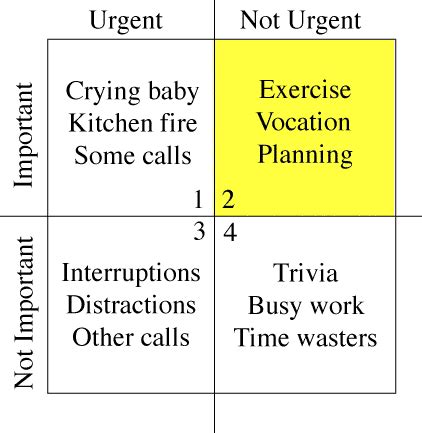
Before optimizing, define what constitutes ‘urgent’ for your player base. A major game-breaking bug fix might be critical for everyone, while a new cosmetic item might be urgent only for a segment of dedicated collectors. Context is everything. Players respond better to notifications that are relevant to their gameplay habits, preferred genres, or specific game titles. Employing robust analytics to understand player behavior, game progress, and in-game preferences is the foundation for effective optimization.
Segmentation and Personalization: The Power Duo
Generic broadcast messages are prone to being ignored. The true power of optimization lies in segmentation and personalization. Divide your player base into meaningful segments based on criteria such as:
- Game Activity: Active players, dormant users, new players.
- Game Progression: Early-game, mid-game, endgame players.
- Preferences: PvP enthusiasts, PvE players, social gamers, collectors.
- Platform/Region: Tailoring content to specific geographical or platform-specific needs.
Once segmented, personalize messages. A notification about a raid boss hotfix will resonate more with players actively engaging in raids than with casual players. Personalization extends beyond content; it includes using the player’s name (where appropriate) and referencing their in-game achievements or current status.
Optimal Timing and Frequency
Sending a notification at the wrong time can be as detrimental as sending irrelevant content. Timing should consider:
- Player’s Time Zone: Always deliver messages during active hours in their local time.
- Peak Playtime: Align urgent notifications with when players are most likely to be engaged or considering playing.
- Event Lifespan: For limited-time events, send reminders as the event nears its conclusion, but avoid spamming.
- Notification Fatigue: Excessive notifications lead to opt-outs. Establish a sensible frequency cap for each user segment.
Crafting Compelling Copy and Leveraging Rich Media
The text of your push notification must be concise, clear, and actionable. Get straight to the point and highlight the urgency and value. Use strong verbs and a sense of excitement or importance. For example, instead of “Update available,” try “Critical Patch Live: Fixes & Improvements!” or “New Limited-Time Event Starts NOW! Don’t Miss Out.”
Rich push notifications, which can include images, GIFs, or even short videos, can dramatically increase engagement. A visual representation of a new character, an event map, or a critical bug being fixed can convey more information and evoke stronger emotions than text alone. Ensure any rich media loads quickly and is optimized for mobile.

A/B Testing and Analytics: Continuous Improvement
Optimization is an ongoing process. Implement A/B testing for various elements of your push notifications:
- Copy Variants: Test different headlines and message bodies.
- Call-to-Action (CTA): Experiment with different buttons or phrases (e.g., “Play Now,” “Learn More,” “Update Game”).
- Timing: Test different send times within specific segments.
- Rich Media: Compare performance of text-only vs. rich media notifications.
Rigorously track metrics like open rates, click-through rates, in-app actions post-notification, and, crucially, opt-out rates. These analytics provide invaluable insights into what resonates with your audience and what leads to disengagement, allowing for continuous refinement of your strategy.
Empowering User Control and Preferences
Give players control over their notification experience. Allow them to customize the types of notifications they receive (e.g., only critical updates, no event alerts, or specific game modes). While this might seem counterintuitive to maximizing reach, it significantly reduces the likelihood of full opt-outs and fosters a sense of trust and respect with your player base. A player who receives only the notifications they truly value is a more engaged and loyal player.
Conclusion
Optimizing push notifications for urgent gaming news and patch updates is a multifaceted endeavor that goes beyond simply sending messages. It requires a deep understanding of your player base, strategic segmentation, precise timing, compelling content augmented by rich media, continuous A/B testing, and a commitment to respecting user preferences. By meticulously refining these elements, game developers and publishers can transform push notifications from a potential annoyance into an indispensable tool for enhancing player engagement, driving retention, and building a thriving game community.