





How to boost FPS in modern PC games for smoother gameplay?

Modern PC games demand increasingly powerful hardware, and maintaining a high frame rate (FPS) is crucial for an immersive and competitive gaming experience. Stuttering or low FPS can turn an epic adventure into a frustrating ordeal. Fortunately, there are numerous strategies, from simple software tweaks to significant hardware upgrades, that can help you achieve that coveted silky-smooth gameplay.
Understanding FPS and Why It Matters
Frame Rate Per Second (FPS) is the number of individual frames your graphics card renders and your monitor displays each second. Higher FPS translates directly to smoother, more responsive visuals, which is especially critical in fast-paced genres like first-person shooters or racing games. A consistent 60 FPS is often considered the baseline for a smooth experience, while 120 FPS or more offers a significant competitive edge on high refresh rate monitors.

Hardware Upgrades: The Foundation of Performance
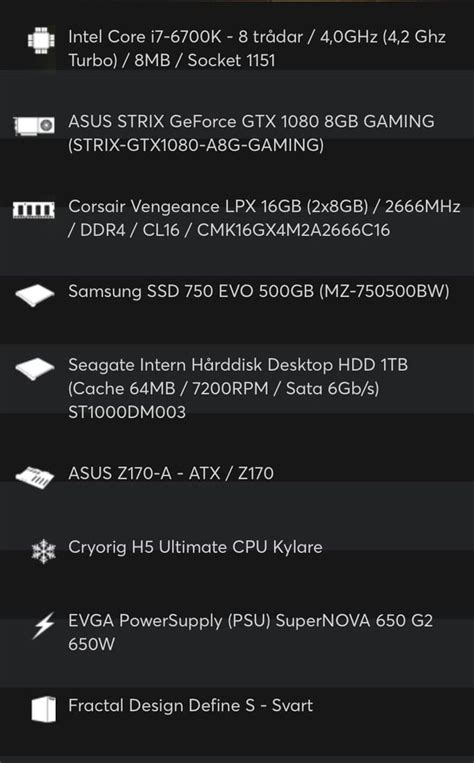
While software optimization can help, sometimes the bottleneck is purely hardware-related. Upgrading key components can provide the most significant FPS boost.
Graphics Card (GPU)
Your GPU is the single most important component for gaming performance. If you’re consistently seeing low FPS, a newer, more powerful graphics card is likely your best investment. Research modern GPUs that fit your budget and offer a significant performance leap over your current card. Remember to check compatibility with your motherboard and power supply.
Processor (CPU)
While the GPU handles most of the graphical heavy lifting, a strong CPU is essential for game logic, AI, physics, and feeding instructions to the GPU. An older or underpowered CPU can bottleneck even a high-end graphics card. For modern gaming, look for multi-core processors with good single-core performance.
RAM (Random Access Memory)
Most modern games recommend at least 16GB of RAM. While more than 16GB might not offer a massive FPS increase, having insufficient RAM will lead to stuttering and loading issues as your system struggles to keep game data readily available. Ensure your RAM speed is also optimized for your CPU (e.g., DDR4-3200 or DDR5-6000+).
SSD (Solid State Drive)
While an SSD doesn’t directly boost FPS, it dramatically improves load times for games and the operating system. This reduces waiting and makes the overall gaming experience much snappier. Install your OS and primary games on an NVMe or SATA SSD for best results.
Software Optimization: Unleash Hidden Potential
Once your hardware is in order, a host of software tweaks can further refine your gaming performance.
Keep Drivers Updated
This is paramount. Graphics card manufacturers (NVIDIA, AMD, Intel) frequently release new drivers that include performance optimizations and bug fixes for the latest games. Always download the newest stable drivers directly from their official websites. Don’t forget to update your chipset drivers as well.
Adjust In-Game Graphics Settings
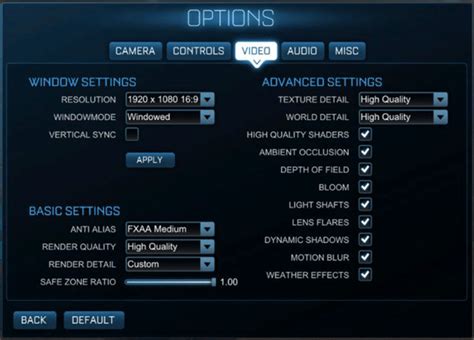
This is often the quickest way to gain FPS. Experiment with the following settings, prioritizing those that have the biggest impact:
- Resolution: Lowering this from 4K to 1440p or 1080p will offer a massive FPS boost.
- Texture Quality: Impacts VRAM usage. Reduce if you have less VRAM.
- Shadow Quality: Shadows are very demanding; lowering them significantly improves FPS.
- Anti-aliasing: Techniques like MSAA or TAA smooth jagged edges but are resource-intensive. Try lower settings or FXAA.
- View Distance/Draw Distance: Reducing this lessens the workload on your CPU and GPU.
- V-Sync: Synchronizes your FPS with your monitor’s refresh rate to prevent screen tearing. Disable it if you have G-Sync/FreeSync or if you prefer higher, uncapped FPS (though it might introduce tearing).
Optimize Operating System Settings
- Game Mode (Windows): Enable Windows Game Mode (Settings > Gaming > Game Mode) to prioritize gaming processes.
- Background Apps: Close unnecessary applications running in the background (web browsers, streaming apps, download clients) that consume CPU, RAM, or network resources.
- Power Plan: Set your Windows power plan to “High Performance” (or “Ultimate Performance” if available) to ensure your CPU isn’t throttled.
Overclocking (Advanced)
Overclocking your CPU and/or GPU can yield extra performance, but it comes with risks. It increases heat generation and can lead to system instability if not done carefully. Only attempt overclocking if you understand the process, have adequate cooling, and are prepared for potential issues. Use reputable software like MSI Afterburner for GPUs or your motherboard’s BIOS for CPUs.
System Maintenance: Keeping Your Rig Running Smoothly
A well-maintained PC is a happy PC, and a happy PC performs better.
Ensure Adequate Cooling
High temperatures cause components to throttle, reducing performance. Ensure your PC has good airflow, clean any dust filters, and consider upgrading your CPU cooler if temperatures are consistently high, especially after overclocking.
Dust Removal
Regularly clean the dust from your case fans, CPU cooler, and GPU heatsink using compressed air. Dust acts as an insulator, trapping heat and hindering performance.
Check Power Supply (PSU)
An underpowered or failing PSU can lead to system instability and performance issues. Ensure your PSU has enough wattage for your components, especially if you’ve upgraded your GPU.

Conclusion
Boosting FPS in modern PC games is a multi-faceted endeavor that combines smart hardware choices with diligent software optimization and regular system maintenance. By systematically addressing these areas, you can transform your gaming experience, achieving smoother visuals, more responsive controls, and ultimately, greater enjoyment from your favorite titles. Consistent vigilance and a willingness to tweak settings will ensure your gaming rig always performs at its peak.
![[Event + Review]: NIVEA Radiant & Smooth Body Serum - Stevie Wong](/images/aHR0cHM6Ly90czQubW0uYmluZy5uZXQvdGg/aWQ9T0lQLkU1M3ZtVmZJdUhRQzNSNUxKemdJRXdIYUU4JnBpZD0xNS4x.webp)


