How to find high-quality, safe game mods & avoid common pitfalls?

Game mods can profoundly transform your gaming experience, adding new content, improving graphics, or fixing issues that developers might have overlooked. However, the vibrant world of modding also harbors inherent risks, from game instability and compatibility nightmares to malicious software. This comprehensive guide will walk you through the essential steps to finding high-quality, safe game mods and avoiding common pitfalls, ensuring an enjoyable and secure modding journey.
The Allure of Game Mods
Game modifications offer an incredible way to extend a game’s lifespan and tailor it precisely to your preferences. From massive content expansions and quality-of-life improvements to purely cosmetic changes, mods empower players to shape their virtual worlds. This level of customization can breathe new life into beloved titles, providing countless additional hours of entertainment. Yet, unlocking this potential requires careful navigation through a landscape that isn’t always officially curated.
Where to Find High-Quality, Safe Mods
The first and most critical step to safe modding is choosing reputable sources. Prioritize platforms with established communities and robust moderation, and always be wary of random websites promising “free mods” without any clear backing.
- Official Modding Platforms & Hubs: Platforms like Steam Workshop are often integrated directly into games, offering a generally safer and sometimes curated environment. Nexus Mods is another colossal and highly respected hub, known for its extensive library, active community, thorough moderation, and well-organized mod pages. Many games also have dedicated, developer-supported modding portals or SDKs (Software Development Kits) that point to trusted resources.
- Developer-Recommended Sources: Always check if the game developers themselves recommend specific modding tools, websites, or communities. These are often the safest bet, as they align with the game’s architecture and are less likely to cause fundamental issues.
- Dedicated Game Forums & Subreddits: Official game forums and active subreddits (e.g., r/skyrimmods, r/falloutmods, r/stardewvalleymods) are excellent places to discover popular mods, read community reviews, and get advice on compatibility and installation. Mod authors often post updates and answer questions directly here, fostering transparency and trust.
How to Assess Mod Quality and Safety
Finding a reliable source is just the beginning; you still need to critically evaluate individual mods before installing them.
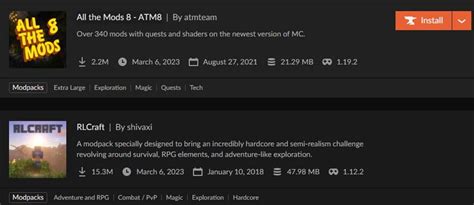
- Read Reviews and Comments: This is your primary defense. Pay close attention to feedback regarding bugs, crashes, performance issues, or any suspicious behavior. Mods with many positive, recent reviews and active discussions are generally a strong indicator of quality and safety.
- Check Update History & Date: A frequently updated mod indicates active developer support and responsiveness to bug fixes, game patches, and community feedback. Mods that haven’t been updated in years, especially for a continuously updated game, might cause significant compatibility issues.
- Examine Author Reputation: Does the mod author have other popular, well-received mods? A history of creating quality, stable content is a strong indicator of reliability and expertise. Established authors are less likely to distribute harmful files.
- Scan with Antivirus Software: Before installing, it’s a wise practice to scan any downloaded files with your antivirus software. While reputable sites usually vet uploads, an extra layer of protection never hurts, especially with executable files (.exe) or complex scripts.
- Backup Your Saves: Always, always back up your game save files before installing new mods. This can save you hours or even days of progress if a mod corrupts your game, forcing you to start over.
Common Pitfalls and How to Avoid Them
Even when using safe sources, certain practices can lead to problems. Awareness of these pitfalls can save you a lot of frustration.
- Downloading from Unverified Sites: Never download mods from obscure or unofficial sites that lack a community, moderation, or clear reputation. These are prime vectors for malware, adware, or poorly made content that can harm your system or game installation.
- Ignoring Installation Instructions: Every mod is different. Some require specific tools (like mod managers), a particular load order, or precise manual file placement. Skipping instructions is a surefire way to break your game or make the mod not work as intended. Always read the mod’s description and installation guide thoroughly.
- Over-Modding & Compatibility Overload: Installing too many mods, especially those that alter similar game files, can lead to conflicts, crashes, and unstable gameplay. Introduce mods gradually and test your game frequently. Use mod managers (like Vortex or Mod Organizer 2) to help resolve conflicts where possible and manage your load order.

- Forgetting to Backup Game Files: Beyond just saves, consider backing up core game files or creating a clean installation copy before embarking on extensive modding. This provides a clean slate if something goes catastrophically wrong, avoiding a full reinstallation of the game itself.
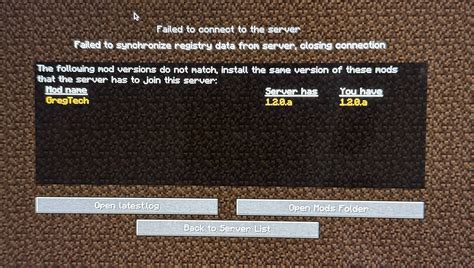
- Not Researching Compatibility: Before downloading, always check if a mod is compatible with your specific game version, other mods you’re using, and any DLCs. Mod pages often list known conflicts or dependencies, which are crucial for a stable setup.

Conclusion: Mod Smart, Play Hard
Modding can significantly enhance and personalize your gaming experience, transforming beloved titles into something uniquely yours. However, it requires a proactive and informed approach. By sticking to reputable sources, carefully evaluating individual mods based on community feedback and update history, and following best practices like backing up your files and meticulously reading installation instructions, you can minimize risks and unlock a vast world of personalized content. Enjoy exploring the endless possibilities that quality, safe game mods offer!