





Minimize build size for faster deployments?

The Critical Link Between Build Size and Deployment Speed
In today’s fast-paced development landscape, the ability to deploy applications quickly and efficiently is paramount. A seemingly innocuous factor that often gets overlooked, yet significantly impacts deployment velocity, is the application’s build size. Larger builds translate directly into longer deployment times, increased resource consumption, and potential bottlenecks in your Continuous Integration/Continuous Deployment (CI/CD) pipelines. Minimizing build size isn’t just an optimization; it’s a fundamental strategy for achieving agility, reducing operational costs, and delivering updates to users faster.

Frontend Optimization Techniques
For web applications, a significant portion of the build size often comes from JavaScript, CSS, and assets. Several strategies can drastically reduce this footprint:
Tree Shaking and Dead Code Elimination
Modern JavaScript bundlers like Webpack and Rollup can identify and remove “dead code”—code that is defined but never used. This process, known as tree shaking, is incredibly effective, especially when working with large libraries that export many modules, only a few of which are actually imported into your project.
Code Splitting and Lazy Loading
Instead of bundling your entire application into a single, large file, code splitting breaks it down into smaller, on-demand chunks. These chunks can then be lazy-loaded, meaning they are only downloaded by the browser when they are actually needed (e.g., when a user navigates to a specific route). This improves initial page load times and reduces the initial build size.
Minification and Uglification
Minification involves removing all unnecessary characters from source code without changing its functionality. This includes whitespace, new line characters, comments, and block delimiters. Uglification goes a step further by renaming variables and function names to shorter, more obscure ones, further reducing file size.
Image and Asset Optimization
Images, fonts, and other media assets can be major culprits for large build sizes. Optimizing images by compressing them, using appropriate formats (e.g., WebP), and lazy loading them can yield substantial savings. Consider using SVG for vector graphics where possible.
Backend and Containerized Application Strategies
While frontend optimizations are critical, backend applications, especially those deployed in containers, also benefit immensely from build size reduction:
Multi-Stage Docker Builds
Multi-stage builds are a Docker best practice. They allow you to use multiple FROM statements in your Dockerfile, each with a different purpose. You can have a build stage that compiles your application with all development dependencies, and then a separate, leaner runtime stage that copies only the compiled artifacts, discarding all unnecessary build tools and temporary files. This dramatically reduces the final image size.
Choosing Smaller Base Images
The choice of your base image significantly impacts the final container size. Instead of using large general-purpose images like ubuntu or full-featured language images, opt for minimal alternatives such as alpine variants (e.g., node:16-alpine, python:3.9-slim-buster) or scratch images when appropriate. These images contain only the essentials, leading to much smaller footprints.
Efficient Dependency Management
Ensure you’re only including necessary production dependencies. For Node.js, this means running npm install --production or carefully managing your devDependencies. For other languages, similar practices apply – separate development tools and test frameworks from your final production artifacts.

The Ripple Effect: Benefits Across the CI/CD Pipeline
The benefits of a minimized build size extend far beyond just faster deployments. Smaller builds:
- Reduce Build Times: Less code to compile, lint, and bundle means quicker feedback loops for developers.
- Lower CI/CD Costs: Less storage required for artifacts, reduced data transfer costs, and potentially fewer compute resources needed for build agents.
- Improve Deployment Reliability: Smaller artifacts are faster to transfer to deployment targets, reducing the likelihood of network timeouts or partial uploads.
- Enhance Developer Experience: Faster local builds and quicker hot module reloading contribute to a more pleasant development environment.
Tools and Continuous Monitoring
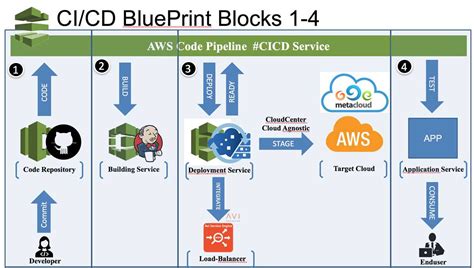
Leverage tools like Webpack Bundle Analyzer, Rollup, Parcel for frontend builds, and Docker Scout or analogous image analysis tools for containers to gain insights into your build composition. Regularly review your dependencies and build configurations. Integrating build size checks into your CI pipeline can prevent regressions and ensure that optimizations are maintained over time.
Conclusion
Minimizing build size is a continuous process and a crucial practice for modern software development teams. By strategically applying techniques such as tree shaking, code splitting, multi-stage Docker builds, and vigilant dependency management, organizations can significantly accelerate their deployment cycles, reduce infrastructure costs, and ultimately deliver a better, faster experience for their users. It’s an investment that pays dividends across the entire software delivery lifecycle.


