Modders: Best ways to gather quality bug reports & manage community feedback?

The Lifeline of Mod Development: Quality Bug Reports and Community Feedback
For any modder, creating engaging and stable content is a passion. However, even the most meticulous developer can miss bugs, and user experience can always be refined. This is where your community becomes invaluable. Effectively gathering quality bug reports and managing community feedback isn’t just about fixing what’s broken; it’s about fostering a thriving community, improving your mod, and ensuring long-term success. But how do you sift through the noise to find actionable insights?

Establishing Clear and Accessible Reporting Channels
The first step to receiving good feedback is making it easy and clear for users to provide it. Don’t make them guess where to go or how to format their input. Consider dedicated channels:
- Dedicated Forum Section: Create a specific sub-forum for bug reports and another for suggestions. Clearly label them and pin a thread with instructions.
- Discord Channels: If you use Discord, have distinct channels like
#bug-reportsand#mod-suggestions. Use moderation bots to guide users or delete off-topic posts. - Issue Trackers (e.g., GitHub Issues): For more technical mods or larger projects, an issue tracker provides a structured environment for bug reports, feature requests, and progress tracking. This also allows for public transparency on known issues.
Regardless of the platform, ensure these channels are prominently linked from your mod’s download page, README, and any relevant community hubs.
Educating Your Users: How to Write a Quality Bug Report
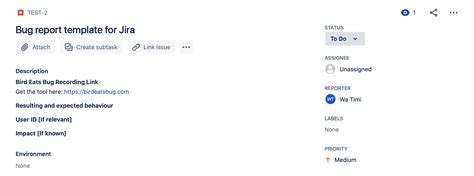
A common challenge is receiving vague reports like “Mod broke game.” To get actionable information, you need to educate your users on what constitutes a good bug report. Create a template and insist on its use:
- Steps to Reproduce: The most critical part. Ask for a numbered list of precise actions leading to the bug. “1. Load game. 2. Equip item X. 3. Enter Y zone.”
- Expected vs. Actual Behavior: What did they expect to happen, and what actually happened?
- Game and Mod Version: Essential for narrowing down when the bug was introduced or if it’s already fixed.
- System Information: Basic PC specs, operating system, and any other relevant mods installed (if applicable).
- Evidence: Request screenshots, short video clips, or relevant game log files. Highlight where to find log files.
Emphasize that a minimal reproducible example (MRE) is incredibly helpful. This means asking users to try and reproduce the bug with only your mod active, if possible.
Leveraging Tools for Tracking and Prioritization
As your mod grows, managing a flood of reports and feedback can become overwhelming. Tools can help:
- GitHub Issues / GitLab Issues: Excellent for tracking, assigning, labeling (e.g., “bug,” “feature-request,” “enhancement,” “critical”), and milestone planning. They integrate well with version control.
- Trello / Asana: Visual board-based tools that allow you to create cards for each report/suggestion, move them through stages (e.g., “New,” “Investigating,” “Confirmed,” “In Progress,” “Done”), and add comments.
- Dedicated Bug Trackers (e.g., Jira, Bugzilla, Redmine): More robust solutions for larger projects, offering advanced filtering, reporting, and workflow customization. These might be overkill for solo modders but are powerful for teams.
Using labels and categories helps you quickly identify critical bugs, filter out duplicates, and prioritize tasks. Regularly review incoming reports and update their status to keep your community informed.
Engaging with Your Community: Transparency and Communication
Your community isn’t just a source of reports; they are your most ardent supporters. Engage with them:
- Acknowledge Everything: Even a simple “Thanks for the report, I’ll look into it!” goes a long way. Let users know their input is valued.
- Be Transparent: Regularly update your community on known issues, current progress, and future plans. A changelog is essential. If a bug is difficult to fix, explain why.
- Manage Expectations: Not every suggestion can be implemented, and not every bug can be fixed immediately. Be polite but firm when explaining why certain feedback may not be incorporated.
- Handle Negative Feedback Gracefully: Criticism is inevitable. Respond professionally, avoid getting defensive, and try to extract constructive elements from even negative comments. Sometimes, a frustrated user just wants to feel heard.
- Foster a Positive Environment: Encourage helpfulness and respect among your users. Moderate channels to keep discussions constructive and welcoming.
Conclusion: The Continuous Cycle of Improvement
Gathering quality bug reports and managing community feedback is an ongoing process, not a one-time setup. By providing clear channels, educating your users, utilizing appropriate tools, and maintaining open communication, you create a feedback loop that fuels continuous improvement for your mod. This not only leads to a more stable and feature-rich creation but also cultivates a loyal and supportive community, which is perhaps the greatest reward for any modder.