My gaming PC overheats! Best cooling solutions for peak performance?

Understanding PC Overheating and Its Impact
Is your gaming PC stuttering, experiencing sudden shutdowns, or sounding like a jet engine during intense sessions? These are classic signs of an overheating system. While a certain level of heat is normal, excessive temperatures can lead to thermal throttling, reduced performance, component degradation, and even permanent damage. For peak performance and the longevity of your valuable hardware, addressing overheating proactively is crucial.
Why Your Gaming PC Heats Up
Before diving into solutions, it’s helpful to understand the common culprits behind a hot PC. Dust accumulation is a major offender, acting as an insulating blanket on components and blocking airflow. Poor case airflow due to insufficient or incorrectly oriented fans, obstructed vents, or messy cable management can trap hot air. Old, dried-out thermal paste on your CPU or GPU can lose its effectiveness, hindering heat transfer. Finally, high-performance components naturally generate more heat, and stock coolers might not be adequate for demanding tasks like gaming or overclocking.

Optimizing Case Airflow and Fan Configuration
The foundation of any good cooling setup is efficient case airflow. This involves creating a clear path for cool air to enter and hot air to exit your PC case. Most setups benefit from an ‘intake’ configuration at the front and bottom, drawing cool air in, and ‘exhaust’ fans at the rear and top, pushing hot air out. Consider upgrading stock case fans to higher-performance models with better airflow (CFM) and static pressure, especially if they are pushing air through restrictive filters or radiators.
- Positive Pressure: More intake than exhaust, helps keep dust out.
- Negative Pressure: More exhaust than intake, can draw dust in through unsealed gaps.
- Balanced Pressure: Equal intake and exhaust, generally a good compromise.
Advanced CPU Cooling Solutions
Your CPU is the brain of your PC and often the primary heat generator. Investing in a robust CPU cooler is paramount.
Air Cooling
High-end air coolers use large heatsinks with multiple heat pipes and powerful fans to dissipate heat. They are generally more affordable, require less maintenance, and offer excellent performance for most gaming CPUs, even those that are moderately overclocked. Ensure your chosen air cooler fits within your case and doesn’t interfere with RAM modules.
Liquid Cooling (AIO & Custom Loops)
For maximum cooling performance, especially for high-end CPUs or aggressive overclocking, liquid cooling is often the answer. All-in-One (AIO) liquid coolers are sealed, self-contained units that are relatively easy to install. They offer superior heat dissipation compared to most air coolers and can contribute to a cleaner internal aesthetic. Custom liquid loops provide the ultimate cooling potential and aesthetic customization but require more expertise and maintenance. Remember to match radiator size (e.g., 240mm, 360mm) to your case’s capacity and your CPU’s thermal output.
The Importance of Thermal Paste
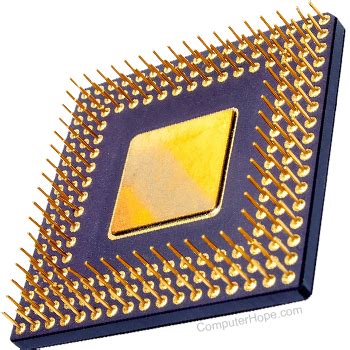
Thermal paste (or thermal grease) is a crucial interface material applied between your CPU/GPU die and its cooler’s baseplate. Its purpose is to fill microscopic imperfections on both surfaces, ensuring maximum heat transfer. Over time, thermal paste can dry out and become less effective. Reapplying fresh, high-quality thermal paste every few years, or whenever you remove your cooler, can significantly improve thermal performance. A small pea-sized or line method application is usually sufficient.
GPU Cooling Considerations
While most modern GPUs come with sophisticated cooling solutions built-in, they are significant heat producers. Ensure your case has adequate airflow around your graphics card, particularly if it’s a large, multi-fan model. Some users opt for aftermarket GPU coolers or even integrate their GPU into a custom liquid cooling loop for extreme performance and lower temperatures, though this is a more advanced modification.
Beyond Hardware: Maintenance and Management
Cooling isn’t just about buying new parts; good practices are equally important.
- Regular Cleaning: Dust is the enemy. Use compressed air to regularly clear dust from fans, heatsinks, and vents. A clean PC breathes better.
- Cable Management: Untidy cables obstruct airflow. Route cables neatly behind the motherboard tray or along the case edges to ensure unrestricted air movement.
- Monitoring Software: Use tools like HWMonitor, MSI Afterburner, or NZXT CAM to keep an eye on your CPU and GPU temperatures. Understand what ‘normal’ temperatures are for your components and identify when they’re running too hot.
- Fan Curves: Many motherboards and GPU utilities allow you to customize fan speed curves based on temperature. This can help optimize the balance between cooling and noise.

Conclusion: A Cooler PC, A Better Gaming Experience
Tackling PC overheating is a multi-faceted endeavor that often involves a combination of hardware upgrades and diligent maintenance. From optimizing case airflow with the right fans to investing in powerful CPU coolers (air or liquid) and regularly reapplying thermal paste, each step contributes to a healthier, more performant gaming rig. By taking these measures, you’ll not only enjoy a smoother, more stable gaming experience but also extend the lifespan of your valuable components, ensuring your PC remains a peak-performing powerhouse for years to come.