





My PC overheats during gaming. Best cooling setup for high-performance builds?

Understanding PC Overheating During Gaming
Gaming pushes your PC’s components, especially the CPU and GPU, to their limits. In high-performance builds, this intense workload generates significant heat, and if not properly managed, can lead to thermal throttling, reduced performance, system instability, and even long-term damage to your hardware. Recognizing the signs of overheating, such as sudden frame drops, system crashes, or loud fan noise, is the first step towards a stable and enjoyable gaming experience.
Diagnosing the Problem: Is Your PC Really Overheating?
Before investing in new cooling hardware, it’s crucial to confirm that overheating is indeed the issue. Use monitoring software like HWMonitor, MSI Afterburner, or HWiNFO64 to track your CPU and GPU temperatures during gaming. A CPU typically shouldn’t exceed 85°C, and GPUs are generally safe below 90°C under load, though lower is always better. Common culprits for poor thermals include accumulated dust restricting airflow, insufficient case fans, a stock CPU cooler struggling with a high-TDP processor, or poorly applied thermal paste.
Essential Cooling Components for High-Performance Builds
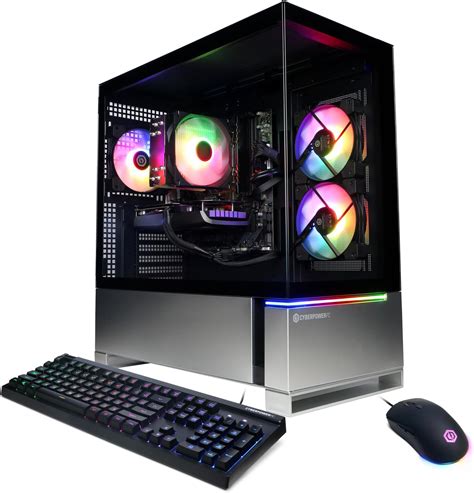
Effective cooling relies on a synergistic approach involving several key components:
CPU Cooling: Air vs. Liquid
For high-performance CPUs (like Intel i7/i9 or AMD Ryzen 7/9), stock coolers are often inadequate. You’ll need an aftermarket solution:
- High-End Air Coolers: Large dual-tower heatsinks with powerful fans (e.g., Noctua NH-D15, be quiet! Dark Rock Pro 4) offer excellent performance, reliability, and are generally quieter than entry-level liquid coolers. They are a solid choice for many high-performance builds.
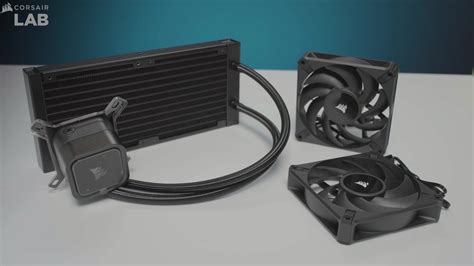
- All-in-One (AIO) Liquid Coolers: These closed-loop systems are popular for their cooling efficiency and aesthetics. Radiator sizes typically range from 240mm to 360mm, with larger radiators offering better heat dissipation. They are particularly effective in cases where space around the CPU socket is limited or for overclocking.
GPU Cooling: Beyond the Stock Fan
Modern GPUs come with robust cooling solutions, but sometimes even these can struggle, especially with factory overclocks or in cases with poor airflow. While direct upgrades are less common than for CPUs, ensuring the GPU’s own fans are clean and functioning optimally is vital. For extreme performance or custom aesthetic, some enthusiasts opt for aftermarket GPU water blocks as part of a custom liquid loop.
Case Fans & Airflow Configuration
The foundation of good cooling is proper case airflow. You need a balance of intake and exhaust fans to create a positive or neutral pressure environment:
- Intake Fans: Typically located at the front and bottom of the case, pulling cooler ambient air into the system.
- Exhaust Fans: Usually at the rear and top, expelling hot air out of the system.
Aim for more intake than exhaust (positive pressure) to help prevent dust ingress, or equal amounts for neutral pressure. High static pressure fans are better for radiators or restricted areas, while high airflow fans are ideal for unrestricted open spaces.
Thermal Paste: The Critical Interface
The thermal paste applied between your CPU/GPU die and its cooler’s cold plate is critical for efficient heat transfer. Old, dried-out, or poorly applied paste can severely impede cooling. Reapplying high-quality thermal paste every few years or when installing a new cooler can yield significant temperature improvements.
Optimizing Your Cooling Setup for Peak Performance
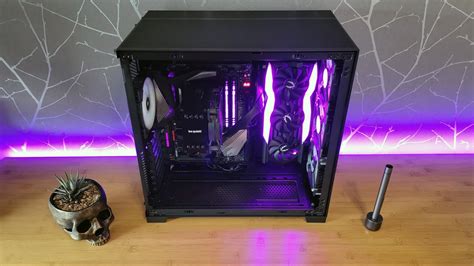
- Case Selection: Choose a PC case designed with airflow in mind. Mesh front panels, ample fan mounts, and spacious interiors are key indicators of good thermal design.
- Cable Management: Neatly routed cables don’t just look good; they prevent obstructions to airflow paths, allowing air to move freely around components.
- Dust Management: Regularly clean your PC, paying special attention to fan blades, heatsinks, and radiator fins. Dust acts as an insulator, trapping heat. Consider dust filters for intake fans.
- Environmental Factors: The ambient room temperature directly impacts your PC’s cooling potential. A cooler room translates to lower internal PC temperatures.

Advanced Cooling Solutions for Enthusiasts
For the ultimate in thermal performance and silence, custom open-loop liquid cooling offers unparalleled heat dissipation. While complex and expensive, a well-designed custom loop can cool both the CPU and GPU simultaneously, allowing for extreme overclocking and very low operating temperatures. Another advanced technique, primarily for experienced users, is CPU delidding, which involves removing the CPU’s integrated heat spreader (IHS) to replace the inferior thermal interface material underneath with liquid metal, significantly dropping CPU temperatures.
Achieving Optimal Thermal Performance and System Longevity
Addressing PC overheating during gaming is crucial for maintaining stable performance and extending the lifespan of your valuable components. By understanding the role of each cooling component and implementing a thoughtful strategy — from selecting the right CPU cooler and optimizing case airflow to regular maintenance and proper thermal paste application — you can transform your high-performance gaming rig into a cool, quiet, and reliable powerhouse. Invest in good cooling, and your PC will reward you with countless hours of smooth, uninterrupted gaming.


