NVMe vs SATA SSD: Which storage is best for game loading times and performance?
The Quest for Faster Gaming: SSDs Explained
In the world of PC gaming, every millisecond counts. From frame rates to input lag, optimizing your system is key to a smooth and enjoyable experience. One of the most significant upgrades you can make to improve game responsiveness and drastically cut down on waiting is transitioning from a traditional Hard Disk Drive (HDD) to a Solid State Drive (SSD). But not all SSDs are created equal, and understanding the differences between NVMe and SATA models is crucial for making an informed decision, especially when it comes to game loading times and overall performance.
This article will delve into the technical distinctions, real-world gaming impact, and practical considerations for both NVMe and SATA SSDs, helping you decide which storage solution is the champion for your gaming rig.
Understanding SATA SSDs: The Reliable Standard
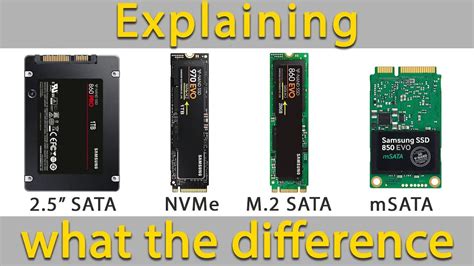
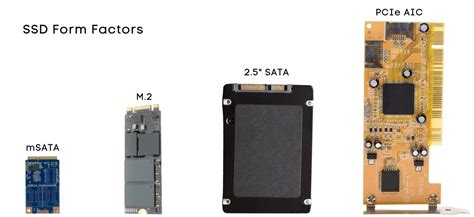
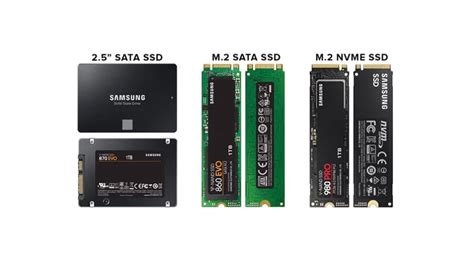
SATA (Serial Advanced Technology Attachment) has long been the standard interface for connecting storage devices in computers. SATA SSDs, typically in a 2.5-inch form factor, connect to your motherboard via a SATA data cable and a SATA power cable. They offer a substantial performance leap over HDDs, with sequential read/write speeds generally capping out around 550 MB/s.
For many years, SATA SSDs were the go-to upgrade for gamers. They drastically reduced boot times, application loading, and in-game level loading compared to spinning hard drives. Their widespread compatibility, relatively lower cost per gigabyte, and ease of installation made them a popular choice for mainstream users and budget-conscious gamers alike.
Unpacking NVMe SSDs: The Speed Demon
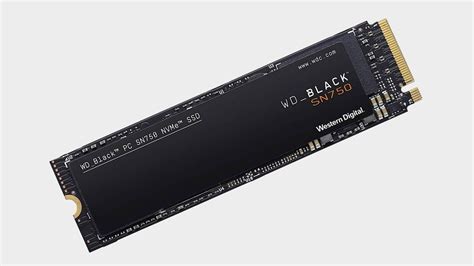
NVMe (Non-Volatile Memory Express) is a communication protocol specifically designed for flash storage, taking full advantage of the high-speed PCIe (Peripheral Component Interconnect Express) bus. Unlike SATA, which was originally designed for HDDs, NVMe allows SSDs to communicate directly with the CPU, bypassing the traditional bottlenecks of the SATA interface. This direct connection, coupled with the increased bandwidth of PCIe lanes, allows NVMe SSDs to achieve vastly superior speeds—often reaching 3,500 MB/s for PCIe Gen3 and even up to 7,000 MB/s or more for PCIe Gen4 drives.
Most NVMe SSDs come in the M.2 form factor, which is a small, rectangular stick that plugs directly into a dedicated slot on modern motherboards. This sleek design eliminates the need for data and power cables, contributing to cleaner PC builds.

Direct Comparison: Game Loading Times
This is where the rubber meets the road for gamers. On paper, NVMe SSDs are undeniably faster, often by a factor of 5-10x in sequential read/write speeds. So, does this translate to dramatically faster game loading times?
For most current generation games, the difference in loading times between a high-end SATA SSD and an entry-level to mid-range NVMe SSD is often less dramatic than benchmarks suggest. While NVMe will consistently be faster, the perceived difference might only be a few seconds, or even fractions of a second, for many titles. This is because game loading isn’t solely dependent on raw storage speed; CPU processing, RAM speed, and how game assets are structured and loaded all play significant roles.
However, with newer titles leveraging technologies like Microsoft’s DirectStorage (on Windows 11) or Sony’s I/O complex on the PlayStation 5, the true potential of NVMe’s high throughput is beginning to be realized. These technologies allow games to stream assets directly from the SSD to the GPU, significantly reducing CPU overhead and enabling much faster loading of large game worlds and textures.
Beyond Loading: In-Game Performance and Workflow
While loading screens are the most obvious beneficiary of faster storage, NVMe’s advantages can extend beyond that. In open-world games with continuous asset streaming, a faster NVMe drive can potentially reduce texture pop-in and stuttering as new areas load in the background. Content creators and streamers, who often deal with large video files and intense multi-tasking, will also notice a significant boost in overall system responsiveness and file transfer speeds with an NVMe drive.
For the average gamer, however, once a game is loaded into RAM, the storage device has a diminishing impact on frame rates. The CPU, GPU, and RAM take over the heavy lifting. The primary benefit remains quicker access to game files and a more responsive operating system.
Price, Capacity, and Compatibility Considerations
Price: Historically, NVMe drives were significantly more expensive than SATA SSDs. While the price gap has narrowed considerably, SATA SSDs still often offer a better cost-per-gigabyte, especially for larger capacities.
Capacity: Both NVMe and SATA SSDs are available in a wide range of capacities, from 250GB up to 8TB or more. For gamers, a 1TB or 2TB drive is often a good sweet spot.
Compatibility: Most modern motherboards have M.2 slots for NVMe drives, but older boards might not. Ensure your motherboard supports NVMe and has an available M.2 slot. If your board supports PCIe Gen4, investing in a Gen4 NVMe drive will yield the best speeds, though Gen3 is still excellent.
The Verdict: Which One for Gamers?
For the ultimate, no-compromise gaming experience and future-proofing your rig, an NVMe SSD is the clear winner. If you’re building a new PC or have a modern motherboard with an available M.2 slot, opting for a fast NVMe drive (especially a PCIe Gen4 model if your system supports it) is highly recommended. It will provide the fastest loading times for current and future games, enhance overall system responsiveness, and offer the best performance for any demanding tasks.
However, if you’re on a tighter budget or upgrading an older system without NVMe support, a SATA SSD is still an excellent upgrade over an HDD. It offers a massive performance boost for a lower cost and remains perfectly viable for a fantastic gaming experience, albeit with slightly longer load times than its NVMe counterpart. Many gamers also choose a hybrid approach: a smaller NVMe drive for the operating system and a few favorite games, and a larger, more affordable SATA SSD for their broader game library.
Ultimately, both NVMe and SATA SSDs offer vastly superior performance to traditional hard drives. The choice between them depends on your budget, your motherboard’s capabilities, and how much you prioritize those extra seconds saved on loading screens.