





Stopping mod malware: Essential safety checks for PC gamers & mod users?
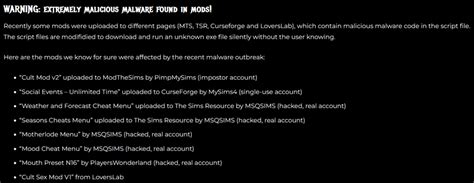
The Allure and Risk of Game Mods
PC gaming thrives on its vibrant modding communities, offering players endless possibilities to enhance, expand, and personalize their favorite titles. From graphical overhauls to entirely new quests and gameplay mechanics, mods can breathe new life into games. However, with this freedom comes a significant security risk: the increasing prevalence of malware hidden within seemingly innocent mods. As bad actors target unsuspecting gamers, understanding and implementing essential safety checks is paramount to protecting your PC and personal data.
The open nature of mod distribution, often relying on user-generated content and less stringent vetting processes than official software, creates fertile ground for malicious code. This isn’t just about ‘mod crashing your game’; it’s about ransomware, keyloggers, cryptocurrency miners, and other serious threats that can compromise your entire system.

Prioritize Trusted Sources and Reputable Platforms
The first and most critical line of defense is where you download your mods. Stick exclusively to well-established, highly reputable modding platforms and official developer-supported repositories. Sites like Nexus Mods, Mod DB, and the Steam Workshop typically have moderation teams and community-driven vetting processes that help filter out malicious content. Avoid obscure forums, direct downloads from unknown users, or sites that seem too good to be true.
Even on trusted sites, exercise caution. Look for official mod pages, authors with a long history of contributions, and mods that have been downloaded by thousands without widespread reports of issues. A brand-new mod from an unknown user, with few downloads and no comments, should raise a red flag.
Scrutinize Reviews, Comments, and Update History
Community feedback is an invaluable resource in identifying problematic mods. Before downloading anything, thoroughly read the comments section. Are other users reporting crashes, strange behavior, or even malware warnings? Pay attention to any red flags, even if they seem isolated. A mod’s update history can also be telling; frequently updated mods by active developers often indicate a commitment to quality and security.
Be wary of mods with an unusually low number of comments or an abundance of generic, overly positive reviews that don’t offer specific feedback. Conversely, well-maintained mods with active discussion, bug reports, and developer responses tend to be safer bets.

Always Scan Downloads with Antivirus Software
Even if a mod comes from a trusted source and has positive reviews, a final scan with robust antivirus software is non-negotiable. Modern antivirus programs are equipped to detect a wide range of threats, including those often hidden within mod archives. After downloading a mod archive (e.g., .zip, .rar), right-click the file and select the option to scan it before extracting or installing its contents.
It’s also advisable to run a full system scan periodically, especially if you’ve recently installed several new mods. Keep your antivirus definitions updated to ensure it can detect the latest threats. Consider using a secondary, on-demand scanner (like Malwarebytes) for an extra layer of protection, as different programs may catch different things.

Understand Mod Permissions and File Behavior
When installing mods, particularly those that require executable files (.exe) or scripts, pay close attention to any permission requests. A mod designed to change textures in a game shouldn’t typically need administrator access to your entire system or attempt to connect to unusual external servers. If a mod asks for permissions that seem excessive for its stated purpose, proceed with extreme caution or reconsider its installation.
Additionally, monitor your PC’s behavior after installing a new mod. Is your CPU usage suddenly spiking when the game isn’t running? Are there new, unfamiliar processes in Task Manager? Is your internet activity unusually high? These can be indicators of cryptocurrency miners or other background malware. Tools like Process Monitor or GlassWire can help you observe file access and network connections.

Implement Advanced Protections and General Security Practices
For truly high-risk modding or if you’re developing mods yourself, consider using a virtual machine (VM) or sandboxing software to isolate potential threats. A VM creates a completely separate, isolated operating system environment where you can test mods without risking your main system. Sandboxing tools like Sandboxie allow you to run applications in an isolated container, preventing them from making permanent changes to your PC.
Beyond mod-specific checks, maintain general cybersecurity hygiene: keep your operating system and all software (including games) up-to-date with the latest security patches. Use strong, unique passwords for all online accounts, especially those related to gaming platforms. Enable two-factor authentication (2FA) wherever possible. A robust firewall is also essential to control incoming and outgoing network traffic.

What to Do If You Suspect Malware
If you believe a mod has infected your system, act quickly: disconnect your PC from the internet to prevent further data exfiltration or spread of malware. Run a full, deep scan with your antivirus software. If it detects threats, follow its instructions for quarantine and removal. You may need to use specialized removal tools for specific types of malware (e.g., ransomware decryption tools).
Consider restoring your system to a previous restore point created before the infection. If the infection is severe or persistent, a full reinstallation of your operating system might be necessary as a last resort. Always back up your important data regularly to an external drive or cloud service to mitigate the impact of data loss.
Conclusion: Vigilance is Your Best Modding Tool
Modding can significantly enrich your PC gaming experience, but it requires a proactive approach to security. By consistently employing these safety checks—downloading from trusted sources, leveraging community feedback, using strong antivirus tools, monitoring permissions, and maintaining overall cybersecurity hygiene—you can significantly reduce your risk of encountering mod-borne malware. Stay vigilant, stay informed, and enjoy the vast, creative world of game modifications safely.

