
How to set up G-Sync/FreeSync for tear-free gaming on high refresh rate monitors?
Learn how to configure NVIDIA G-Sync or AMD FreeSync on your high refresh rate monitor to eliminate screen tearing and enjoy smooth, immersive gaming experiences.
News, Guides, and Everything Gaming.






Learn how to configure NVIDIA G-Sync or AMD FreeSync on your high refresh rate monitor to eliminate screen tearing and enjoy smooth, immersive gaming experiences.
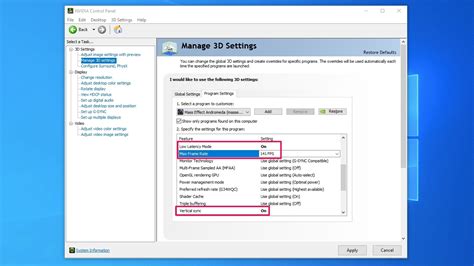
Achieve buttery-smooth, tear-free gaming by properly enabling G-Sync or FreeSync on your compatible monitor with this comprehensive guide.
This article explores the benefits of G-Sync and FreeSync adaptive sync technologies, helping you decide if they’re right for you and guiding you through their correct setup for a smoother gaming experience.

Optimizing monitor settings is crucial for competitive FPS gaming to minimize latency and ensure every millisecond counts towards victory.
Mastering your monitor settings is crucial for competitive FPS games, striking a delicate balance between visual clarity and lightning-fast responsiveness to gain an edge over opponents.

Optimize your gaming monitor settings to gain a competitive edge in high refresh rate FPS titles, focusing on fluidity, responsiveness, and visual clarity.
Learn the essential steps to configure G-Sync or FreeSync on your new gaming monitor and GPU for a perfectly smooth, tear-free gaming experience.

To gain a competitive edge in fast-paced first-person shooter games, understanding and optimizing your monitor’s refresh rate, response time, and adaptive sync technologies is crucial for a smooth and responsive gameplay experience.
This article delves into the causes of stuttering in competitive shooters and provides actionable monitor settings to minimize input lag for a smoother, more responsive gaming experience.

This article explores optimal gaming monitor settings, including refresh rate, response time, adaptive sync, and overdrive, to achieve the highest possible FPS and minimize input lag for a competitive edge in gaming.