
Why do my FPS drop in demanding games? Is my CPU or GPU bottlenecking?
Uncover the reasons behind frustrating FPS drops in demanding games and learn how to identify whether your CPU or GPU is the bottleneck holding back your gaming performance.
News, Guides, and Everything Gaming.






Uncover the reasons behind frustrating FPS drops in demanding games and learn how to identify whether your CPU or GPU is the bottleneck holding back your gaming performance.

Discover how to identify if your CPU is holding back the powerful RTX 4080 in modern games and what steps you can take to optimize your gaming experience.

Discover how to identify whether your gaming PC’s performance is limited by its CPU or GPU, and learn the best strategies for upgrading your components to achieve smoother gameplay.

Experiencing low FPS in your gaming PC can be frustrating, and pinpointing whether your CPU or GPU is the bottleneck is crucial for effective troubleshooting and upgrades.

Discover if your current CPU is holding back your new GPU’s potential for smooth 1440p gaming and learn how to identify and address bottlenecks.

Learn how to diagnose and resolve random FPS drops in your gaming PC by identifying whether your GPU, CPU, or RAM is causing a performance bottleneck.

Discover how to identify if your CPU is limiting your GPU’s potential for gaming, and learn practical steps to check, diagnose, and resolve bottlenecks for smoother gameplay and higher frame rates.
Experiencing low FPS in new games at 1440p often points to a hardware bottleneck, with either your CPU or GPU struggling to keep up, requiring careful diagnosis to optimize performance or plan an upgrade.
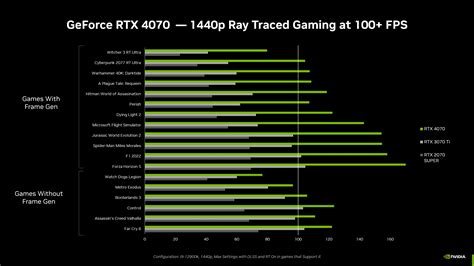
Upgrading your GPU to an RTX 4070 can sometimes reveal a CPU bottleneck, leading to underperformance in demanding games, but understanding how to diagnose and resolve it is key.
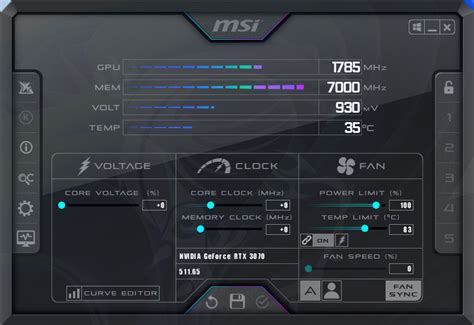
This article explains what a CPU bottleneck is in gaming, how to effectively identify it using monitoring tools, and offers practical solutions to optimize your system’s performance and achieve higher frame rates.