How to troubleshoot mod conflicts after game updates effectively?
Learn effective strategies and a step-by-step process to identify, isolate, and resolve mod conflicts that arise after a game update, ensuring your modded game runs smoothly.
News, Guides, and Everything Gaming.






Learn effective strategies and a step-by-step process to identify, isolate, and resolve mod conflicts that arise after a game update, ensuring your modded game runs smoothly.

Building a thriving community and providing effective support are paramount for modders to ensure longevity, positive reception, and continued growth of their projects.
When a cherished game mod is abandoned, the community can often come together to revive and maintain it through organization, technical effort, and collaborative spirit.

Navigating the vibrant world of game modding requires vigilance to distinguish between enhancing content and harmful software, ensuring your gaming experience remains secure and enjoyable.
Navigating the world of game mods can significantly enhance your gaming experience, but it requires understanding how to prevent and resolve conflicts while identifying trustworthy sources for quality additions.

Learn essential steps and best practices to thoroughly vet game mods for safety and ensure they are malware-free before enhancing your gaming experience.

Effective communication and proactive compatibility management are crucial for mod creators to maintain a healthy community and ensure their mods remain enjoyable and functional.

Identifying safe and high-quality game mods is crucial for an enjoyable and secure gaming experience, requiring players to scrutinize several key indicators before installation.
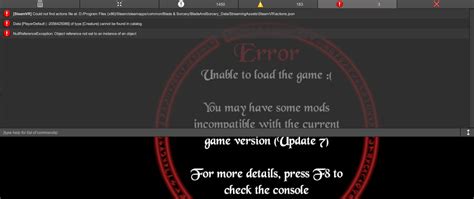
This comprehensive guide will help you effectively diagnose and resolve common mod installation errors, ensuring a smoother gaming experience with your favorite modifications.

Building and sustaining a thriving community around your game modifications requires consistent effort, clear communication, and a strategic approach to fostering a welcoming and collaborative environment.