





What are best practices for gamers to vet and manage third-party game mods safely?

Third-party game mods can profoundly enhance a gaming experience, adding new features, improving graphics, or even creating entirely new gameplay loops. However, they also introduce potential risks, ranging from game instability to malware and security vulnerabilities. To enjoy the benefits without the drawbacks, gamers must adopt a strategic approach to vetting and managing these additions.
Understanding the Risks Associated with Game Mods
Before diving into modding, it’s crucial to understand the inherent dangers. Unverified mods can contain malicious code designed to steal personal information, install ransomware, or use your system for crypto-mining. Beyond security threats, poorly coded mods can lead to game crashes, save file corruption, and even system instability. Compatibility issues between multiple mods are also a common headache, causing unexpected bugs or preventing the game from launching.

Vetting Mods: Where and How to Find Safe Downloads
Choose Reputable Modding Platforms
The first line of defense is to only download mods from well-established and trusted platforms. Websites like Nexus Mods, Mod DB, and the Steam Workshop are often curated and have community systems in place for reporting suspicious content. Avoid obscure forums, direct downloads from unknown sources, or unofficial mirrors.
- Community Feedback: Always check ratings, comments, and bug reports. A mod with many positive reviews over a long period is generally safer. Look for active discussions where users report success or issues.
- Mod Author Reputation: Research the mod author. Do they have a history of creating popular and reliable mods? Are they active in the community, responding to feedback and providing updates? A transparent and engaged author is a good sign.
- Update Frequency: Regularly updated mods suggest ongoing support and a commitment to fixing bugs and maintaining compatibility with game updates. Mods that haven’t been updated in years might cause issues with current game versions.
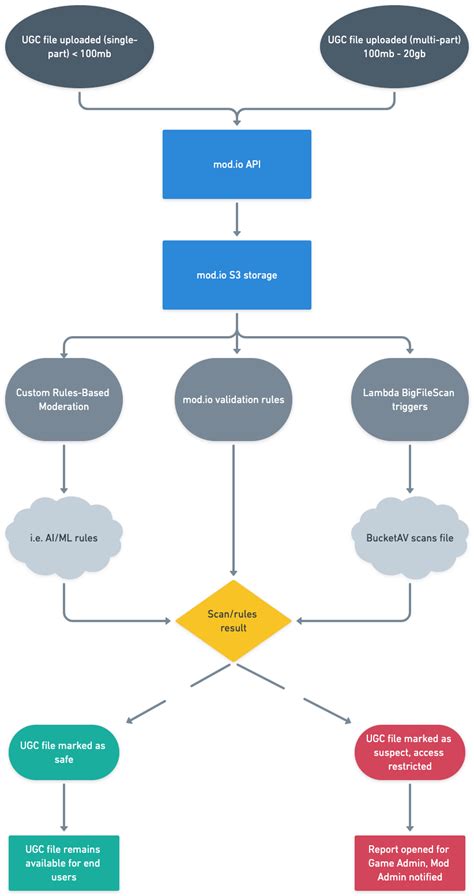
Security Scans and Verification
Even from reputable sources, an extra layer of caution is advisable. Before installing any mod, especially executable files (.exe, .dll) or archives containing them:
- Scan with Antivirus/Anti-Malware: Always run a comprehensive scan of downloaded mod files using your updated antivirus and anti-malware software.
- File Integrity Check: Some mod authors provide checksums (MD5, SHA-1) for their files. Compare the downloaded file’s checksum to the one provided by the author to ensure the file hasn’t been tampered with during download.
- Sandbox Environment (Advanced): For highly suspicious mods, consider testing them in a virtual machine or a sandbox environment to isolate potential threats from your main system.
Effective Mod Management Strategies
Utilize Mod Managers
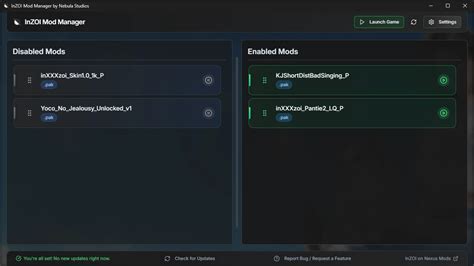
For games with extensive modding communities (like Skyrim, Fallout, or The Witcher 3), dedicated mod managers (e.g., Mod Organizer 2, Vortex, NMM) are indispensable. These tools streamline installation, manage load orders, detect conflicts, and allow for easy uninstallation without leaving residual files. They also often keep mods separate from the core game directory, preventing irreversible changes.
Backup Your Game Files and Saves
Before installing any new mod, especially large or complex ones, always back up your game’s installation directory and your save files. This simple step can save you hours of frustration if a mod causes irreversible damage or corruption. Many mod managers also offer snapshot features for easier rollbacks.
Install Mods Incrementally
Avoid installing dozens of mods at once. Instead, add mods one or a few at a time, testing the game thoroughly after each addition. This makes it much easier to identify which specific mod is causing a problem if one arises. Prioritize essential mods first, then add aesthetic or quality-of-life improvements.

Maintain and Update Your Mods
Modding isn’t a one-and-done process. Game developers frequently release patches, which can break mod compatibility. Likewise, mod authors often release updates to fix bugs, add features, or ensure compatibility with new game versions. Regularly check for updates for your installed mods and integrate them carefully. Keep your mod manager and any related tools updated as well.

Conclusion
While the world of third-party game mods offers unparalleled customization and enhancement, it’s a landscape that demands careful navigation. By understanding the risks, meticulously vetting sources and files, and employing robust management strategies, gamers can confidently explore the vast potential of modding, ensuring their systems remain secure and their gaming experiences consistently enjoyable.

