





What are top tips for new mod users to find reliable, safe game mods?

Embarking on Your Modding Journey Safely
The world of game modding offers an incredible array of enhancements, from quality-of-life improvements and graphical overhauls to entirely new content and gameplay mechanics. However, for new users, diving into this expansive ecosystem can feel daunting, with concerns about game stability and, more importantly, system security. Finding reliable and safe mods is paramount to a positive modding experience. Here’s a comprehensive guide to help you navigate the modding landscape with confidence.

Start with Reputable Sources
The first and most critical step is to only download mods from well-established and trusted platforms. These sites have robust communities, moderation teams, and often scan for malicious content.
- Nexus Mods: Arguably the largest and most popular modding site for a vast array of PC games. It features a sophisticated system of endorsements, user reviews, and detailed mod pages.
- Steam Workshop: For games that support it, the Steam Workshop is incredibly user-friendly. Mods can be subscribed to directly from Steam, often installing automatically. While generally safe, always check the mod’s comments and ratings.
- Official Game Forums/Wikis: Many games have dedicated official forums or community-run wikis where reputable mods are often linked or discussed. These are usually curated by experienced players.
- Developer-Endorsed Sites: Some game developers have specific sites where they host or recommend mods for their games.
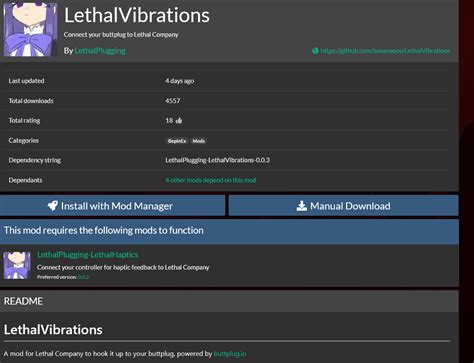
Scrutinize Reviews and Endorsements
A mod’s popularity and community feedback are strong indicators of its reliability and safety. Before downloading, take these steps:
- Read Comments: The comment section is a goldmine of information. Look for common issues, bug reports, and especially warnings about viruses or malicious code. Positive comments from many users over time are a good sign.
- Check Endorsements/Ratings: Most modding sites have a rating or endorsement system. Mods with thousands of endorsements and high ratings from a large number of users are generally safer bets.
- Download Count: A high number of unique downloads indicates widespread usage and implied safety, as issues would likely have been reported by the community.
- Mod Author Reputation: Experienced mod authors with a history of creating popular, well-supported mods are usually trustworthy. Check their other works and profile for credibility.

Understand Mod Updates and Compatibility
A well-maintained mod is a safe mod. Check the following:
- Last Updated Date: Mods that haven’t been updated in years might be outdated, incompatible with current game versions, or abandoned. This doesn’t inherently make them unsafe, but it does increase the risk of instability.
- Version Compatibility: Always check if a mod is compatible with your game’s current version. Incompatible mods are the leading cause of crashes and bugs.
- Dependencies: Some mods require other mods (called dependencies) to function. Ensure you download all necessary files from their original, reliable sources.
Utilize Mod Managers and Backups
For many games, especially those with extensive modding communities like Bethesda titles (Skyrim, Fallout) or CD Projekt Red games (The Witcher 3, Cyberpunk 2077), a mod manager is indispensable.
- Mod Managers (e.g., Mod Organizer 2, Vortex): These tools simplify installation, enable/disable mods easily, and help identify conflicts without directly altering your game’s core files. This makes troubleshooting much safer and easier.
- Backup Your Game: Before installing any mods, especially larger ones, always back up your game’s saves and, ideally, the entire game directory. This ensures you can revert to a clean state if something goes wrong.
- Read Installation Instructions: Every mod should have clear installation instructions. Follow them meticulously. Deviating can lead to unexpected issues.

Exercise Caution and Common Sense
- Avoid Unofficial or Obscure Sites: If a mod is only available on a random, unknown file-sharing site, or if it makes grand promises with little to no community verification, it’s best to steer clear.
- Scan Downloads: While reputable sites do their best, a quick scan of downloaded archives with your antivirus software before extracting them adds an extra layer of protection.
- If it sounds too good to be true…: Be skeptical of mods that promise outrageous benefits without any downsides, or those that seem to offer premium content for free in a suspicious manner.

Conclusion
Modding can significantly enhance your gaming experience, opening up new avenues of enjoyment and replayability. By prioritizing reputable sources, actively engaging with community feedback, understanding mod compatibility, and using proper management tools, new users can confidently explore the vast and exciting world of game modifications without compromising their system’s safety. Happy modding!

