





What cooling solutions prevent gaming PC overheating for stable FPS?

Why Optimal PC Cooling is Non-Negotiable for Gamers
For any serious PC gamer, stable frame rates (FPS) are the holy grail. Nothing breaks immersion or puts a damper on competitive play faster than stuttering, lag, or unexpected crashes. Often, the culprit behind these performance woes is overheating. When components like your CPU and GPU get too hot, they automatically throttle their performance to prevent damage, leading to significant drops in FPS. Investing in robust cooling solutions isn’t just about protecting your hardware; it’s about unlocking and maintaining peak gaming performance.
This article will delve into various cooling solutions, from fundamental air cooling to advanced liquid systems, and other critical factors that collectively ensure your gaming rig runs cool, quiet, and delivers that consistent, high FPS experience you crave.

The Foundations: Air Cooling Solutions
Air cooling remains the most common and often cost-effective method for keeping PC components cool. It relies on fans and heatsinks to dissipate heat.
CPU Air Coolers
Your CPU is the brain of your gaming PC, generating substantial heat under load. A dedicated CPU air cooler is essential. These typically consist of:
- Heatsink: A metal block (usually copper or aluminum) with fins that draw heat away from the CPU.
- Heat Pipes: Copper tubes containing a liquid that vaporizes at the hot end and condenses at the cool end, efficiently transferring heat to the heatsink fins.
- Fans: Mounted to the heatsink, these fans push air through the fins, rapidly dispersing heat. Larger fans (e.g., 120mm, 140mm) generally move more air at lower RPMs, resulting in quieter operation.
When choosing, consider your CPU’s Thermal Design Power (TDP) and the cooler’s rated cooling capacity. Tower coolers with multiple heat pipes and large fans offer superior performance over stock coolers.
Case Fans & Airflow Management
Beyond the CPU cooler, the overall airflow within your PC case is paramount. A well-designed airflow path ensures fresh, cool air is drawn in, circulates efficiently, and hot air is exhausted.
- Intake Fans: Typically located at the front or bottom of the case, these draw cool air into the system.
- Exhaust Fans: Usually at the rear or top, these push hot air out of the case.
- Positive vs. Negative Pressure: A slightly positive pressure (more intake than exhaust) can help prevent dust ingress, while negative pressure can lead to more dust being pulled in through unfiltered openings.
Good cable management is also crucial here. Cluttered cables obstruct airflow, creating pockets of hot air. Routing cables behind the motherboard tray keeps the main compartment clear.

Stepping Up: Liquid Cooling Solutions
For high-end gaming rigs, overclocked systems, or those prioritizing aesthetics and silence, liquid cooling offers superior thermal performance.
All-in-One (AIO) Liquid Coolers
AIOs are self-contained, pre-filled liquid cooling units that are relatively easy to install. They consist of a CPU block with an integrated pump, tubes connecting to a radiator, and fans mounted on the radiator. The liquid circulates, absorbing heat from the CPU and dissipating it through the radiator fins with the help of fans.
Radiator sizes vary (e.g., 120mm, 240mm, 360mm) and generally, a larger radiator provides better cooling capacity. AIOs offer a significant performance boost over high-end air coolers and can look very sleek in a build.
Custom Liquid Cooling Loops
For the ultimate in cooling performance and customization, a custom liquid loop is the answer. These systems allow you to cool multiple components (CPU, GPU, RAM, motherboard VRMs) with a single, highly efficient loop. They involve individual components:
- Water Blocks: For each component to be cooled.
- Pump/Reservoir: Circulates the coolant and holds excess fluid.
- Radiators: Multiple large radiators for maximum heat dissipation.
- Tubing & Fittings: Connects all components, often involving bending hard tubes for aesthetics.
While offering unmatched performance and visual appeal, custom loops are complex, expensive, and require meticulous maintenance.
Beyond the Main Coolers: Other Crucial Elements
Thermal Interface Material (TIM)
Whether you’re using air or liquid cooling, the thermal interface material (TIM) between your CPU/GPU and their respective coolers is vital. Thermal paste fills microscopic imperfections on the surfaces, ensuring maximum heat transfer. Always use a high-quality thermal paste and apply it correctly (a small pea-sized dot for CPUs is common, or a thin, even spread for GPUs).
GPU Cooling Solutions
While CPUs get a lot of attention, your GPU is often the hottest component during gaming. Most modern GPUs come with sophisticated factory coolers featuring multiple fans and large heatsinks. Aftermarket GPU coolers (both air and AIO-style) are available for those seeking lower temperatures or quieter operation, particularly for highly overclocked cards.
Case Selection and Dust Management
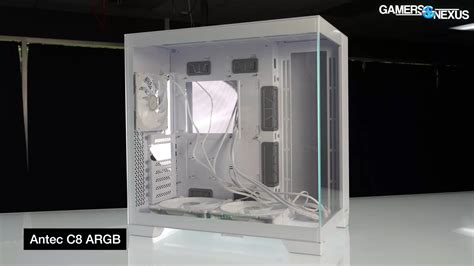
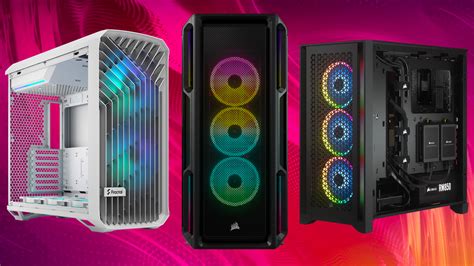
The PC case itself plays a major role. Cases with good airflow designs (e.g., mesh front panels, ample fan mounts) are preferable. Regularly cleaning dust filters and the interior of your case prevents dust buildup, which acts as an insulator, hindering cooling performance.
Software & Monitoring
Hardware cooling is only half the battle; software optimization and diligent monitoring complete the picture.
- Fan Curves: Most motherboards and GPU utilities allow you to customize fan curves. This lets you set fan speeds to increase with temperature, balancing performance and noise.
- Monitoring Software: Tools like HWMonitor, MSI Afterburner, or Core Temp allow you to keep an eye on CPU, GPU, and other component temperatures in real-time. Knowing your temperatures helps you identify potential overheating issues before they become critical.
- Undervolting: For advanced users, undervolting your CPU or GPU can reduce power consumption and heat output with minimal impact on performance, improving thermal headroom.
Conclusion
Preventing gaming PC overheating for stable FPS is a multi-faceted endeavor that combines thoughtful hardware choices with meticulous setup and ongoing maintenance. Whether you opt for robust air cooling, an efficient AIO, or a custom liquid loop, remember that optimal airflow within your case, quality thermal paste, and proactive dust management are equally critical. By understanding and implementing these cooling strategies, you can ensure your gaming rig performs at its best, delivering smooth, consistent frame rates through even the most demanding gaming sessions, and ultimately extending the lifespan of your valuable components.


