What monitor specs truly matter for competitive gaming?

Unlocking Your Potential: Essential Monitor Specs for Competitive Play
In the high-stakes world of competitive gaming, every millisecond and visual cue can mean the difference between victory and defeat. While a powerful PC and a stable internet connection are fundamental, the monitor you choose acts as your primary window into the game. Skimping on the right display can severely hinder your performance, no matter how skilled you are. But with a dizzying array of specifications, what monitor specs truly matter when the game is on the line?
The Core Pillars: Refresh Rate, Response Time, and Input Lag
These three metrics form the bedrock of a competitive gaming monitor. Understanding their importance is crucial.
Refresh Rate (Hz)
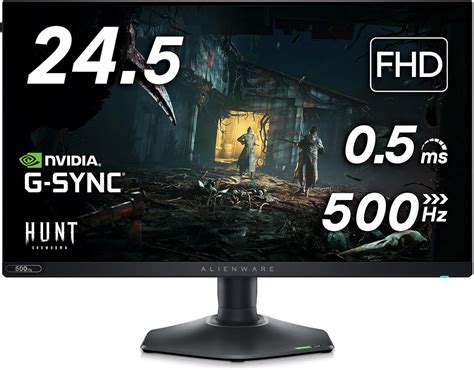
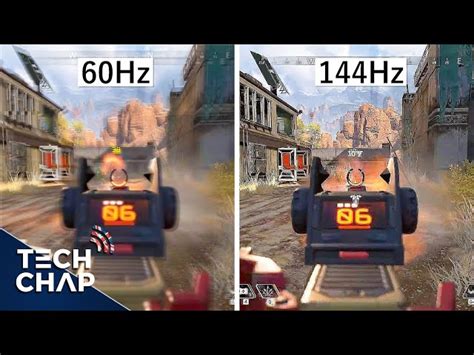
Measured in Hertz (Hz), the refresh rate indicates how many times per second your monitor can update the image on its screen. A higher refresh rate means smoother visuals and more up-to-date information. While 60Hz was once the standard, competitive gamers now widely embrace 144Hz, 240Hz, or even 360Hz monitors. The difference is immediately noticeable, offering a fluid experience that allows you to react faster to in-game events and track fast-moving targets with greater precision.
Response Time (ms)
Response time, typically measured in milliseconds (ms), refers to how quickly a pixel can change from one color to another (usually gray-to-gray or GTG). A low response time minimizes motion blur and ghosting, ensuring that fast-moving objects appear sharp and clear. For competitive play, a 1ms GTG response time is the gold standard, preventing the blurry trails that can obscure critical details and make target acquisition harder.
Input Lag
Input lag is the delay between your input (e.g., mouse click, key press) and when that action is displayed on the screen. While not always listed as a direct spec, monitors with low input lag are vital for competitive gaming. It’s an internal processing delay within the monitor itself. High input lag can make your game feel sluggish and unresponsive, creating a noticeable disconnect between your actions and what you see. Professional reviews often test for this, and competitive monitors are specifically designed to minimize it.
Panel Type: A Balancing Act
The type of panel a monitor uses influences its performance characteristics. The three main types are TN, IPS, and VA.
TN (Twisted Nematic) Panels
Historically, TN panels were the undisputed champions for competitive gaming due to their extremely fast response times and high refresh rates, often at a lower cost. Their drawbacks include poorer color reproduction and narrower viewing angles, but for pure speed, they remain a strong contender.
IPS (In-Plane Switching) Panels
IPS panels offer superior color accuracy and wider viewing angles, making them excellent for visual fidelity. While traditionally slower than TN, modern IPS panels have made significant strides, now offering 1ms GTG response times and high refresh rates (144Hz+). Many competitive gamers now opt for high-refresh-rate IPS monitors for the best balance of speed and visual quality.
VA (Vertical Alignment) Panels
VA panels excel in contrast ratio, providing deep blacks and vibrant colors. However, their response times can be slower than TN or high-end IPS panels, sometimes exhibiting ghosting or black smearing, which can be detrimental in fast-paced games. While some modern VA panels have improved, they are generally less recommended for peak competitive play compared to TN or IPS.
Resolution: Clarity vs. Frames
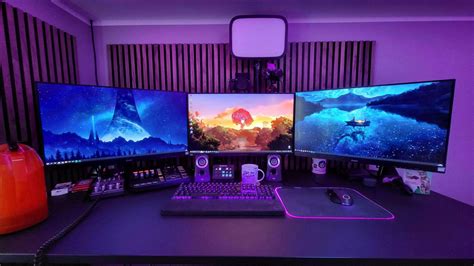
For competitive gaming, the adage “frames over pixels” often holds true. While a higher resolution like 4K offers stunning visual detail, it demands significantly more graphical processing power from your PC, potentially sacrificing crucial frame rates. Most competitive gamers find the sweet spot at 1080p (Full HD) or 1440p (QHD), allowing them to consistently hit very high frame rates (144 FPS and above) that complement their high-refresh-rate monitors.
Adaptive Sync: G-Sync and FreeSync
Adaptive Sync technologies like NVIDIA’s G-Sync and AMD’s FreeSync are crucial for eliminating screen tearing and stuttering. They synchronize your monitor’s refresh rate with your GPU’s frame rate. This ensures a consistently smooth and fluid visual experience without distracting artifacts, making it easier to track targets and react without visual interruptions. While not directly improving response time or input lag, a tear-free image provides a significant competitive advantage by enhancing clarity.

Other Considerations (Less Critical for Pure Performance)
- HDR (High Dynamic Range): While HDR significantly enhances visual immersion with brighter highlights and deeper shadows, it’s generally not considered a make-or-break feature for competitive advantage.
- Color Accuracy: Important for content creators, but less so for competitive gaming where speed and clarity take precedence over perfect color rendition.
- Ergonomics: Crucial for comfort during long gaming sessions, but not a “spec” that impacts in-game performance.
Conclusion: Prioritize Speed and Smoothness
For competitive gaming, the monitor specs that truly matter boil down to speed and smoothness. Prioritize a high refresh rate (144Hz+), a low response time (1ms GTG), and minimal input lag. Pair this with an appropriate panel type (high-refresh IPS or TN) and an adaptive sync technology (G-Sync or FreeSync) to achieve the most responsive and visually consistent gaming experience possible. While other features are nice to have, they should always be secondary to these core performance metrics if your goal is to climb the ranks.