What refresh rate & resolution combo is ideal for competitive gaming?
Navigating the Display Landscape for Esports
In the high-stakes world of competitive gaming, every millisecond and every pixel can make a difference. Gamers are constantly seeking the edge that can elevate their performance, and a critical component in this pursuit is the display monitor. Specifically, the combination of refresh rate and resolution plays a pivotal role in how games look, feel, and ultimately, how effectively a player can react to the unfolding action. But with a myriad of options available, determining the ideal refresh rate and resolution combo for competitive play can be a complex decision.
Understanding Refresh Rate: The Pursuit of Smoothness
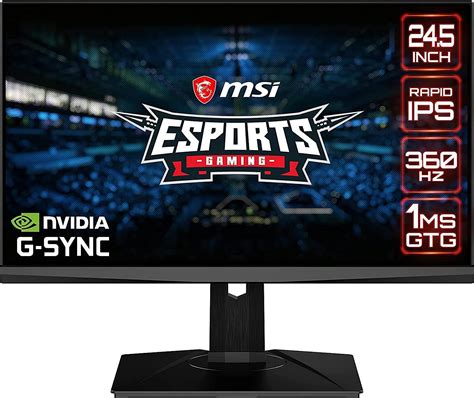
Refresh rate, measured in Hertz (Hz), refers to the number of times your monitor updates the image on its screen per second. A 60Hz monitor refreshes 60 times per second, while a 144Hz monitor refreshes 144 times, and so on. For competitive gaming, a higher refresh rate is almost universally preferred. It results in a smoother, more fluid visual experience, which can make tracking fast-moving targets easier and reduce motion blur.
Crucially, a higher refresh rate also means lower input lag – the delay between your action and its display on screen. This is because the monitor can display new frames more frequently, making your inputs appear almost instantaneously. While 60Hz was once the standard, modern competitive gamers often target 144Hz, 240Hz, or even 360Hz monitors, especially in fast-paced First-Person Shooters (FPS) or fighting games where reaction time is paramount.
Resolution: Clarity vs. Performance
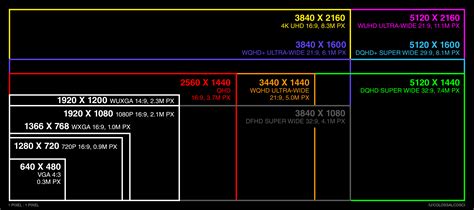
Resolution refers to the number of pixels displayed on your screen, typically expressed as width x height (e.g., 1920×1080 for Full HD, or 1080p). A higher resolution means more pixels, leading to a sharper, more detailed image. While this sounds inherently better, for competitive gaming, there’s a significant trade-off to consider: performance.
Driving more pixels requires significantly more processing power from your graphics card (GPU). Running a game at 4K resolution (3840×2160) at a high frame rate demands a top-tier GPU, whereas running the same game at 1080p (1920×1080) would yield much higher frames per second (FPS) on the same hardware. In competitive scenarios, maintaining a consistently high frame rate is often more important than achieving maximum visual fidelity, as it directly impacts responsiveness and smoothness.
The Ideal Combo: Prioritizing Responsiveness
For most competitive gamers, the consensus leans towards prioritizing refresh rate over raw resolution, especially for fast-paced genres like FPS, MOBAs, and battle royales. Here are the most common and recommended combinations:
- 1080p (Full HD) at 144Hz, 240Hz, or 360Hz: This is often considered the sweet spot for many competitive players. 1080p is not graphically demanding, allowing even mid-range GPUs to consistently push very high frame rates, which can then be displayed by a high refresh rate monitor. The visual clarity is sufficient to spot enemies, and the high refresh rate provides exceptional smoothness and low input lag.
- 1440p (QHD) at 144Hz or 240Hz: For those with more powerful GPUs who want a bit more visual clarity without sacrificing too much performance, 1440p offers a noticeable step up from 1080p. It provides a sharper image, which can be beneficial in certain games for identifying distant targets, while still allowing for high refresh rates. This requires a strong GPU to maintain consistent high FPS.
- 4K (UHD) at 60Hz or 120Hz/144Hz: While 4K offers stunning visual detail, it’s generally not recommended for pure competitive play. Even the most powerful GPUs struggle to maintain ultra-high frame rates (200+ FPS) at 4K, limiting the benefits of high refresh rate monitors. It’s better suited for single-player, visually stunning games where immersion is prioritized over milliseconds of reaction time.

Beyond the Core Metrics: Other Key Considerations
While refresh rate and resolution are paramount, other display features also contribute to a competitive edge:
- Response Time: This measures how quickly pixels can change color. A lower response time (e.g., 1ms GTG – Gray-to-Gray) minimizes ghosting and motion blur, making fast movements clearer. TN panels traditionally excel here, though IPS panels have made significant strides.
- Panel Type:
- TN (Twisted Nematic): Fastest response times, often found in high refresh rate competitive monitors. Colors and viewing angles are less vibrant.
- IPS (In-Plane Switching): Excellent color accuracy and wide viewing angles, with improving response times and high refresh rates. A good balance for competitive and general use.
- VA (Vertical Alignment): Good contrast and deeper blacks, but generally slower response times and more ghosting, making them less ideal for competitive play.
- Adaptive Sync Technology (G-Sync/FreeSync): These technologies synchronize your monitor’s refresh rate with your GPU’s frame rate, eliminating screen tearing and stuttering, leading to a smoother experience. This is highly recommended for any gaming setup.
- Input Lag: While related to refresh rate, some monitors have additional processing that can introduce input lag. Look for monitors with low inherent input lag.
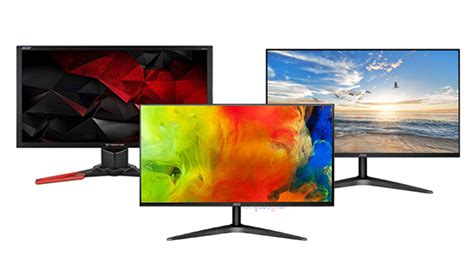
Finding Your Perfect Balance
Ultimately, the “ideal” combination depends on your budget, your system’s capabilities, and the specific games you play. For the vast majority of competitive gamers, a 1080p or 1440p monitor with a refresh rate of 144Hz or 240Hz will provide the best balance of performance, visual clarity, and responsiveness. Invest in a high refresh rate first, then consider the highest resolution your GPU can comfortably drive while maintaining those high frame rates.
Remember, consistent high frame rates are king in competitive gaming. A stable 144+ FPS at 1080p with a 144Hz monitor will almost always yield a better competitive advantage than a fluctuating 60-80 FPS at 4K on a 60Hz display. Test different settings and find what feels most responsive and enjoyable for you.