





What’s bottlenecking my gaming PC’s FPS?

Understanding Performance Bottlenecks
Experiencing lower-than-expected Frames Per Second (FPS) in your favorite games can be frustrating. Often, the culprit is a performance bottleneck, where one component in your system is unable to keep up with the others, limiting the overall output. Identifying this weak link is crucial for effective troubleshooting and targeted upgrades.
A balanced system ensures that all components work in harmony, maximizing your gaming experience. An imbalance, however, means you might have invested heavily in one area (e.g., a top-tier graphics card) only to have its potential stifled by another (e.g., an older CPU or slow RAM).
The Usual Suspects: CPU vs. GPU
The Central Processing Unit (CPU) and Graphics Processing Unit (GPU) are the primary drivers of gaming performance. It’s common for one of these to be the bottleneck, depending on the game and its settings.
CPU Bottleneck
A CPU bottleneck occurs when your processor can’t feed data to the GPU fast enough. This often happens in CPU-intensive games (like open-world titles or strategy games with many AI elements) or when running at lower resolutions where the GPU has less work to do. Signs include low GPU utilization (e.g., 50-70%) while the CPU is near 100% usage.
GPU Bottleneck
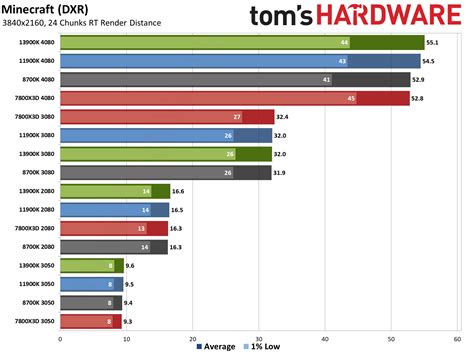
Conversely, a GPU bottleneck means your graphics card is struggling to render frames at a high enough rate, even if your CPU has plenty of overhead. This is common in graphically demanding games, at higher resolutions (e.g., 1440p, 4K), or with high graphics settings. Your GPU utilization will typically be near 99-100%, while your CPU utilization is lower.
Beyond CPU and GPU: RAM and Storage
While less common as primary bottlenecks, insufficient or slow RAM and storage can also impact FPS and overall system responsiveness.
RAM (Random Access Memory)
If you have too little RAM (e.g., 8GB for modern gaming), your system might resort to using slower virtual memory on your storage drive, leading to stutters and performance drops. RAM speed also plays a role, especially with Ryzen CPUs, where faster RAM can significantly improve CPU performance.

Storage
While storage speed rarely affects in-game FPS directly (once a game is loaded), using an older Hard Disk Drive (HDD) for your operating system or games can result in agonizingly slow loading times and potential micro-stutters as assets are streamed. Upgrading to a Solid State Drive (SSD), particularly an NVMe drive, offers a dramatic improvement in load times and system snappiness.
Software and Settings Bottlenecks
Sometimes, the bottleneck isn’t hardware at all. Software factors can significantly impact your FPS:
- Outdated Drivers: Ensure your graphics card drivers are always up to date.
- Background Applications: Close unnecessary programs and processes running in the background.
- Game Settings: Overly ambitious graphics settings can easily overwhelm your hardware. Experiment with lowering settings like anti-aliasing, shadow quality, or texture resolution.
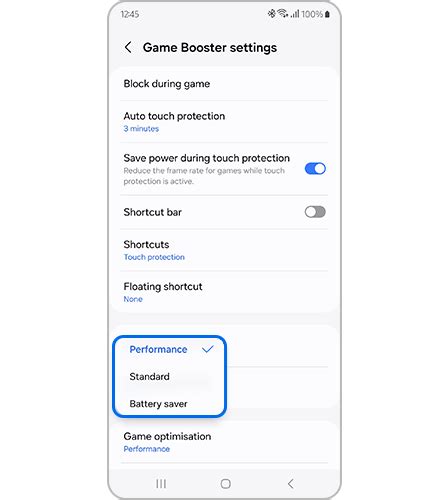
- Operating System Optimization: Ensure Windows is updated and optimized for gaming (e.g., Game Mode enabled, power plan set to ‘High Performance’).
How to Identify a Bottleneck
The best way to pinpoint a bottleneck is by monitoring your system’s resource usage while gaming. Tools like MSI Afterburner (with RivaTuner Statistics Server), HWMonitor, or even Windows Task Manager can display real-time CPU and GPU utilization, temperatures, and RAM usage.
Launch a demanding game and observe the percentages. If your GPU is consistently at 99-100% while your CPU is much lower, you’re GPU-bound. If your CPU is at or near 100% and your GPU is idle or not fully utilized, your CPU is the bottleneck.

Resolving Bottlenecks and Upgrading Strategically
Once you’ve identified the bottleneck, you can make informed decisions. If your GPU is the bottleneck, upgrading to a more powerful graphics card is likely your best bet. If it’s the CPU, a processor upgrade (which might also necessitate a new motherboard and RAM) would be required. For RAM issues, adding more modules or upgrading to faster ones can help. For storage, switching to an SSD is a no-brainer.
Remember, the goal is a balanced system where no single component significantly holds back the others, allowing you to get the most out of your gaming rig and enjoy smooth, high-FPS gameplay.


