What’s the best budget build for competitive play in the current meta?
The Quest for Competitive Edge on a Budget
Competitive gaming has become increasingly accessible, yet the pursuit of optimal performance often seems tied to an ever-rising budget. For aspiring esports athletes or serious casuals, the challenge isn’t just winning, but doing so on hardware that won’t empty your wallet. The ‘current meta’ in competitive play dictates certain hardware requirements, primarily focusing on stable high frame rates and minimal input latency to react quicker and see more clearly. This guide breaks down how to achieve a genuinely competitive setup without overspending.
The key to a successful budget build lies in smart prioritization. Instead of aiming for maximum graphical fidelity or flashy aesthetics, we’re targeting raw, uncompromised performance where it matters most: in-game responsiveness and visual clarity. Every dollar needs to contribute directly to your competitive advantage.
Deciphering the Current Meta’s Demands
When we talk about the ‘current meta’ in hardware, we’re referring to the typical demands of popular competitive titles like Valorant, CS:GO, League of Legends, Dota 2, or even battle royales like Fortnite and Apex Legends. These games, while varying in graphical intensity, all prioritize high and stable frame rates (144 FPS or higher is often the target), low system latency, and quick load times. They reward responsiveness over ultra-realistic textures.
Therefore, a budget competitive build doesn’t need the most expensive CPU or the very latest top-tier GPU. What it needs is a balanced system that can consistently push frames above the refresh rate of a high-refresh monitor, process game logic efficiently, and store/retrieve game data rapidly. Fancy RGB or elaborate cooling systems are often secondary or entirely unnecessary expenses.
Core Components: Where to Spend, Where to Save
The Processor (CPU): Finding the Sweet Spot
For competitive gaming, a powerful CPU is important, but you don’t always need the absolute best. Mid-range chips from Intel (e.g., Core i5 K-series or non-K recent generations) or AMD (e.g., Ryzen 5 series) often provide excellent value. Look for processors with good single-core performance, as many competitive games still heavily rely on it. An older generation chip on a discount can be a fantastic performer.
The Graphics Card (GPU): The Heart of Gaming
This is often the most expensive component, but also the most critical for frame rates. For 1080p competitive gaming, an entry-to-mid range dedicated GPU is usually sufficient. Think of cards like an Nvidia RTX 3050/4060 or AMD RX 6600/7600. Sometimes, integrated graphics (like AMD’s APUs) can suffice for less demanding titles if the budget is extremely tight, but a dedicated card offers a significant competitive edge. The second-hand market can be a goldmine for slightly older but still potent GPUs.
Memory (RAM): 16GB is the Standard
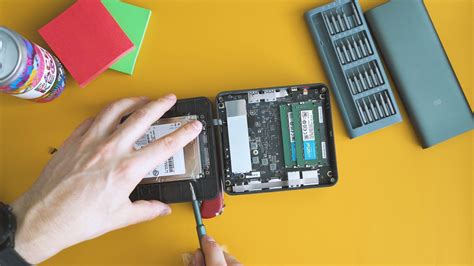
16GB of DDR4 (or DDR5 if the platform supports it and prices are competitive) running at 3200MHz (DDR4) or 5200MHz+ (DDR5) is the sweet spot for nearly all competitive games. Going beyond 16GB offers diminishing returns for gaming alone, and slower RAM can actually hinder CPU performance in some titles, especially on AMD platforms. Two sticks (e.g., 2x8GB) are better than one for dual-channel performance.
Storage: SSD is Non-Negotiable
A Solid State Drive (SSD) for your operating system and primary competitive games is absolutely essential. The speed difference compared to an HDD drastically reduces load times, getting you into the action faster. A 500GB NVMe SSD is a good starting point, with larger capacities available if your budget allows. You can always add a cheaper HDD later for bulk storage.
Peripherals and Display: The Unsung Heroes
Monitor: High Refresh Rate is King
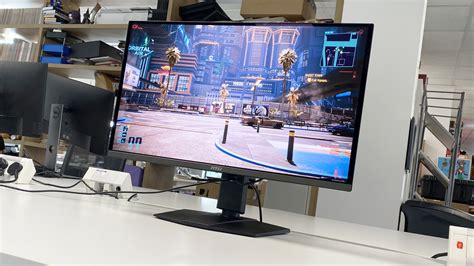
A high refresh rate monitor (144Hz or higher) at 1080p resolution is arguably the single most impactful upgrade for competitive play after a capable GPU. It allows you to see more frames per second, leading to smoother visuals and quicker reaction times. Don’t compromise on refresh rate for higher resolution (e.g., 1440p) if your budget is tight; 1080p is perfectly fine for competitive gaming. Look for monitors with low response times (1ms GTG).
Keyboard, Mouse, and Headset: Precision and Communication
While an expensive mechanical keyboard or ultralight gaming mouse can offer marginal improvements, a reliable, responsive, and comfortable setup is key. Look for reputable brands offering entry-level mechanical keyboards or membrane keyboards with good actuation. For mice, prioritize a comfortable shape, a reliable sensor (PixArt 3360 series or better), and a lightweight design. A clear-sounding headset with a good microphone is vital for team communication. Avoid overly expensive ‘gaming’ peripherals and focus on core functionality and comfort.
Smart Shopping and Optimizing Your Investment
The Second-Hand Market and Sales
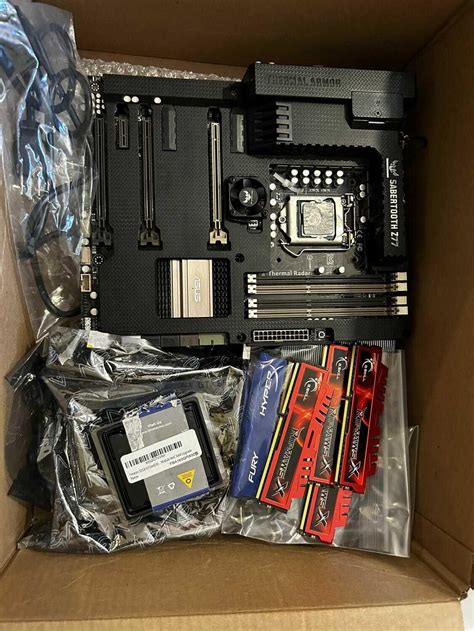
One of the best ways to build a budget competitive PC is by exploring the second-hand market (e.g., eBay, local marketplaces). Components like GPUs, CPUs, and RAM can often be found at significant discounts. Always buy from reputable sellers and ask for proof of functionality. Keep an eye out for seasonal sales (Black Friday, Prime Day, etc.) and clearance sections at major retailers.
Motherboard and Power Supply Unit (PSU): Don’t Overlook Reliability
While you don’t need the most expensive motherboard, choose one from a reputable brand that supports your chosen CPU and RAM speeds. Similarly, a reliable PSU is crucial for system stability and longevity. Don’t cheap out on the PSU; a good quality 80+ Bronze rated unit from a known brand (e.g., Corsair, EVGA, Seasonic) with sufficient wattage for your components is a wise investment.
Software: The Free Performance Boost
Once your hardware is assembled, don’t forget the power of software optimization. Keep your operating system (Windows) updated, ensure your graphics drivers are always current, and tweak in-game settings for maximum FPS. Disabling background applications, managing startup programs, and fine-tuning Windows power settings can all contribute to a smoother competitive experience without costing an extra dime.

Conclusion: Smart Choices for Competitive Success
Building a budget PC for competitive play in the current meta is entirely achievable with careful planning and smart spending. By prioritizing core performance components like the GPU, CPU, fast RAM, and an SSD, and coupling them with a high-refresh-rate monitor and reliable peripherals, you can create a setup that delivers a genuine competitive edge without breaking the bank. Research, compare prices, consider the second-hand market, and remember that raw performance for competitive titles often triumphs over lavish aesthetics. Your skill, combined with optimized hardware, will be your greatest asset on the digital battlefield.