





What’s the best strategy to resolve mod conflicts for stable game performance?
Understanding Mod Conflicts
Modding can dramatically enhance your gaming experience, adding new content, improving graphics, or altering gameplay mechanics. However, installing multiple mods often leads to conflicts, causing crashes, freezes, graphical glitches, or other instability issues. These conflicts typically arise when two or more mods try to modify the same game file, script, or resource, leading to unintended overwrites or logical errors.
The quest for a perfectly stable, modded game is a common one among enthusiasts. The best strategy isn’t a single silver bullet, but rather a systematic approach that combines prevention, detection, and resolution techniques. Patience and methodical troubleshooting are your greatest allies in this endeavor.

Preventative Measures: Laying the Groundwork
Before you even install your first mod, a few crucial steps can save you hours of headaches later. Always back up your unmodded game files. This provides a clean slate to revert to if things go spectacularly wrong. More importantly, thoroughly read every mod description, installation guide, and compatibility notes. Many mod authors explicitly state known conflicts or required patches.
Utilize a reliable mod manager (like Mod Organizer 2, Vortex, or NMM for older games). These tools greatly simplify installation, uninstallation, and crucially, the management of load orders and file overwrites. They also often provide features for profile management, allowing you to experiment with different mod setups without affecting your primary game.
The Load Order: Your Primary Battleground
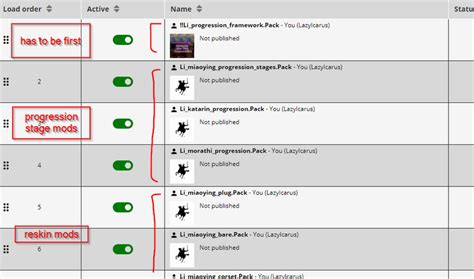
The load order dictates which mod’s changes take precedence when multiple mods modify the same assets. This is often the most significant source of conflicts. Generally, a mod loaded later will overwrite the changes of a mod loaded earlier. Understanding this principle is fundamental.
Most mod managers have built-in sorting tools (e.g., LOOT for Bethesda games) that analyze your installed mods and suggest an optimized load order. While these tools are incredibly helpful, they aren’t always perfect. You may need to manually adjust the order based on specific mod requirements or trial and error.
Embrace Compatibility Patches
Many popular mods have dedicated compatibility patches created by either the original mod authors or the community. These patches are designed to make two or more conflicting mods work harmoniously. Always check if a patch exists for conflicting mods you wish to use. Installing them correctly, usually after both main mods in the load order, is critical.
Strategic Installation and Testing
Never install dozens of mods at once. This is a recipe for disaster. Instead, install mods in small batches (e.g., 5-10 at a time), then launch your game and test extensively. If you encounter issues, you’ll know the problem lies within the last batch installed, making identification much easier. When a problem arises, try disabling mods from the last batch one by one until stability returns. This pinpoints the culprit.
Leveraging Diagnostic Tools and Community Wisdom
Beyond mod managers, several tools can help diagnose conflicts. For games like Skyrim or Fallout, xEdit (TES5Edit, FO4Edit) is invaluable for viewing exactly which records are being altered by different mods and identifying direct overwrites. Crash log analyzers can also provide clues about which specific files or scripts are causing game instability.
When you’re stumped, turn to the community. Game-specific modding forums, Reddit communities, and Discord servers are treasure troves of information. Search for your specific issue, as it’s highly likely someone else has encountered and resolved it. When asking for help, provide as much detail as possible: your mod list, load order, game version, and a clear description of the problem.

The Nuclear Option: Starting Fresh
Sometimes, despite all efforts, a modded game can become irrevocably corrupted or too complex to untangle. In such cases, the most effective, albeit drastic, solution is often to perform a clean reinstallation of the game and start your modding process from scratch. This ensures no lingering corrupted files or hidden conflicts persist. Be sure to delete all game files and related modding tools/folders before reinstalling to ensure a truly clean slate.

Conclusion: Patience and Persistence Pay Off
Resolving mod conflicts for stable game performance is a journey that requires a systematic approach. By adopting preventative measures, diligently managing your load order, utilizing compatibility patches, testing incrementally, and leveraging diagnostic tools and community knowledge, you can significantly improve your chances of enjoying a rich, modded experience. Remember, every mod conflict resolved is a lesson learned, making you a more adept modder. The effort is often well worth the reward of a personalized and immersive game.

