





What’s the best way to report mod bugs constructively to creators?

Why Constructive Bug Reports Matter
In the vibrant world of game modding, user-created content constantly enhances our gaming experiences. However, like any software, mods can have bugs. The way these bugs are reported significantly impacts a mod creator’s ability to fix them and maintain their projects. A well-structured, constructive bug report isn’t just about getting your issue resolved; it’s about supporting the modding community, respecting creators’ time, and ensuring the longevity and quality of the mods we all enjoy.
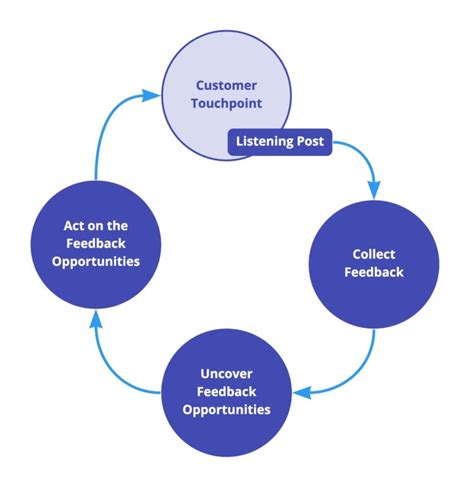
Key Principles for Effective Bug Reporting
Before you even start typing, consider these fundamental principles:
- Be Patient and Polite: Mod creators are often volunteers working in their free time. A demanding or aggressive tone will likely be ignored or demotivate them.
- Do Your Homework: Check if the bug has already been reported or if there’s a known fix/workaround. Read the mod’s description, FAQ, and recent comments.
- Be Specific and Detailed: Vague reports like “the mod is broken” are useless. Provide concrete information.
- Be Objective: Stick to the facts of the bug, not your frustration with it.
Before You Report: Essential Preparations
A good bug report starts long before you open the issue tracker. Take these crucial steps:
- Reproduce the Bug Reliably: Can you make it happen again consistently? Note down the exact steps you took. If it’s intermittent, describe the conditions under which it occurred.
- Isolate the Problem: If you’re using multiple mods, try disabling other mods to see if the bug persists. This helps determine if it’s a conflict or an issue with the specific mod.
- Gather All Relevant Information:
- Mod Version: Always include the exact version of the mod you are using.
- Game Version: The exact version of the base game.
- Operating System & Hardware: While not always critical, sometimes specific hardware or OS versions can play a role.
- Error Logs/Crash Reports: These are invaluable! Know where your game saves its error logs (e.g., crash logs, console output, debug logs) and how to retrieve them. Attach them as files, or paste relevant sections if they’re very short.
- Screenshots/Videos: A picture is worth a thousand words. If the bug is visual, capture it.

Crafting Your Report: Where and How
Once you have your information, it’s time to write the report. Find the appropriate channel:
- Mod Page (Nexus Mods, CurseForge, Steam Workshop): Look for a “Bugs” tab, “Issues” section, or a dedicated forum thread.
- Mod Creator’s Discord Server: Many creators have a Discord with dedicated bug reporting channels. Follow their specific guidelines there.
- GitHub/GitLab Repository: For more technically inclined creators, an issue tracker on a code hosting platform is common.
Structuring Your Bug Report
Aim for clarity and conciseness:
1. Clear and Concise Title:
- Bad: “Mod is broken!”
- Good: “[BUG] Crash when opening inventory with X item equipped (v1.2.3)”
- Good: “[BUG] Texture missing on Y NPC in Z location (v2.0)”
2. Steps to Reproduce:
Number these steps clearly, starting from a fresh save or specific game state. Be as precise as possible.
1. Load game save "MySaveFile".
2. Go to location [Coordinates/Area Name].
3. Equip item "Shiny Sword of Doom".
4. Open inventory menu.
5. Game crashes/Inventory appears empty.
3. Expected vs. Actual Outcome:
- Expected: “The inventory should open normally, displaying all equipped items.”
- Actual: “The game crashes to desktop / The inventory opens but is completely empty.”
4. Supporting Information:
Attach or link to your logs, screenshots, and videos. Include your mod list (if relevant), game version, mod version, and basic system specs.
5. Additional Notes:
Any other observations, potential workarounds you tried, or if it’s an intermittent issue.

What NOT to Do When Reporting Bugs
Avoiding these common pitfalls will make you a much more valuable contributor:
- Don’t Be Vague: “It’s buggy” provides zero actionable information.
- Don’t Demand or Threaten: “Fix this NOW or I’m uninstalling!” is counterproductive.
- Don’t Spam: Reporting the same bug multiple times in different places is annoying.
- Don’t Blame: Focus on the problem, not on assigning fault.
- Don’t Expect Immediate Fixes: Creators have lives. Be patient.
- Don’t Skip Reading Instructions: Many mods have specific bug reporting guidelines. Follow them.
Conclusion: Fostering a Healthy Modding Ecosystem
Reporting bugs constructively is a crucial act of community participation. By taking the time to provide clear, detailed, and respectful feedback, you’re not just helping yourself; you’re actively contributing to the improvement of the mod, supporting the creator, and making the modding experience better for everyone. Your effort makes a tangible difference in keeping our favorite mods alive and thriving.

